# Writing and debugging speculation rules with Polypane
Speculation rules are a way to ask the browser to download or even render pages that your visitors are likely to visit next, so that when they click a link, the page is already loaded and can be displayed (almost) instantly.
They're completely declarative: you add them to your site by adding a JSON structure inside a script tag with the type `speculationrules+json`. That type means browsers that don't yet support speculation rules (more on those later) will simply ignore the script. They don't get the benefits, but there's also no downsides.
That declarative nature does also mean that you don't get immediate feedback if something goes wrong or is misconfigured. The browser will simply ignore rules it can't understand or that are incorrectly specified, which makes debugging a bit more challenging.
In this article I'll first go over how speculation rules work, and then show how to check and debug them in Polypane.
**What's [Polypane](/)?** Polypane has everything a browser has, plus all the tools you need to build responsive, fast, accessible, and SEO-friendly websites and apps with multi-viewport synchronised previews, comprehensive device emulation and extensive accessibility tooling.
Polypane 32 added a speculation rules overview to the [Meta panel](/docs/meta-information/) that shows a live overview of your rules, which links match your rules and what the status for each link is, so you get fast and specific feedback on how your rules are being applied.
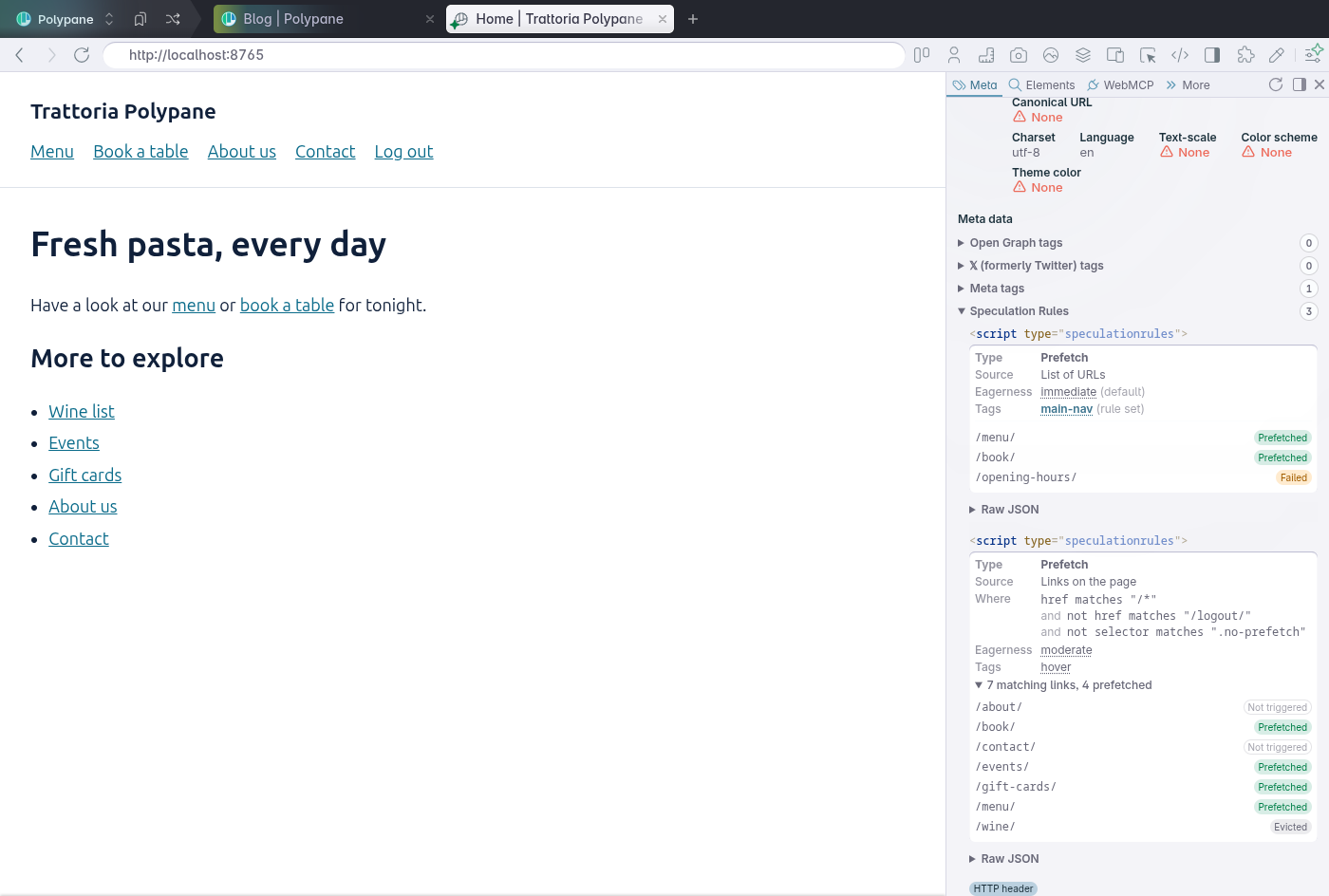
More on that further down the page. First, let's look at the two main types of speculation rules: prefetch and prerender.
## Prefetch and prerender
Speculation rules can do two things with a page: prefetch it or prerender it.
With a **prefetch** the browser downloads only the HTML of the page ahead of time. The images, stylesheets and scripts on that page still get loaded when you navigate to it.
With a **prerender** the browser downloads the page and everything on it, and renders it in the background. When you navigate, the finished page gets swapped in.
Prerendering is much faster for your visitors, but it also uses more memory and data because the whole page is rendered. That means it also runs your JavaScript.
This can have unintended effects: prerendering a /logout url might log a user out without them ever clicking the link, and your analytics scrips will count this prerender as a real visit unless you take precautions. (more on that later)
### A note on resource hints
There is also a `` that lets you prefetch resources, which while also being called "prefetch", has nothing to do with speculation rules.
I know. Anyway, speculation rules are for pages, while resource hints are for individual resources like images, scripts and stylesheets.
Polypane also has checks and validation for resource hints, but they're a different topic. You can find the resource hints overview [in the Meta panel](/docs/meta-information/).
## Browser support
Speculation rules work in Chrome, Edge and other Chromium browsers. Lists of URLs have been supported since Chrome 109, and document rules, eagerness and the HTTP header since Chrome 121.
[Safari](https://bugs.webkit.org/show_bug.cgi?id=295193) and [Firefox](https://bugzilla.mozilla.org/show_bug.cgi?id=1969396) are both working on support, but at the time of writing neither has shipped it. Luckily, you can add speculation rules to your site now, and they will just be ignored until support ships
Polypane is built on Chromium, so the rules you add to your page show up in the Meta panel as soon as you load it.
## Adding speculation rules to your page
Speculation rules are JSON, and there are two ways to get them to the browser.
The first is a script element in your HTML with the type `speculationrules`:
```html
```
The second is a `Speculation-Rules` HTTP header that points to a JSON file with your rules:
```http
Speculation-Rules: "/rules.json"
```
The JSON file needs to be served with the `application/speculationrules+json` MIME type. If you have a fancy CDN, it might do this for your automatically.
The structure is the same whether you include it in a script element or serve it via the `Speculation-Rules` header. If you're adding speculation rules yourself, it's probably easier to add them directly in your HTML with a script element.
## Building a prefetch rule
The simplest rule is a list of URLs:
```json
{
"prefetch": [
{
"urls": ["/menu/", "/book/", "/opening-hours/"]
}
]
}
```
This tells the browser to fetch the URLs `/menu/`, `/book/` and `/opening-hours/` ahead of time.
If you define a list of explicit URLs, the browser prefetches them as soon as it finds the rule.
This is useful if you have a small site, or a few specific links you want to prefetch ahead of time. But on larger, more dynamic sites, you don't want to maintain a list of URLs manually.
### Using the links on the page
With a _document rule_, the browser uses the current page to find links. You describe which ones you want with a `where` clause:
```js
{
"prefetch": [
{
"where": { "href_matches": "/*" }
}
]
}
```
This prefetches every link to a page on your own site. `href_matches` accepts a URL pattern to match the URLs against. `/*` is most commonly used to match all URLs on the site, and you can combine this with other rules to refine which links get prefetched.
You can exclude specific links with "not":
```js
{ "not": { "href_matches": "/logout/" } }
```
Or by a CSS selector, so you can easily opt out specific links in your HTML with a class:
```js
{ "not": { "selector_matches": ".no-prefetch" } }
```
And you combine conditions with `and` or `or`:
```js
{
"prefetch": [
{
"where": {
"and": [
{ "href_matches": "/*" },
{ "not": { "href_matches": "/logout/" } },
{ "not": { "selector_matches": ".no-prefetch" } }
]
}
}
]
}
```
With this, you can build up a set of conditions that precisely control which links get prefetched and which ones are excluded without having to manually list every URL.
Lastly, the examples above show urls on your own site, but you can also prefetch external URLs.
This should be done with caution: you might want to prefetch urls on a (different) subdomain, but prefetching external URLs on other domains means the user connects to third-party servers without them knowing, and sending potentially identifying information along with the request.
### When the browser starts prefetching: Eagerness
Using a _document rule_ changes when the browser starts prefetching links. Your list of three URLs can be safely prefetched immediately, but your page might contain a hundred links and prefetching all of them would be wasteful so the browser is more conservative by default.
Instead, the browser by default starts prefetching _document rule_ links when the user interacts with them, such as by pressing down on a link. But we can specify this behavior by setting the `eagerness` property of a rule.
```js
{
"prefetch": [
{
"where": {
"and": [
{ "href_matches": "/*" },
{ "not": { "href_matches": "/logout/" } },
{ "not": { "selector_matches": ".no-prefetch" } }
]
},
"eagerness": "moderate"
}
]
}
```
Eagerness has four possible values that determine when the browser starts prefetching matching links.
The values are `immediate`, `eager`, `moderate`, and `conservative`, and you'll notice that they're not specific. Instead it's up to the browser to decide exactly what "moderate" means depending on the circumstances.
Because those circumstances are different between desktop and mobile, they result in different timings for when the browser starts prefetching links:
| Eagerness | Desktop | Mobile |
| --- | --- | --- |
| `immediate` | As soon as the browser finds the rule | As soon as the browser finds the rule |
| `eager` | After hovering over a link for 10 milliseconds | 50 milliseconds after a link scrolls into the viewport |
| `moderate` | After hovering over a link for 200 milliseconds, or when pressing down on it | 500 milliseconds after scrolling stops, for links near the last tap |
| `conservative` | When pressing down on a link | When pressing down on a link |
If you leave `eagerness` out, it's implicit value depends on the type of rule: lists of url's are `immediate` and document rules are `conservative`.
### Tags
The last thing you can add is a `tag`. Tags are sent to your server in the `Sec-Speculation-Tags` request header, so you can use it to track or debug which rules triggered which requests.
You can set it on a single rule:
```js
{
"prefetch": [
{
"where": {
"and": [
{ "href_matches": "/*" },
{ "not": { "href_matches": "/logout/" } },
{ "not": { "selector_matches": ".no-prefetch" } }
]
},
"eagerness": "moderate",
"tag": "hover"
}
]
}
```
Or on the whole rule set, and then it applies to every rule in it:
```js
{
"tag": "main-nav",
"prefetch": [
{
"urls": ["/menu/", "/book/", "/opening-hours/"]
}
]
}
```
## Building a prerender rule
The syntax for prerendering is similar to prefetching, but the way the browser handles the result is different.
Use `prerender` instead of `prefetch` to prerender the URLs instead:
```js
{
"prerender": [
{
"urls": ["/menu/", "/book/"]
}
]
}
```
Here the browser will download both these URLs, render their HTML, load their external resources and then have the page ready to display instantly when the user clicks a link that goes to either URL.
### When to prerender
A prerender rule takes the same `where` clause, `eagerness` and `tag` as a prefetch rule. Because a prerender does so much more than a prefetch, you do need to be more careful with which pages you prerender and when.
A prerendered page takes up memory, so the browser limits how many of them it keeps.
`immediate` prerenders on page load, so it has a fixed number it goes through before it stops.
The other eagerness modes acts on user interactions like hovering a url. They keep a running list of prerenders, dropping the oldest one when a new prerender is added and the limit is reached.
These are the limits in Chrome, with the ones for prefetching next to them:
| Eagerness | Prerenders | Prefetches |
| --- | --- | --- |
| `immediate` | 10 | 50 |
| `eager` and `moderate` on desktop | 2, the oldest is dropped | 2, the oldest is dropped |
| `eager` and `moderate` on mobile | 2, the oldest is dropped | 6, the oldest is dropped |
| `conservative` | 2, the oldest is dropped | 2, the oldest is dropped |
For most pages `moderate` or `conservative` is the better choice. By the time someone has hovered over a link for 200 milliseconds or pressed down on it, they're probably going to that page:
```json
{
"prerender": [
{
"where": { "href_matches": "/*" },
"eagerness": "moderate"
}
]
}
```
Keep `immediate` for a short list of URLs that most of your visitors go to next.
### Prerendering pages can have unintended consequences
A prerendered page runs its JavaScript, so only prerender pages that don't change anything when you load them. Exclude the URLs that change something, like logging out or shopping cart related URLs:
```js
{
"prerender": [
{
"where": {
"and": [
{ "href_matches": "/*" },
{ "not": { "href_matches": "/logout/" } },
{ "not": { "href_matches": "/cart/*" } }
]
}
}
]
}
```
While prefetching URLs on other sites is possible, prerendering pages is blocked in Chromium.
### Combining prefetch and prerender
A rule set can have both a `prefetch` and a `prerender` key. A prefetch is cheap, so you can start it early and only prerender once the browser is more sure:
```json
{
"prefetch": [
{
"where": { "href_matches": "/*" },
"eagerness": "eager"
}
],
"prerender": [
{
"where": { "href_matches": "/*" },
"eagerness": "moderate"
}
]
}
```
When a visitor moves their mouse over a link the browser prefetches that page, and when they stay on the link for 200 milliseconds the browser prerenders the page with the HTML that's already downloaded.
## Detecting a prerender in your scripts
The scripts on a prerendered page run while that page is still in the background, and your visitor might never navigate to it.
For code that should only run for a real visit, like counting a page view, check `document.prerendering`. It's `true` while the page is being prerendered, and the `prerenderingchange` event fires when your visitor navigates to the page:
```js
function trackPageView() {
// send your page view
}
if (document.prerendering) {
document.addEventListener('prerenderingchange', trackPageView, { once: true });
} else {
trackPageView();
}
```
When your visitor never navigates to the page the event doesn't fire, so no page view gets counted.
On your server, the request for a prerender has `prerender` in its `Sec-Purpose` header:
```http
Sec-Purpose: prefetch;prerender
```
The browser cancels a prerender when the response is not a 2xx, so for a URL that should never be prerendered, like `/logout/`, you can return a 503 for requests with that header.
[
### Polypane has everything you need to build great sites
Learn about Polypane](/)
## Checking your speculation rules
And that brings us to checking your speculation rules in the browser. Because there is no explicit failure, knowing if you correctly excluded urls, or if the right URLs fall under the right rules can be tricky.
That brings us to Polypane, where the Meta panel helps you see exactly what the browser knows about your speculation rules.

## Finding your speculation rules in Polypane
Open the [panel](/docs/intro-to-panel/), go to the Meta tab and open "Speculation Rules". If the page has no speculation rules the section isn't shown.
Polypane lists every rule set the browser knows about for the page, whichever way it was added:
* Script elements in your HTML are shown as an element. Hover it to highlight it in the page and click it to inspect it in the Elements panel.
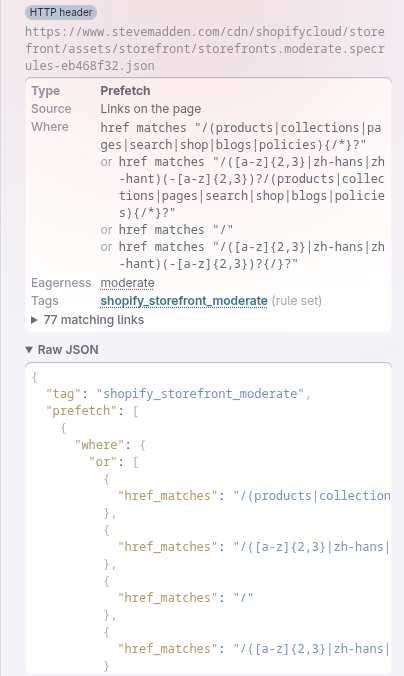
* Rule sets from the `Speculation-Rules` header get an "HTTP header" label and the URL of the JSON file.
For example, here is a rule set added via the `Speculation-Rules` header:
## Checking a list of URLs
Let's go back to that initial list of explicit URLs I mentioned at the start of this article. Below, I've added the tag "main-nav".
```html
```
This is how Polypane shows that rule set:
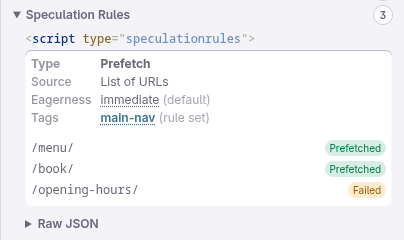
Polypane parsed the JSON and created a visual representation of the rule set in the Meta panel. This lets you easily see all the component parts of the rule without having to read the raw JSON.
* **Type**: Prefetch, Prerender or Prerender until script.
* **Source**: "List of URLs" for a rule like this one.
* **Eagerness**: I didn't set one, so Polypane shows the default that applies and adds "(default)".
* **Tags**: the tag I set, and that it comes from the rule set.
In Polypane, hovering over the eagerness shows when the browser will start loading the resource on desktop and on mobile, so you can do a quick check without having to reference documentation like this.
The block then shows all the urls that match this rule set. Here it's pretty simple, since it's just the three URLs I listed. `/menu/` and `/book/` are prefetched and ready to be used. `/opening-hours/` failed. If you hover over the status you see why: the response status was not 2xx. That page doesn't exist on my demo site, so the server returned a 404.
A typo in a URL is easy to make and doesn't show a warning, so the failed prefetch might go unnoticed unless you check the status in Polypane.
Other reasons you can come across for a failed prefetch or prerender:
* The response is not HTML.
* The URL redirected to a URL that can not be prefetched.
* The user has cookies for this cross-site URL. Browsers only prefetch pages on other sites for visitors that have no cookies there.
* Cross-site URLs need HTTPS.
* The server sent a `Retry-After` for this URL.
## Checking which links a rule matches
Lets look at the more complex example of a _document rule_ with a `moderate` eagerness:
```html
```
And what Polypane shows for this rule:
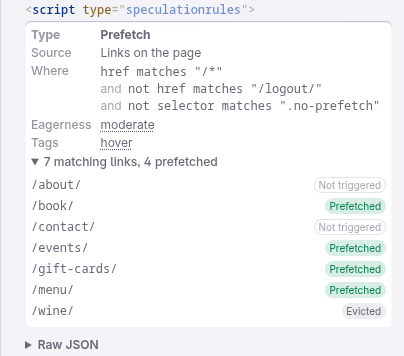
Polypane writes out the `where` clause with one condition per line with syntax highlighting, so it's easier to read and understand the logic of your rule.
A document rule doesn't have explicit URLs in it, so below the rule Polypane shows the links on the page that the browser matched to it.
For this rule set there are 7 matching links. If you write a `where` clause and you see a different number of matching links than you expect, it means your conditions are not matching the elements you intended.
You can also see that some of the links have apparently already been hovered for long enough to trigger prefetching, shown with a green "Prefetched" status.
### Watching the statuses change
My rule has `moderate` eagerness, so the browser waits for me to do something. When the page loads, the links that only this rule applies to have the status "Not triggered". Hover over that status to see what would trigger it.
If you hover over a link, or focus is, for long enough, you can see the status change from "Not triggered" to "Prefetching" and then to "Prefetched":
`/menu/` and `/book/` are already prefetched without me hovering over them. That's because they are also in my `main-nav` speculation rules which are set to `immediate`, so the browser already prefetched them as soon as the page loaded. The browser only keeps one prefetch per URL, and you see that same prefetch under every rule the URL matches.
### Evicted prefetches
At the end of the video, `/wine/` has the status "Evicted":

Browsers put a limit on how many prefetches and prerenders they keep around, and for rules that aren't `immediate` Chrome keeps at most two prefetches on desktop. I hovered over the wine list first, then over events and gift cards, and when the third prefetch finished the browser dropped the oldest one.
The list still shows four prefetched links, because `/menu/` and `/book/` were prefetched by the `immediate` list rule (which has a limit of 50) and don't count towards that limit of two.
Pages that are evicted are removed from the cache, but when you hover over them again, they will be prefetched anew and a different page may be evicted in their place. The last two hovered urls are the ones the browser keeps ready for prefetching.
## Checking prerender rules
On my demo page I send a prerender rule through the HTTP header, so that the booking page gets prerendered when someone presses down on a link to it:
```json
{
"tag": "cdn",
"prerender": [
{
"where": { "href_matches": "/book/" },
"eagerness": "conservative"
}
]
}
```
Everything you read above works the same for prerender rules, with "Prerendering" and "Prerendered" as statuses.
### Prerendering pages on another site
Chrome only prerenders pages on the same site as the page the rule is on. A rule like this will never do anything for the last URL:
```json
{
"prerender": [
{
"urls": ["/menu/", "/book/", "/menu/", "https://example.com/"]
}
]
}
```
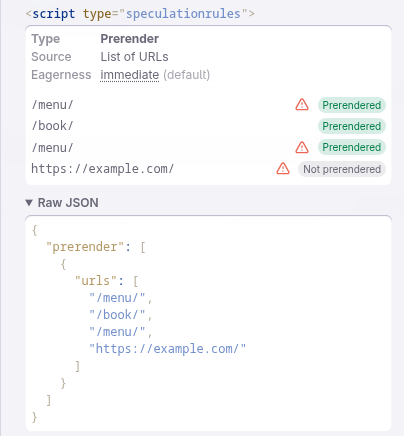
Polypane puts a warning next to `https://example.com/` and gives it the status "Not prerendered". Hover over either to see that it's because the URL is cross-site.
`/menu/` also has a warning because it appears twice in the list. That doesn't break anything, but in a long list it's usually a sign of a copy and paste mistake, so both entries get a warning and when you hover over one of them the other gets highlighted.
### Too many prerenders
Prerendering a page costs a lot more memory than prefetching it, so the limits are lower. Chrome allows 50 `immediate` prefetches per page, but only 10 `immediate` prerenders. This rule set has 12:
```json
{
"prerender": [
{
"urls": [
"/dishes/1/",
"/dishes/2/",
"/dishes/3/",
"/dishes/4/",
"/dishes/5/",
"/dishes/6/",
"/dishes/7/",
"/dishes/8/",
"/dishes/9/",
"/dishes/10/",
"/dishes/11/",
"/dishes/12/"
]
}
]
}
```
and in Polypane, you can see that the first 10 URLs are marked as "Prerendered" and the last two as "Not prerendered".
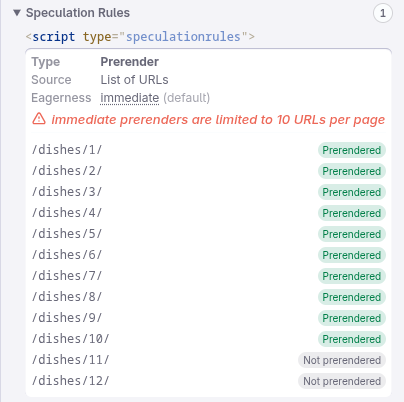
Polypane shows a warning on the rule so you know that some URLs won't be prerendered and your intentions won't be fully realized.
The limit counts for the whole page, so with multiple rule sets it's the ones that were added last that lose out.
## Warnings for rules that don't do anything
So with the meta panel open, you can navigate through your pages and see exactly how the browser is handling your speculation rules for each page.
When something is wrong with your speculation rules, browsers skip the part they don't understand and carry on with the rest. Your page keeps working, so you don't find out that part of your rules is being ignored.
Here's some common issues that can cause your speculation rules to be ignored. Polypane will show warnings for these cases so you can spot them quickly.
### Invalid JSON
A trailing comma is enough for the browser to ignore an entire rule set:
```json
{
"prefetch": [{ "urls": ["/menu/", "/book/"] }],
}
```
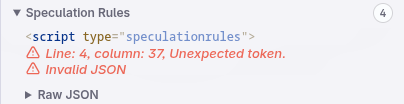
Polypane shows that the JSON is invalid along with the browser's own message about where it went wrong.
### Rules the browser skipped
Your JSON can be valid and still have a rule in it that the browser doesn't accept. In this rule set I made up an eagerness for the first rule:
```json
{
"prefetch": [
{
"urls": ["/menu/"],
"eagerness": "sometimes"
},
{
"urls": ["/book/"]
}
]
}
```
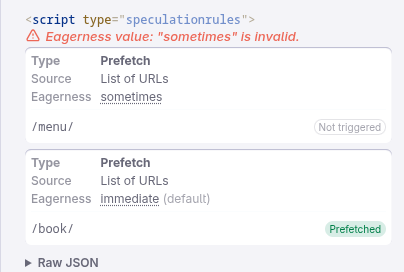
The browser drops the first rule and keeps the second. Polypane shows the browser's message about what it skipped above the rule set, and you can see the effect in the statuses: `/book/` is prefetched and `/menu/` never gets triggered.
### Empty rule sets
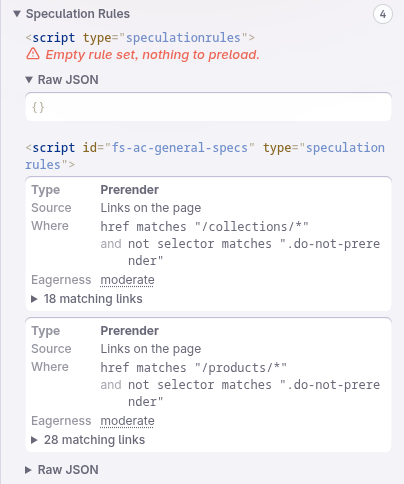
A rule set without any rules in it does nothing:
```html
```
You wouldn't write this by hand, but it's easy to end up with when a template or a plugin generates your rules and has nothing to fill in. Here's that happening in the wild:
### Preloading that is switched off
Speculation rules aren't always strictly adhered to by the browser. They can be disabled for different reasons that are to the benefit of the user:
* when the device is low on battery.
* when the device is on a metered connection or data saver is enabled.
* when the user has disabled preloading for privacy or performance reasons.
There is nothing wrong with your rules then, but nothing will happen either.
## Letting an agent check your rules
All of the warnings in this article are also part of Polypane's page checks. When you ask an agent to check your page through [Polypane Automation](/docs/automation/), So you can ask things like:
* "which links on this page are not covered by a speculation rule?"
* "hover over the first five links and tell me which prefetches get evicted".
* "build me a speculation rule for the main navigation on this page"
## Further debugging of prefetch and prerender in the Network panel.
In the [Network panel](/docs/network-panel/), requests that were started by a speculation rule get their own group, "prefetched requests", so they don't get mixed in with the requests your page made for itself.
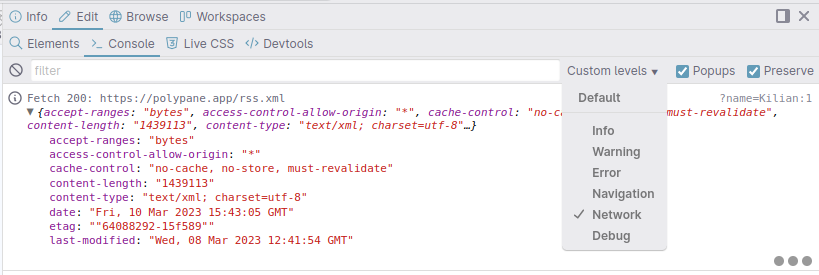
Each request is labelled "(prefetched)" and has "rules" as its initiator. The failed prefetch from earlier is here too, with its 404 status. This makes it easy to dig deeper into what happened with each prefetch request and understand why it succeeded or failed.
Click on a request to see its headers. These two tell your server that a request came from a speculation rule, and which one:
```http
Sec-Purpose: prefetch
Sec-Speculation-Tags: "main-nav"
```
You can use those on your server to skip things that shouldn't happen for a page nobody is looking at yet, like counting a page view.
## Other performance features in Polypane
Speculation rules make the next page load faster. For the performance of the page you're on, Polypane has a few more features.
* [Core Web Vitals](/docs/web-vitals/) for every pane as you browse are shows at the bottom of the pane.
* [Network panel](/docs/network-panel/) for inspecting all the requests and their details.
* Resource hints in the [Meta panel](/docs/meta-information/) for your `preload`, `prefetch` and `preconnect` links.
Each of these features helps you understand and improve the performance of your site in different ways.
## Check your own site!
Open your site in Polypane, open the speculation rules in the Meta panel and hover over a few links to see if the browser does what you expected it to.
Not using Polypane yet? [Start a free trial](/download/) and find out what your speculation rules are doing.
---
Polypane is the browser for web developers. Try it at https://polypane.app.