See every screen, device & user preference, while you build.
Polypane has everything a browser has, plus all the tools you need to ship responsive, fast, accessible, and SEO-friendly websites and apps.
Build the way you already build with Polypane as your browser, and find and fix issues as you go.


Trusted by developers shipping work that matters.
This thing is FAST and the synchronized scrolling works amazingly. Prepare to be impressed.


Polypane is really saving my bacon. Kilian knocked it out of the park, this is my new favorite development tool.

Polypane helped me see a spacing issue between two breakpoints that I wasn’t aware of. Love it 💯

I've started playing around with Polypane and 🤯. It has awesome debugging tools, I'm really impressed.

Build, don't browse.
Polypane is the (Chromium-based) browser devs use to build sites. Check your site continuously as you build, so you find issues as they happen instead of at QA or in production.
See every breakpoint
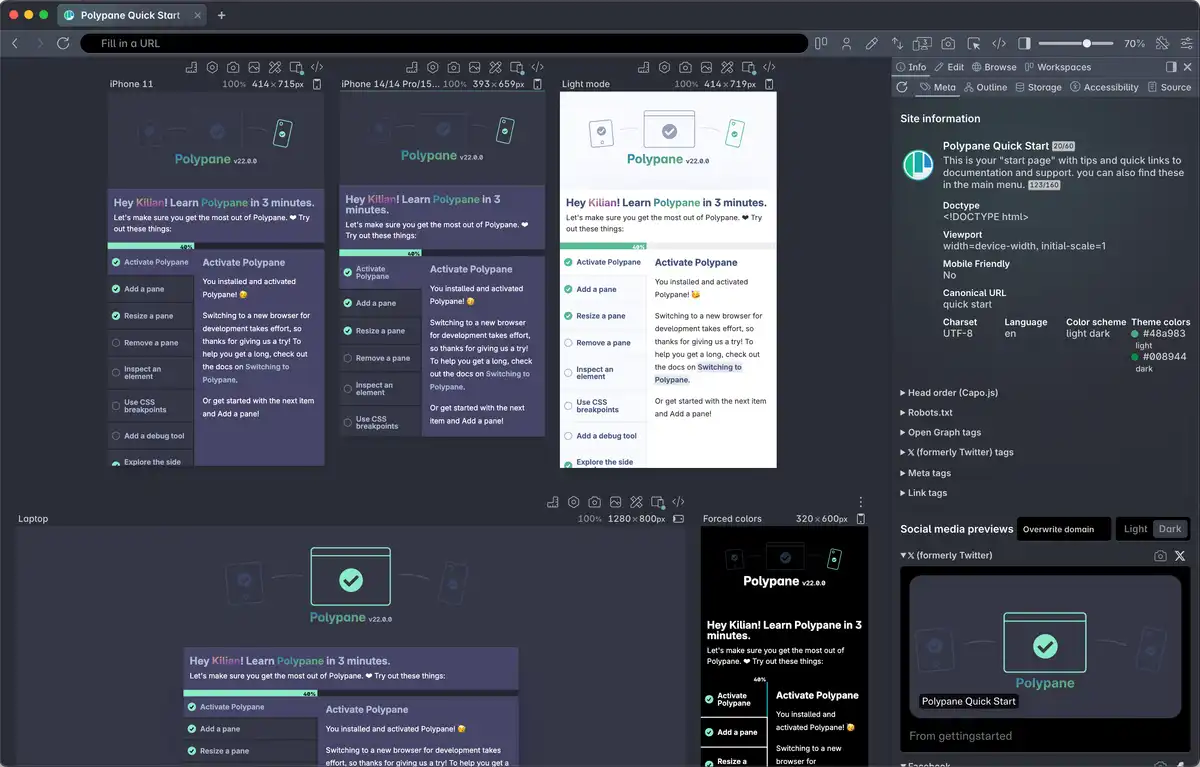
Mobile to 5K. Every breakpoint visible and synchronized.
Catch issues as you build
Structure, metadata, accessibility. Instant feedback while you work.
View everything side by side
Dark mode, light mode, high contrast, reduced motion. All visible at once.
Stop resizing. See everything at once.
Stop the manual resize-refresh-check-fix-resize cycle. Get all your viewports in one overview, no browser resizing needed.
Mobile screens, 5K monitors, all your CSS breakpoints or any size you want.
Emulate everything. Not just screen size.
Polypane goes beyond viewport dimensions. Full device emulation including user agent, touch events, locale, safe area insets and viewports. It's the most comprehensive emulation available.
Test like you're on the actual device, without leaving your desk. Only available in Polypane.
One interaction. Every viewport.
Every scroll, click, hover, focus and keystroke syncs across all viewports instantly.
Stop repeating yourself by testing devices one-by-one. Interact once, test it everywhere.
Your localhost, on any device in the world
Share your local development environment anywhere, on any browser, on any device. No tunneling setup, no deployment needed.
Polypane Portal syncs everything to external browsers: scroll position, interactions, style edits and layout debugging. Build in Polypane, test on the real thing.

From A11y to Z-index.
Your site is more than just its visuals. Polypane has over 40 different debug tools and simulators to help you with every aspect.
Test your site in completely new ways, never miss an issue again.
Check out our Debug tools and Simulators.
Social media share card previews.
Up-to-date previews of social media cards for X/Twitter, Facebook, Slack, LinkedIn, Discord, Telegram, Bluesky, Threads, WhatsApp and Google Search.
Pixel-perfect rendered in dark and light mode. Even with your localhost. Fix typos before they're shared out.
Developers and designers love Polypane.
Here's what they say:
Polypane is easily one of the most useful tools for modern web designers and developers.

It is convenient seeing your work in multiple responsive views at the same time. Love it, 💯

This thing is FAST and the synchronized scrolling works amazingly. Prepare to be impressed.

Polypane is really saving my bacon. Kilian knocked it out of the park, this is my new favorite development tool.

If you’re designing modern applications and websites, you should try Polypane! It’s worth every penny!

I've started playing around with Polypane and 🤯. It has awesome debugging tools, accessibility checks and tests, and more. I'm really impressed.

Polypane has all the tools you need to build great web experiences.
Dark mode media feature testing.
No need to flip your entire operating system! Test light and dark mode side-by-side in the same view.
Also works for reduced motion, reduced data, prefers-contrast, forced-colors and even print styles.
…And that's only scratching the surface.
Polypane has everything you need to make awesome web experiences.
Why developers choose Polypane over Chrome, Firefox or Safari
Polypane replaces your patchwork of tools with a single, powerful browser designed for building better websites. Once you try it, you'll never want to go back.
With Chrome, Firefox or Safari
Frustration. Inefficiency. Blind spots.
With Polypane
Clarity. Speed. Confidence.
Switching between breakpoints manually
Constantly resizing your window or dragging dev tools around.
Multiple synchronized viewports
See and interact with all breakpoints at once. Build once, preview everywhere.
Slow testing workflow
One screen, one viewport, one change at a time.
Faster iterations
Edit code → changes live across all devices instantly.
Missing accessibility issues
Limited or no built-in accessibility checks. Manual testing with patchwork extensions. Ship inaccessible code anyway.
Built-in accessibility auditing
Instant contrast checks, focus order overview, accessibility features emulation, and more.
Guessing about UX across devices
What your site actually looks like on mobile is a mystery until you test each one individually.
Device realism
Pre-configured panes that match real device resolutions and behaviors.
Over-reliance on extensions
Cramming 10+ dev tools into Chrome, Firefox or Safari and still missing insights.
All-in-one power tools
Meta previews, live reloading, image overlays, design & dev tools in one clean interface.
Inconsistent testing environments
You test on your screen. Designer tests on theirs. QA tests on something else. "Works on my machine" but everyone sees something else.
Unified testing experience
You all see the same thing: every pane, every breakpoint, every audit. Everyone's on the same page.
Build the way you already build, without missing anything.
Free 14 day trial, no credit card needed.
- 1 Create your account. Takes a minute.
- 2 Download the app. For Windows, Mac & Linux.
- 3 Build your next project with Polypane

Frequently Asked Questions
What makes Polypane different from a normal browser?
Polypane is designed specifically for building and testing websites. It's a development browser with integrated features like synchronized multi-viewport testing, accessibility auditing, and an extensive set of developer tools that general-purpose browsers don't have.
When should developers use Polypane vs Chrome, Firefox, or Safari?
Polypane is purpose-built for building and testing responsive, accessible websites. Think of it this way: your IDE is for writing code, Polypane is for building and testing websites, and Chrome/Firefox/Safari are for browsing the web and final cross-browser testing.
Why use Polypane instead of a few extensions?
An extension looks at the page you have open right now. That's only your viewport, your preferred color scheme and your device settings. And the bugs aren't found on your own device, because that's the one you already test on.
The bugs that make it to production are usually the ones that only show up in a combination, like a forgotten variable causing a contrast issue that only appears in dark mode, or a layout that breaks between your iPhone 16 and an iPhone 13 mini you didn't check, but your customer did.
Polypane puts all those states next to each other while you build and proactively flags issues, so you fix them while you build.
What rendering engine does Polypane use?
How does Polypane work?
Edits in the inspector apply to all instances at once, letting you see changes immediately. At the same time, Polypane analyzes your CSS, HTML, storage, metadata, and more to automatically lint your entire page and gives you feedback on how to improve it.
Can I test all browsers in Polypane?
No, but also yes. It's not possible to show all rendering engines in a single, cross-platform browser. Under the hood Polypane uses the Chromium engine, the same as Chrome, Edge, Brave and many other browsers. It renders sites the way 95%+ of your visitors will see them.
Polypane can also emulate other browsers like Safari for iOS or Firefox. This means your site's JS will think it's running in them and you can use that to test specific fallback logic. The underlying rendering engine is still Chromium though, so a real Safari or Firefox can render things differently.
Even if you use a developer browser, you should still test in multiple rendering engines. That's what Polypane Portal lets you do: open the Portal URL in any browser or device you have, and all of them are synced with Polypane. Portal is free for all Polypane users.
When is Polypane a bad fit?
And because Polypane is based on Chromium, it will not help you with issues specific to Safari or Firefox. You'll still want to test in those, which is whatPolypane Portal is for.
What operating systems does Polypane support?
Our Windows builds are signed with an Extended Validation code signing certificate, and our Mac builds are signed and notarized by Apple.