CSS Selector Specificity Calculator
Calculate the specificity of selectors all the way up to CSS Selectors level 4
Specificity explained right where you need it: in your browser.
Polypane shows the specificity of every selector in your styles, right in the elements panel.
Hover a selector and Polypane highlights the parts that add to its specificity. It even works for nested CSS and complex :is() selectors, so you always know why a style wins.
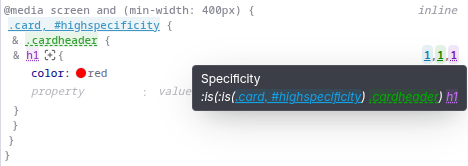
See the specificity of your selectors directly in your browser
What is CSS selector specificity?
If an element is targeted by multiple selectors, browser use the specificity of the selector to determine which styling to apply. Each selector has a specificity that is determined by what you use in that selector: elements, ID's, classes etc. This specificity is split up in different levels.
A single value in a higher level is more important than all levels below it. For example, you can have a 1000 class names, and a selector with a single ID would still be more specific.
Gotcha's when dealing with CSS selector specificity issues
- The universal selector
*has no specificity. - properties with
!importantare applied even if the selector is less specific. - …Except for the properties with
!importantin same or a higher specificity selectors later in your CSS. - …Except for the
style=""attribute on an element. - If you use a pseudo class like
:not()or:is(), the selector inside it with the highest specificity determines the specificity. - Anything in a
:where()has no specificity. - For
:nth-child(),:nth-last-child(),:host()and:host-context()pseudo-classes the specificity is the combination of the pseudo-class itself (0,1,0) plus the most specific of the selectors in them. - For the
::slotted()pseudo-element the specificity is the combination of the pseudo-element itself (0,0,1) plus the specificity of the selector inside it. - Child or sibling selectors (
>, ~, +) add no specificity.
Build the way you already build, without missing anything.
Free 14 day trial, no credit card needed.
- 1 Create your account. Takes a minute.
- 2 Download the app. For Windows, Mac & Linux.
- 3 Build your next project with Polypane