Documentation
Learn how Polypane improves your workflow
Measure text length
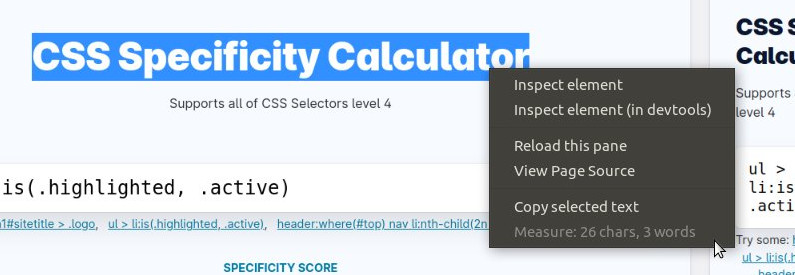
Select any text in Polypane and right-click it to open the context menu. There you can quickly see the length of the selected text.
For broader readability testing, see the Readability debug tool.
The ideal line length is between 45 and 70 characters, but because characters usually have variable widths in different fonts, it's not always easy to tell how long a line is.
Depending on the text selected, Polypane will show:
- The number of characters
- The number of words
- The number of sentences
- The number of emoji
Measure text works for all languages understood by your operating system and will assume selected text is written in the page language. It will fall back to english.
Have a question about Polypane?
Reach out via (real human) chat, Slack or our contact form:
Contact SupportBuild the way you already build, without missing anything.
Free 14 day trial, no credit card needed.
- 1 Create your account. Takes a minute.
- 2 Download the app. For Windows, Mac & Linux.
- 3 Build your next project with Polypane