Documentation
Learn how Polypane improves your workflow
Polypane Changelog
Polypane is updated roughly every month with new features, bug fixes and other improvements. Find the changelogs for all versions below.
v29.0.0 May 4, 2026
Polypane 29 Polypane 29 introduces a redesigned panel UI that feels more familiar, a new network panel for inspecting requests, a new snippet store for discovering and installing snippets, and a custom selectors overview in the outline panel, plus many other improvements and fixes. Full release notes
New
- New Network panel
- New Snippet store
- New Panel: Switch to single-line with overflow tab bar
- New Grid/Flex visualisations in Polypane Peek
- New Outline panel: Custom selector overview
- New Passkeys keychain integration on macOS
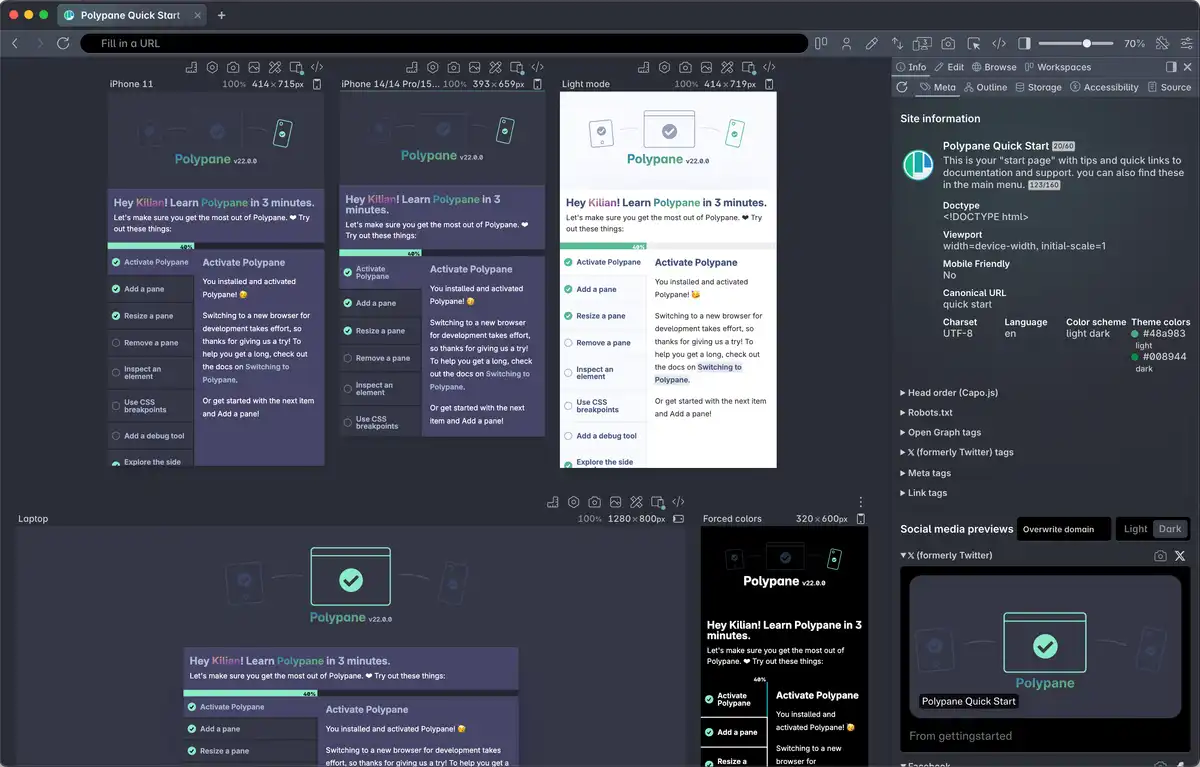
- New Meta panel: WhatsApp preview
- New Devtools panel: Inspect shared workers and service workers (Thanks Przemyslaw!)
- New Snippets panel: live preview option (Thanks Kari!)
- New Activated html-in-canvas API by default
- New Chromium 148.0.7778.56
Improvements
- Improved Polypane Peek: iframes are now inspectable and can be selected
- Improved Load performance for custom local domains (Thanks Mike!)
- Improved Confirmation dialogs are now deduplicated when called multiple times in a row (Thanks Matija!)
- Improved JSON viewer: Makes data available in the console as window.json
- Improved Elements panel: A11y tab now links all labelledby elements (Thanks Eric!)
- Improved Elements panel: A11y tab now shows aria-describedby value (Thanks Eric!)
- Improved Elements panel: Stable references to elements for hot reloading dev servers (Thanks Matyáš!)
- Improved Elements panel: Load new styles on injection by hot reload servers (Thanks Matyáš!)
- Improved Elements panel: Toggle pseudo styles in style panel (Thanks Eric!)
- Improved Elements panel: del key now removes element in tree view
- Improved Console panel: new $$$() helper that also searches shadow DOM.
- Improved Outline panel: Accessibility tree now shows a description as well as the referenced IDs (Thanks Eric!)
- Improved Basic auth popup now follows the system design
- Improved Form autofill: Ability to use a default email address (Thanks Tom!)
- Improved Form autofill: Move lists matching the element to the top
- Improved Find elements: cmd/ctrl + enter now shows element in Elements panel (Thanks Ricky!)
- Improved Debug tools: Improve wording in Color contrast tool (Thanks Ana!)
- Improved Snippets Editor: Improved layout when editing
- Improved Traffic lights alignment on macOS 26 is now improved
- Improved Session management: Add confirmation dialog before deleting session
- Improved Pane resizing performance when you have a lot of panes open
- Improved More deterministic page loading after click actions
- Improved Integrations: new Marker.io logo
Fixes
- Fix Elements panel: Improve accessible name calculation labeled by elements with roles without accname (Thanks Eric!)
- Fix Elements panel: Events badge was not visible in tree view (Thanks Ashlee!)
- Fix Elements panel: Allow editing the color of an image-only background property
- Fix Elements panel: Copy CSS for keyframes was missing the animation name
- Fix Elements panel: Font weight wasn't accurate for contrast calculation in A11y tab
- Fix Browse panel: Previous tab shortcut was not working (Thanks Matija!)
- Fix Browse panel: New window from panel did not always create new tab
- Fix Browse panel: New tab should focus access bar (Thanks Matija!)
- Fix Browse panel: Add extension button did not work
- Fix Full page screenshots: use correct viewport height when making screenshots
- Fix Context menu: 'Save link as...' option did not work
- Fix Outline panel: Prevent accessibility tree from collapsing focused elements
- Fix Outline panel: Prevent double tooltips when hovering over elements
- Fix Styles: Prevent React router from trashing styles on load (Thanks Nathan!)
- Fix Console panel: Prevent extra white space in styled console messages
- Fix 'No internet connection' warning is now aligned correctly
- Fix Meta panel: The suggested file name now includes correct name
v28.0.3 March 10, 2026
Polypane 28.0.3
This is a bugfix release. Full 28 Release Notes
Fixes
- Fix Issue preventing Mac users from auto-updating
Previous changes in 28.0.2:
Improvements
- Improved Added cmd/ctrl+shift+d shortcut to reload all debug tools (Thanks Florian!)
- Improved Snippet manager UI improvements
- Improved Outline panel: now ignores hidden headings for duplicate content checks
- Improved Outline panel: Improved logic for aside elements in sectioning content (Thanks Eric!)
- Improved More resilient build and update internals
- Improved Elements panel: Improve performance for large DOM trees
- Improved Context menu performance in browse panel
- Improved Peek now shows the currentSrc for videos
- Improved Meta panel: Warn when the og:url is not the same as the canonical or page url
- Improved Breakpoints no longer list negative value widths
- Improved Breakpoint panes adhere to the minimum pane width
- Improved Reduced installer download size by an average of 25%
- Improved Updated list of Google Fonts
- Improved Updated Chromium to 146.0.7680.31
Fixes
- Fix Prevent Polypane shortcuts overwriting global ones on app launch (Thanks Benoit!)
- Fix Elements panel: issue where autocomplete cleared the typed value when adding attributes or css values
- Fix Color picker not setting correct background color when inspecting from Elements panel
- Fix Snippets: Last save location is now correctly remembered when saving snippets
- Fix Install extensions from suggestion box when you have multiple sessions
- Fix Reinstate sync engine after main window reopen on macOS
v28.0.2 March 10, 2026
Polypane 28.0.2 This is a bugfix release. Full 28 Release Notes
Improvements
- Improved Added cmd/ctrl+shift+d shortcut to reload all debug tools (Thanks Florian!)
- Improved Snippet manager UI improvements
- Improved Outline panel: now ignores hidden headings for duplicate content checks
- Improved Outline panel: Improved logic for aside elements in sectioning content (Thanks Eric!)
- Improved More resilient build and update internals
- Improved Elements panel: Improve performance for large DOM trees
- Improved Context menu performance in browse panel
- Improved Peek now shows the currentSrc for videos
- Improved Meta panel: Warn when the og:url is not the same as the canonical or page url
- Improved Breakpoints no longer list negative value widths
- Improved Breakpoint panes adhere to the minimum pane width
- Improved Reduced installer download size by an average of 25%
- Improved Updated list of Google Fonts
- Improved Updated Chromium to 146.0.7680.31
Fixes
- Fix Prevent Polypane shortcuts overwriting global ones on app launch (Thanks Benoit!)
- Fix Elements panel: issue where autocomplete cleared the typed value when adding attributes or css values
- Fix Color picker not setting correct background color when inspecting from Elements panel
- Fix Snippets: Last save location is now correctly remembered when saving snippets
- Fix Install extensions from suggestion box when you have multiple sessions
- Fix Reinstate sync engine after main window reopen on macOS
v28.0.1 February 17, 2026
Polypane 28.0.1 This is a bugfix release. Full 28 Release Notes
Improvements
- Improved Environments switcher: Add cmd + click as option to cycle through environments for mac (Thanks Nicolas!)
- Improved Meta panel: Improved Bluesky preview for pages with missing og info (Thanks Matija!)
- Improved Outline panel: Form list now also indexes role=form
- Improved Address bar now recognises localhost paths as valid urls (Thanks Harald!)
- Improved Portal: You can now middle-click the icon to close the portal
- Improved Peek: Improved area rendering logic
Fixes
- Fix Elements panel: prevent collecting styles too fast for CSS-in-JS libraries to apply (Thanks Lara!)
- Fix Elements panel: Show force starting-style option for styles nested inside starting style
- Fix Elements panel: Calculation error in box model (Thanks Bramus!)
- Fix Elements panel: Currently selected element could not be collapsed by mouseclick (Thanks Harald!)
- Fix Meta panel: Breadcrumbslist microdata with single item would break updates (Thanks Marc!)
- Fix Environments dropdown: Prevent horizontal scroll in dropdown
v28.0.0 February 10, 2026
Polypane 28
The first release of 2026 comes with plenty of improvements to Projects, the new Environments feature prevents you from confusing production for localhost, the Elements panel is faster and more powerful than ever, and Polypane now runs on Chromium 146. Full Release Notes
New
- New Environments for Projects
- New Elements panel: Edit CSS Selectors
- New Console: Support for console.group (Thanks Giles!)
- New Command bar: Activate or deactivate snippets from the command bar (Thanks Eric!)
- New Chromium 146.0.7650.0
Improvements
- Improved Projects, Bookmarks and Environments can now be re-ordered (Thanks Michael!)
- Improved Projects: Open or switch from the CLI (Thanks Marc!)
- Improved Projects: Open or switch from the macOS and windows dock/taskbar (Thanks Benoit!)
- Improved Elements panel: Constructed stylesheets no longer open browse tabs when clicked
- Improved Elements panel: Updated performance when inspecting elements
- Improved Elements panel: make !important styles more visible
- Improved Elements panel: press <ShortCutDisplay cmdKey letter="Enter" /> when editing HTML to apply it
- Improved Elements panel: Show warning for invalid autocomplete values
- Improved Elements panel: Support for
::search-textpseudo-element styling - Improved Meta panel: Improved UI
- Improved Meta panel: Handle broken link tags on pages
- Improved Meta panel: Link meta tags containing URLS are now clickable
- Improved Meta panel: Show the type of 'alternate' link tags
- Improved Meta panel: New Bluesky preview for pages without OG image
- Improved Meta panel: Show warning if security.txt is expired
- Improved Meta panel: Allow webp for og images
- Improved Meta panel: Updated Discord designs
- Improved Outline panel: Form outline warns about small font sizes
- Improved Outline panel: New bottom-aligned panel layout
- Improved Outline panel: Support shipping and billing values in Form autocomplete
- Improved Outline panel: Expand all details option (Thanks Jules!)
- Improved Outline panel: show autocomplete warnings in form overlay
- Improved Context menu: Hold <ShortCutDisplay cmdKey /> when clicking 'reload pane' to do a hard reload
- Improved Cache: Disable cache now applies to panes instead of sessions
- Improved Improved page load performance
- Improved Improved tab creation performance
- Improved Debug tools: Polypane UI is excluded from placeholdifier debug tool (Thanks Dave!)
- Improved Browse/devtools panel: Improve resize performance
- Improved Browse panel: Show bookmarks in Browse panel (Thanks Matija!)
- Improved Live reload: Redesigned to fit better with Polypane UI
- Improved Consistent 'clear input' UI throughout the app
- Improved New macOS installer background
- Improved Tab customisation UI redesign
- Improved Panes without navigation sync now get a color indicator when environments or domains match
- Improved Browse panel: Search in page (Thanks Matija!)
- Improved Browse panel: Better focus handling for keyboard users (Thanks Matija!)
- Improved Browse panel: Support for default browser shortcuts when focused
- Improved Rulers: Middle click button to disable rulers quickly
- Improved Reference image: updated UI
- Improved When setting a new default new pane, the default new layout is updated too (Thanks Michael!)
- Improved Form autofilling now has Dutch and Canadian postal code formats (Thanks Maarten!)
- Improved We no longer hide the browse and devtools panels when drop downs overlay them
- Improved Emoji pickers now always start with search, and default to Unicode 16 emojis
- Improved Accessibility panel: Update ruleset
- Improved Updated list of Google fonts
Fixes
- Fix Prevent UI from breaking when there are many open tabs (Thanks Ron!)
- Fix Projects: prevent duplicate project names
- Fix Browse panel: Prevent issue where new tabs could not be created
- Fix Snippet panel: Prevent stale focus outlines after use
- Fix Elements panel: Box model would sometimes not render (Thanks Scott!)
- Fix Elements panel: Updating parent styles works again (Thanks Scott!)
- Fix Outline panel: Make sure numbering and focus arrows are visible again
- Fix Outline panel: Prevent link errors from being clipped
- Fix Outline panel: Show broken links now filters list again
- Fix Outline panel: Tracking button in detached panel works again
- Fix Outline panel: Detached panel did not always get new data
- Fix Outline panel: add missing
street-addressautocomplete value - Fix Outline panel: correctly support autocomplete on implicitly typed input elements
- Fix Storage panel: Fix bug where session could not be accessed for initial panes
- Fix Meta panel: Robots.txt duplicate warning layout issue
- Fix Bookmarks: Middle clicks open new tab
- Fix Context menus in Chrome devtools panel not showing
- Fix Emulation: Correctly show the current network throttling profile
- Fix Emulation: scrolled settings no longer prevent tabs from being clickable (Thanks Dave!)
- Fix Update measured screenshot button correctly on activation
- Fix Background color of overview screenshots did not match UI
- Fix Request new permission on launch to allow sites to use desktopCapture on macOS
v27.1.0 December 17, 2025
Polypane 27.1 Polypane 27.1 is here and Polypane Portal has expanded! The Polypane console will now show the console messages from all connected browsers so you get instant feedback on errors and your own logs. Snippets are now also injected and ran in connected portals. This combination makes Polypane's Portal an even more powerful tool for testing and debugging across multiple browser and real devices. The elements panel and projects have also received a lot of quality of life improvements in this release. Full release notes
New
- New Portal: Console messages from connected browsers are now shown in the main Polypane console
- New Portal: Snippets are now ran in connected browsers
- New Elements panel: Arrow key navigation for DOM tree
- New Elements panel: Support for adopted stylesheet editing
- New Elements panel: Filtering for computed styles
- New Elements panel: collapsing of unused custom properties
- New Outline panel: Enable/disable automatic updating
- New Projects: Import/export projects
- New Projects: Import/export bookmarks
- New Projects: Import bookmarks.html file support
- New Projects: Filter bookmarks and navigate by keyboard
Improvements
- Improved Elements panel: Support for referential IDREFs
- Improved Elements panel: Hold cmd/ctrl while hovering DOM tree to hide element info
- Improved Console panel: use
keys(),values()andentries()to log iterable objects - Improved Console panel: messages now support multiple styles using %c
- Improved Outline panel: Show elements with role=img in image outline (Thanks Robbert!)
- Improved Outline panel: Improve rendering performance for large outlines
- Improved Outline panel: Focus outline now shows warning for missing accessible names (Thanks Ron!)
- Improved Accessibility info updates fasted across the app
- Improved Color picker: Picking a new selected color no longer changes the background color (Thanks Eric!)
- Improved Projects: option to hide project selector button (Thanks Artem!)
- Improved Projects: Adding bookmarks will refocus the URL input
- Improved Quick start: Links are now opened in new tabs (Thanks Max!)
- Improved Meta panel: Capo.js head order overview updated to 2.0.0
- Improved Snippets: Deleting a folder now deletes all containing snippets
- Improved Snippets: Support importing bookmarks HTML
- Improved Snippets: Updated list of Google fonts
- Improved Updated Chromium to 142.0.7444.226
Fixes
- Fix Marker.io integration needed an API update.
- Fix QR for Portal now updates correctly (Thanks Jesper!)
- Fix Console popups would sometimes lock up the app (Thanks Luan!)
- Fix Projects: Add bookmarks as new tabs would not work (Thanks Andy!)
- Fix Split view: Prevent rulers from overlapping pane headers
- Fix Elements panel: CSS Suggestions for new properties would be clipped
- Fix Elements panel: Fix HTML editing styling on Linux
- Fix Elements panel: adding styles with trailing ; works automatically
- Fix Sidebar: Issue where sidebar could be visible without it being opened
v27.0.2 November 24, 2025
Polypane 27.0.2 Changelog
This is a bugfix release. Polypane 27 brings a new project-focused workflow, a new snippets panel, improved DOM editing and is built on Chromium 142. Full changelog
Fixes
- Fix Issue where launching Polypane with a URL would return an error
- Fix Search icons disappearing after app updates
v27.0.1 November 21, 2025
Polypane 27.0.1 Changelog
This is a bugfix release. Polypane 27 brings a new project-focused workflow, a new snippets panel, improved DOM editing and is built on Chromium 142. Full changelog
Notes
- Note Widevine DRM has been disabled for this release
Improvements
- Improved Inspection and snippet logic for frameworks that use full page hydration (Thanks Rick!)
- Improved Improve computed name resolution for links with titles (Thanks Ron!)
- Improved Snippets panel: Design Alignment
- Improved Updated list of supported Google Fonts
- Improved Chromium version 142.0.7444.175
Fixes
- Fix Prevent crashes on macOS when accessing certain menu items
- Fix Projects and bookmarks dropdown and Project editor no longer falls behind browse panel (Thanks Eric!)
- Fix Selecting project favicon could result in Google icon being shown (Thanks Eric!)
- Fix Alignment issues with project button on macOS Tahoe
v27.0.0 November 20, 2025
Polypane 27
This release brings a new project-focused workflow, a new snippets panel, improved DOM editing and is built on Chromium 142. Full changelog
New
- New Projects to group tabs, bookmarks and sessions
- New Snippets panel to save and run JS and CSS snippets
- New Meta panel: Show overview of alternate links (Thanks Charlie!)
- New Elements panel: Duplicate and remove elements
- New MacOS Liquid Glass icon
- New Chromium 142
Improvements
- Improved Elements panel: shows line numbers for CSS Styles
- Improved Elements panel: Hide and copy element in context menu
- Improved Elements panel: Force starting style feature
- Improved Download start and end notifications
- Improved Support for punycode domains (Thanks Christian!)
- Improved Browse panel: Automatically uses the tab or project session
- Improved Full page layout now uses the page title as name instead of "new pane"
- Improved Debug tools: Slow down view transitions tool
- Improved Debug tools: New force hover styling debug tool (Thanks Ron!)
- Improved Measure rectangle is now called Area
- Improved Area screenshot now activate areas when not visible
- Improved Meta panel: Slack design update
- Improved Don't ask for confirmation when importing workspace into empty slot
- Improved Accessible name calculation for form elements (Thanks Ron!)
- Improved Extensions: Now open new tabs in main UI instead of browse panel (Thanks Ron!)
- Improved Performance across the app thanks to react-compiler
Fixes
- Fix Prevent stalled application launch when Widevine DRM can't be downloaded (Thanks Alexandra!)
- Fix Noticeable white corners in dark mode for error views
- Fix Emulation icon no longer always has an active dot (Thanks Randall!)
- Fix Console: console.log(undefined) is now printed in the console (Thanks Luke!)
- Fix Page zoom shortcuts on Windows now work again (Thanks Ron!)
- Fix Replace cmd + h to hide element with ctrl + h on Mac (Thanks Michel!)
- Fix Horizontal layout no longer can be dragged in certain configurations
- Fix Fix 'paste and go' context menu option on Address bar
v26.0.1 October 13, 2025
Polypane 26.0.1 This is a bugfix release Full 26.0.0 release notes.
Improvements
- Form outline: Support for external buttons with form attribute
- Form outline: Warning for insecure form submissions
- Form outline: Style and clarity improvements
- Huge speed improvement to video generation thanks to Mediabunny
- Target Size debug tool: Prevent UI from being tested for overlap (Thanks Eric!)
- Peek: improve accessible name computation for textareas
- Updated list of Google fonts
- Updates accessibility rulesets
- Updated Chromium to 140.0.7339.13
Fixes
- Performance regression on macOS Tahoe
- Newly added panes would not sync their scroll position with other panes
- Pane console stats: prevent delay before showing
- Workspaces did not apply from detached panel (Thanks Jordi!)
- Pane recording: Fix for black background on videos of pages without specified background color
v26.0.0 September 29, 2025
Polypane 26 Polypane 26 brings the most accurate device emulation available anywhere. We now emulate small viewport units (svh) and device-specific safe area insets, two critical factors that affect every mobile layout but were impossible to emulate until now. This means layout bugs that previously only surfaced on real devices can now be caught and fixed fast during development. Full release notes.
New
- New Small viewport emulation
- New Safe area emulation
- New New iPhone and Android devices (thank Peter, Jules, Declan, Markus, Floris, James, Julian, Jeroen, Kari, Kriszti, Tim, Alex, Greg, Sara, Ryan, Pontus, Jan and Christian!)
- New Add multiple measurement overlays at once
- New Chromium 140
Improvements
- Improved Elements panel: Support inlining import rules (Thanks Nathan!)
- Improved Elements panel: Updated CSS property and value suggestions
- Improved Elements panel: Styles update after pane resize (Thanks Bob!)
- Improved Elements panel: New attributes are recognised as idrefs
- Improved Elements panel: cmd + h toggles visibility of selected element (Thanks Harald!)
- Improved Elements panel: Performance improvements for large CSS files
- Improved Elements panel: hidden elements are now more desaturated
- Improved Elements panel: Improve rendering of style panel for Bricks based sites
- Improved Elements panel: inspect and edit :host styling (Thanks Murat!)
- Improved Outline panel: Suggestions for landmarks and headers have a separate section now
- Improved Outline panel: Astro and Nuxt devtoolbars are now ignored for outlines
- Improved Outline panel: Clarification for the term 'label' (Thanks Eric!)
- Improved Extensions: Show suggested extensions in the extension panel
- Improved Extensions: Show suggestions for extensions that have built-in alternatives
- Improved Workspaces: new device lab, iOS and Android workspaces
- Improved Workspaces: updated worldwide most used sizes workspace
- Improved Permissions: Better handling of permissions on file protocol
- Improved Sessions: option to show session name abovs panes (Thanks Kiran!)
- Improved Tabs: new context menu option to reopen closed tab
- Improved Screenshots: Always hide scrollbar when taking screenshots
- Improved Navigation: You can now turn off navigation sync for an entire tab at once (Thanks Kiran!)
- Improved Scroll sync now runs at higher framerates
- Improved Color picker: export color and background combination as CSS
- Improved Layout switcher: links to workspaces (Thanks David!)
- Improved App-wide confirmation system to prevent destructive actions (Thanks David!)
- Improved Cache disabling logic now handles more cases
- Improved Switch to new Chat support provider Crisp
- Improved Better logic for overflow detection (Thanks Emma!)
- Improved updated list of Google fonts
Fixes
- Fix Elements panel: Prevent elements panel crash for certain HTML structures (Thanks Pandu!)
- Fix Reference image: Top offset on reference image cuts off by viewport (Thanks Niels!)
- Fix Rulers: issue where you couldn't add guides in full layout with measure overlay visible
- Fix Breakpoints: Fix detection logic for media query ranges
- Fix Breakpoints: Correctly detect all nested breakpoints (Thanks Erik!)
- Fix Color picker: Colors on Wayland were always fully transparent (Thanks Philipp!)
- Fix Outline panel: Deal with HTML element height affecting outline detection (Thanks Eric!)
- Fix Focus sync didn't work in some cases
- Fix Context menu: 'autofill form' is now shown on all form descendants
- Fix Issue where bulk screenshots sometimes wouldn't be saved
v25.1.1 July 31, 2025
Polypane 25.1.1 This is a bugfix release. Full release notes for 25.1 and 25.1.1.
Improvements
- Improved Prevent permission popups for DRM requests
Fixes
- Fix DRM: Fix Spotify playback on Mac
- Fix Color contrast now takes color-scheme settings into account (Thanks Karthik!)
- Fix Elements panel: using arrow keys while editing attributes could result in the attribute being deleted
- Fix Elements panel: Fix issue where shadow root couldn't be selected (Thanks Mark!)
- Fix Elements panel: Show child nodes for elements that only have a shadowRoot as direct child
v25.1.0 July 30, 2025
Polypane 25.1 Polypane 25.1 is now available, and it brings DRM support through Widevine, a new reopen last closed tab feature and a number of improvements and fixes. Full release notes. New
- New DRM support through Widevine
- New Reopen last closed tab feature
Improvements
- Improved Outline panel: Show only links with issues option (Thanks Anthony!)
- Improved Form outline: prevent form element rows from being too tall
- Improved Meta panel: Shows warning when a robots meta tag prevents indexing (Thanks Laurent!)
- Improved Guides: Split view layout now has enough space for the vertical ruler
- Improved Form autofilling no longer changes hidden fields (Thanks Mathieu!)
- Improved Prevent generated screenshot names from becoming too long
- Improved Polypane Peek: hide contrast value if no contrast is available
- Improved Elements panel: Expand elements in the tree view if they have text content and pseudo elements (Thanks Laurent!)
- Improved Extensions: Find extensions now opens in new tab
- Improved Quick Start: shortcuts now no longer change when emulating different operating systems (Thanks Damien!)
- Improved Updated list of Google Fonts
- Improved Updated Chromium to 138.0.7204.157
Fixes
- Fix Elements panel: Show shadowRoot contents again (Thanks Mark!)
- Fix Elements Panel: parsing of oklab/oklch text-shadows in elements panel and tooltips
- Fix Guides: NaN values in guides for vertical ruler in split layout
- Fix Closing popups in focus and full mode reopens devtools again (thanks Karl!)
- Fix Adjusted panel text size was only applied in the first tab (Thanks Laurent!)
- Fix Meta panel: catch errors when parsing faulty microdata (Thanks Laurent!)
- Fix Meta panel: Now show microdata when available on its own rather than together with RDFa
- Fix Meta panel: App freeze when trying to hide social media previews (Thanks George!)
v25.0.1 July 4, 2025
Polypane 25.0.1 This is a bugfix release. Full release notes.
Improvements
- Improved Elements panel now shows HTML comments in the tree view (Thanks Kim!)
- Improved Extensions: better support for extension popups
- Improved Recording: support recording of very large panes
- Improved Updates list of Google fonts
- Improved Updated Chromium 138.0.7204.97
Fixes
- Fix Context menu on color suggestion not being visible (Thanks Eric!)
- Fix Outline panel: Fix issue where hidden buttons had an incorrect label
v25.0.0 June 30, 2025
Polypane 25 We've updated our browser extension implementation to support Manifest v3 so we support a ton more extensions, there's a new Form outline view that shows you the structure of your forms, and we've updated to Chromium 138 along with many fixes and updates to existing features. Full release notes.
New
- New Manifest v3 extensions support
- New Outline panel: Form outline view
- New Chromium 138
Improvements
- Improved Elements panel: New CSS properties and attributes support
- Improved Elements panel: CSS property suggestions are now sorted by popularity
- Improved Meta panel: accuracy of StructuredData validation (Thanks Josh)
- Improved Storage panel: automatically updates when storage changes
- Improved Outline panel: Prevent warning about duplicate landmarks when some are hidden
- Improved Outline panel: more accurate detection of name for hidden elements
- Improved Updated default sizing of some device presets
- Improved JSON and XML viewer now support URLs with TrustedHTML enabled
- Improved Debug tools: Toggle option to move target size UI out of the way (Thanks Emma!)
- Improved Layout debugging: we now use p3 colors where available (Thanks Dyna!)
- Improved Emulation: Add a reset to defaults button (Thanks Steve!)
- Improved Color picker: Right-click suggestion to copy value or full suggestion string (Thanks Eric!)
- Improved Focus layout: Randomly resizing the pane now animates the resize
- Improved Updated Web Vitals library
- Improved Update Google fonts list
Removals
- Removed SCSS parsing in the Live CSS Panel
- Removed Support for Manifest v2 extensions
Fixes
- Fix Elements panel: issue with selectors with nested parentheses
- Fix Elements panel: Prevent non-values from being recognised as (in)valid IDs
- Fix Elements panel: Fix occurances where the tree view would remain empty until selecting an element
- Fix Elements panel: Unnamed layers weren't displayed correctly
- Fix Elements panel: Color contrast checker in a11y tab now takes font-size into account again
- Fix Source panel: Better layout in horizontal layout (Thanks Andreas!)
- Fix Meta panel: prevent crash when adding an invalid URL as domain overwrite
- Fix Undocked devtools opening when moving away from devtools panel
- Fix Context menu not working after a hard reload
- Fix Node highlights: prevent design leak issue with global CSS values
- Fix Hiding the header on mac prevented top pane buttons from being clickable (Thanks Trond!)
- Fix Remove space in front of color swatch screenshot default file name (Thanks Eric!)
- Fix Prevent resize events for unfocused tabs
v24.1.2 June 4, 2025
Polypane 24.1.2
This is a bugfix release.
Improvements
- Improved Updated list of known Google fonts
- Improved Updated Chromium to 136.0.7103.149
Fixes
- Fix for CVE-2025-5419
Polypane 24.1.0 A new measure overlay lets you drag out a rectangle on the page and measure arbitrary parts of the page and screenshot the selected area. The XML viewer lets you inspect and filter XML files like RSS or OPML files and the Find by CSS selector has a new inspection option. Full release notes.
v24.1.1 May 21, 2025
Polypane 24.1.1
This is a bugfix release.
- Fix Elements panel: Fix issue displaying nested
@supportsstyling rules (Thanks John!)
Polypane 24.1.0 A new measure overlay lets you drag out a rectangle on the page and measure arbitrary parts of the page and screenshot the selected area. The XML viewer lets you inspect and filter XML files like RSS or OPML files and the Find by CSS selector has a new inspection option. Full release notes.
v24.1.0 May 19, 2025
Polypane 24.1.0 A new measure overlay lets you drag out a rectangle on the page and measure arbitrary parts of the page and screenshot the selected area. The XML viewer lets you inspect and filter XML files like RSS or OPML files and the Find by CSS selector has a new inspection option. Full release notes.
New
- New Measure overlay: New measure tool to measure arbitrary parts of the page
- New XML/RSS Viewer (Thanks Evan!)
- New Find elements now has a new option to inspect the element in the devtools (Thanks Nils!)
- New Meta panel: New LinkedIn share design
- New Updated Chromium to 136.0.7103.93
Improvements
- Improved Tabs: You can now double-click a tab to overwrite the title and color
- Improved Elements panel: We now hide internal Polypane elements in the elements panel to improve performance
- Improved Rulers: Showing and hiding rulers can now be done per tab
- Improved Meta panel: Improved layout for charset, language row
- Improved Outline panel: improve performance when gathering data
- Improved Split layout: pane dragger is now correctly centered
- Improved updated the list of Google fonts
Fixes
- Fix Full layout: Website no longer has rounded corners
- Fix Devtools panel: Devtools did not correctly resize along with panel on first open
- Fix Using The Pointer lock API would crash Polypane (Thanks Andrew!)
- Fix Inspect in Devtools did not always open the panel properly (Thanks Tor!)
- Fix Permission refresh bug is now solved for all permission types
- Fix Rulers: Color picker now show correctly when editing the color
- Fix Outline panel: Right-click and open in new tab works again
- Fix Hover style syncing randomly stopped working
- Fix Video recording: fixed issue where part of video would be cut off
- Fix Windows ARM: Fixed crash on startup
v24.0.2 May 5, 2025
Polypane 24.0.2
This is a bugfix release. Full release notes.
Improvements
- Improved Meta panel: show humans.txt and ai.txt in authored dimensions
- Improved Elements panel: Improve element selection performance
- Improved Outline panel: Improved performance for gathering outlines
- Improved Touch emulation logic interactions
- Improved Chromium 136.0.7103.49
Fixes
- Fix Prevent redirection to broken URL after accepting permission requests
- Fix Title bar background color on Windows
- Fix Bus messages weren't filtered by tab
- Fix Hover sync would stop working when hard refresing panes
- Fix Device metric emulation bug causing cut off content (Thanks Eric!)
- Fix Prevent devtools from occassionaly opening undocked (Thanks Matthias!)
v24.0.1 April 30, 2025
Polypane 24.0.1
This is a bugfix release. Full release notes
New
- New Elements panel: Support
@import layer()in the style editor (Thanks Manuel!) - New Presets: added a new KaiOS mobile phone preset (Thanks Declan!)
- New Links opened in new tabs will use the same session as the tab you clicked from (Thanks Devan!)
Improvements
- Improved Elements panel: Improve bottom-aligned layout
- Improved Outline panel: Lower the threshold for manual link testing to 50 links
- Improved Reference image: Middle click the icon to remove the reference image
- Improved Workspaces: Improve bottom-aligned layout for large workspaces
- Improved Handling of tab dragging
- Improved Panes now maintain a consistent border radius regardless of the zoom level
- Improved Live reload: improved icon clarity
- Improved Automatically replace crashed panes on reload
- Improved Mac users can now also grant access to camera and microphone in Polypane (Thanks Ruben!)
- Improved Chromium 136.0.7103.48
Fixes
- Fix Reference image would be removed on initialisation (Thanks Ayaan!)
- Fix Recording: pages without explicit background color now get a color-scheme aware default background color (Thanks Eric!)
- Fix Color picker in elements panel would close when selecting a full red color
- Fix Color picker could reset it's hue to 0 when saturation or lightness was set to 0
- Fix Workspaces: Allow unnamed workspaces to be dragged
- Fix Highly zoomed in panes would have incorrect device metrics (Thanks Eric!)
- Fix Middle-clicking navigational buttons would result in incorrect URL showing in the address bar
- Fix Elements panel: update accessible name for elements who's accessible names are only calculated on focus (Thanks Eric!)
- Fix Elements panel: issue where the style editor would not show suggestions while typing
- Fix Live reloading: reinstate support for globs in the ignorepatterns.txt file (Thanks Matt!)
v24.0.0 April 23, 2025
Polypane 24
We're introducing a new recording feature, a 3D stacking context visualization, you can customize tab titles and colors so you never confuse local and production again, the elements panel lets you edit HTML while preserving events, and we've updated Chromium to version 136. Full release notes
New
- New Record panes and annotate the resulting video
- New Debug tools: Stacking context 3d visualisation (Thanks Ollie!)
- New Custom tab title and color
- New Custom tab and address bar colors based on domain
- New Elements panel: Support for event-preserving HTML editing
- New Copy link to highlight
- New Meta panel: Mastodon preview now includes author information
- New Chromium 136.0.7103.33
Improvements
- Improved Elements panel: show warnings for elements/roles that should not have an aria-label or accessible name
- Improved Elements panel: Show information on an elements status as containing block and the containing block it's in (Thanks James!)
- Improved Elements panel: middle-click layout debugging icon to turn it off across the page (Thanks Paulo!)
- Improved Elements panel: support for forcing the
:openpseudo state - Improved Elements panel: inspect and edit styles for new pseudo classes like ::checkmark, ::picker-icon, and carousel-related ::column, ::scroll-button, ::scroll-marker, and ::scroll-marker-group.
- Improved Elements panel: support for
corner-shape - Improved Elements panel: support for newly added CSS properties and associated values
- Improved Elements panel: Show explainer warning when you double-click to edit in the tree view
- Improved Meta panel: Order and hide social media previews (Thanks Bailey!)
- Improved Meta panel: Improve handling of HTML in Slack card previews
- Improved Outline panel: Now also knows how to handle tabindices lower than -1 (Thanks Jules!)
- Improved Outline panel: Add warning for links with the word "continue"
- Improved Outline panel: visual content is normalised before comparing to prevent false positives
- Improved Outline panel: Shows links with missing href attribute and warns about them
- Improved Outline panel: Focus order now follow browser logic for radio button groups (Thanks Eric!)
- Improved Design: New pane resizing indicator designs
- Improved Design: New focused pane indicator style
- Improved Design: Address bar now shows full URL as title when truncated
- Improved Design: Add the pane rotation button back again
- Improved Design: Integrations are hidden by default
- Improved Design: Latest set panel position is applied to new tabs to bring it in line with other browsers
- Improved Debug tools: Track focus infobox is now in the bottom right, no longer obcured by status bar (Thanks Eric!)
- Improved Debug tools: Target size is now even more accurate for edge cases (Thanks Eric!)
- Improved Debug tools: Target size checks now have a recheck button, and an option to check targets in paragraphs
- Improved Rename cache disable option for clarity around sessions
- Improved Right-click context menu options for video elements (Thanks Eric!)
- Improved JSON viewer: Opening JSON files from disk now automatically uses the full layout
- Improved More performant address bar suggestions
- Improved Workspace panel: Re-order custom workspaces (Thanks Sam!)
- Improved Screenshots: Default screenshot handling action is now configured in screenshot settings
- Improved Screenshots: Better defaults for arrows and other annotation shapes
- Improved Screenshots: refactored to be at the correct scale to improve quality
- Improved Color picker: Show pickers for fore- and background and improve design
- Improved Tabs: Allow dragging non-active tabs without first activating them (Thanks Sander!)
- Improved Emulation: improved handling of mobile page zoom logic and resetting
- Improved Extensions: When switching tabs, the first pane is automatically set as the extension target
- Improved Additional notifications during autoupdate download process
- Improved Accessibility panel: Improve wording around which versions of WCAG 2 are being used
- Improved Console panel: Use the right mac shortcut on mac (Thanks Livio!)
- Improved Improve userAgentData emulation (Thanks Stephanie!)
- Improved Updated set of accessibility rules
- Improved Updated list of known Google fonts
Fixes
- Fix Allow workspace imports that are missing a title (Thanks Masana!)
- Fix Prevent issue where the reload button would keep spinning even after the page has finished loading (Thanks Steve!)
- Fix Backdrop filters didn't work in some cases (Thanks Matthias!)
- Fix The Storage panel not updating correctly (Thanks David!)
- Fix Clearing stored data now works across all sessions
- Fix Browse panel: correctly hide status bar on context menu
- Fix Opening files from disk on Windows and Linux
- Fix update navigator.userAgentData platform information (Thanks Stuart!)
- Fix Pane title blinking when switching between tabs
- Fix Outline panel: Prevent accessibility tree from other active tabs from showing
- Fix Outline panel: only run checks for title attribute if it is defined (Thanks Eric!)
- Fix Outline panel: Prevent error for images with invalid URLs as src.
- Fix Outline panel: Headings overview now correctly handles headings with explicit roles (Thanks Eric!)
- Fix Outline panel: Prevent duplicate elements from appearing in the outline panel (Thanks Eric!)
- Fix Improved accessibility name calculation for images
- Fix Improved accessibility name calculation for complex nesting (Thanks Eric!)
- Fix Command bar: Lorem ipsum generator always returned 3 sentences
- Fix Allow pages without favicon to also be available as suggestion in the Address bar
- Fix Context-menu being temporarily unopenable after form input on macos
- Fix Elements panel: Fix background of dropdown with panes (Thanks Qton!)
- Fix Elements panel: Better handling of tab key in style editor
- Fix Rulers: Column overlay didn't update on browser resize in the Full layout
- Fix Meta panel: Return correct attribute copy when copying an undefined language
- Fix Meta panel: Prevent showing double errors for non-existent languages
- Fix Polypane no longer marks link elements without an href as focusable
v23.1.1 February 19, 2025
Polypane 23.1.1
This is a debug release Full 23.1 release notes
New
- New Chromium 132.0.6834.196
Fixes
- Fix Scroll sync on Astro sites with view transitions (Thanks Frank!)
- Fix Page load error message didn't update size in Full layout
- Fix Prevent find-in-page locking the browser
- Fix Rename "social media previews" to "social media cards"
v23.1.0 February 13, 2025
Polypane 23.1 Improvements to the Elements panel, screenshot editor and JSON viewer. full release notes
New
- New Elements panel: Show events on elements (Thanks Eric!)
- New Screenshot editor: new Marker tool
- New Turn on all focus-visible styling debug tool
- New Add Startpage search engine
- New Chromium 132.0.6834.194
Improvements
- Improved JSON viewer: Now shows the index of array items
- Improved JSON viewer: Ordering of original JSON is now preserved
- Improved JSON viewer: Performance improvements for large JSON files
- Improved Meta panel: Updated X preview
- Improved Portal: Switch over to using Bonjour domain name
- Improved Elements panel: Support for new select pseudos
- Improved Screenshot editor: Add shortcuts for all tools
- Improved Color picker: Better alignment for color palette
- Improved Prevent rewriting of CSS clip paths and incorrect rewriting of URLs for external resources (Thanks Harald!)
- Improved Keyboard accessibility fixes throughout the app (Thanks Ian!)
- Improved mac installer icon
- Improved updated Google Fonts list
Fixes
- Fix Background color of select dropdowns in settings popover (Thank Qton!)
- Fix Menu issues and typos (Thanks Qton!)
- Fix Portal: Fix Bonjour on Mac not broadcasting address
- Fix Color picker: color format UI broken
- Fix Scroll position in Share panel works again (Thanks Neal!)
- Fix Session: newly added sessions didn't apply emulation settings
- Fix Session management: Multiple UI fixes for dark mode
- Fix Issue where Chromium devtools would open in new window instead of panel
- Fix Scroll position is now preserved on reload again
- Fix Scoll to top and scroll to bottom buttons in reload menu work again
v23.0.1 January 24, 2025
Polypane 23.0.1 This is a bugfix release. Full release notes
Improvements
- Improved Spelling throughout the app (Thanks qton!)
- Improved Colors in the session manager in dark mode (Thanks qton!)
- Improved Updated list of Google fonts
Fixes
- Fix Opening screenshot folder on mac and windows now works again (Thanks Eric!)
- Fix Opening Polypane with a URL didn't create a new tab for the URL
- Fix Vertical overview screenshot never completing (Thanks Travis!)
- Fix Tooltips in browse panel being clipped
- Fix Debug tools: Clear up text spacing on first load
- Fix Matching Debug tools are now case insensitive and backwards compatible (Thanks Eric!)
- Fix Console panel: uncaught exceptions now show properly
v23.0.0 January 16, 2025
Polypane 23 Polypane 23 runs on Chromium 132 and includes a number of quality of life improvements and bug fixes. Full release notes
New
- New Undocked panel and devtools now have their own task bar icon on Windows (Thanks Charles!)
- New Separate Mac Installer icon
- New Polypane Portal now supports Bonjour
- New Chromium 132
Improvements
- Improved Changing the pane size with Arrow keys now happens instantly (Thanks Michael!)
- Improved Speed up the creation of
window.__polypanein the page context (Thanks James!) - Improved Color contrast checker now no longer shows tooltips for valid contrast pairs
- Improved Disabling Content-security-policy now more accurarely rewrites headers for better support
- Improved Elements panel: After setting a forced state, the element styles are automatically reparsed
- Improved Elements panel: support for
::details-content - Improved The traffic lights on macOS now show and hide depending on the apps state
Fixes
- Fix Elements panel: specificity errors for deeply nested css functions
- Fix Crash when switching to new tabs in some cases
- Fix Header toggle button backgrounds in light mode
- Fix Tooltip for buttons in header no longer show behind window controls
- Fix Pane reordering buttons weren't visible (Thanks Ryan!)
- Fix Elements panel: Class editor didn't update after selecting a new element (Thanks Marc!)
- Fix Elements panel: pressing Arrow up in a style editor now selects the last item rather than the second-last in the suggestion list
v22.1.1 December 20, 2024
Polypane 22.1.1
- Fix Show find in page UI again (Thanks Eric!)
- Fix Focus order works for SPAs again
- Fix Focus order correctly differentiates between programmatically focusable divs and keyboard focusable scrollers
- Fix Panes animate in and out again, fixes onboarding (Thank Oliy!)
- Fix Social media previews using GIF now show the first frame again
- Fix Some extensions no longer installed correctly due to Chrome store changes
Polypane 22.1 In this last full release of 2024 we're shipping two big new features and a host of improvements and fixes. The biggest new feature is the introduction of true browser tabs that keep their state, and the second is the new split layout. Full release notes
New
- New True browser tabs that keep their state
- New Split layout
- New Astigmatism simulators (Thanks Kuba!)
- New Support for blob: and data: URLs (Thanks Jeroen!)
Improvements
- Improved Better performance during synced scrolling
- Improved Styling changes for better readability
- Improved Better Address bar sorting logic
- Improved Show warning in address bar when web security is disabled (Thanks Lloyd!)
- Improved Performance for large DOMs (Thanks Luke!)
- Improved Middle-click to drag now works in horizontal and vertical layous (Thanks Sil!)
- Improved Elements panel: Warning icons when
all:unsetis used (Thanks Marcus!) - Improved Elements panel: Suggestions no longer get applied on hover
- Improved Elements panel: Stylesheets are now clickable to inspect them (Thanks Marc!)
- Improved Elements panel: Better support for SVGs encoded in CSS values (Thanks Philip!)
- Improved Elements panel: Increase/decrease numbers with mouse wheel
- Improved Elements panel: CSS selector generation is now faster and avoids unstable css-in-js selectors
- Improved Elements panel: Support color previews and editing for inherit and currentcolor
- Improved Meta panel: Updated Mastodon design
- Improved Meta panel: Updated Bluesky design
- Improved Meta panel: Updated Google design
- Improved Meta panel: Shorter warning for tab target sizes
- Improved Web vitals: Removed FID from the list of web vitals
- Improved Web vitals: Show difference between no data yet, and the value being 0
- Improved Web vitals: Updated INP data to be more accurate
- Improved Outline panel: Focus order overlay now takes tabindex into account (Thanks Eric!)
- Improved Outline panel: List items that could be in the focus order but are not now
- Improved Outline panel: Improved logic for generic roles with computed name in a11y tree (Thanks Eric!)
- Improved Outline panel: show warnings for repeating computedNames
- Improved Outline panel: Clearly show difference between content and presentational images (Thanks Eric!)
- Improved Outline panel: checkbox option to hide presentational images
- Improved Live CSS panel: Introduced the new CSS logo
- Improved Live CSS Panel: Faster SCSS parsing
- Improved Live CSS Panel: Better update logic
- Improved Debug tools: Updated A11y.css
- Improved Debug tools: Placeholderifier with only translatable now supports translatable=no on parent elements (Thanks Robbert!)
- Improved Windows: Use native titlebar controls
- Improved Windows: Fix blurry text in installer
- Improved Windows: support for touch pane resizing
- Improved Accessibility panel: Titles are now copyable (Thanks Bart!)
- Improved Accessible name calculation: support self-referential aria-labelledby
- Improved Full layout and Focus layout now use separate panes
- Improved Extensions: Add Testing Playground to known extensions
- Improved Polypane peek: Separate logic for content and presentational images
- Improved A11y (app-wide): Show the correct role for presentational images
- Improved Command bar: added close other tabs commands
- Improved Accessibility panel: Updated accessibility ruleset
- Improved Updated list of Google Fonts
- Improved Updated Chromium to 130.0.6723.152
Fixes
- Fix Favicon from previous page applying when current page has no favicon of its own
- Fix Logic for when social media previews show the og image
- Fix Image tooltips now correctly show warnings for missing alt text
- Fix Color jump to hue 0 when dragging color to grayscal for ruler color
- Fix Incorrect rendering of pages due to outdated Chromium flags
- Fix Connection errors now clear web vitals and console stats
- Fix Elements panel: improve support for CSS Selectors when calculating specificity
- Fix Elements panel: updating the color of a property using a css custom property as value updates that custom property
- Fix Elements panel: pressing the chromium button now always opens the chromium devtools in the panel
- Fix Elements panel: Faster updating of style overview after changes
- Fix Middle click to remove debug tools
- Fix Exclude Marker.io from internal pages
- Fix Exclude marker.io from CORS header changes
- Fix incorrect size for Marker.io button for focus and full layouts
- Fix issue where Chromium devtools would not be in dark mode
- Fix Invisible text in options in the app settings menu dropdowns (Thanks Alex!)
- Fix Detached panel icon on macOS showed a 1px open line
- Fix Outline panel: Late-discovered focusable elements are added in the correct order (Thanks Manuel!)
- Fix Outline panel: Show potential landmarks option is now remembers between app starts
- Fix Tooltip for buttons would sometimes list "undefined"
- Fix Icon colors in dark mode session manager (Thanks qton!)
v22.1.0 December 19, 2024
Polypane 22.1 In this last full release of 2024 we're shipping two big new features and a host of improvements and fixes. The biggest new feature is the introduction of true browser tabs that keep their state, and the second is the new split layout. Full release notes
New
- New True browser tabs that keep their state
- New Split layout
- New Astigmatism simulators (Thanks Kuba!)
- New Support for blob: and data: URLs (Thanks Jeroen!)
Improvements
- Improved Better performance during synced scrolling
- Improved Styling changes for better readability
- Improved Better Address bar sorting logic
- Improved Show warning in address bar when web security is disabled (Thanks Lloyd!)
- Improved Performance for large DOMs (Thanks Luke!)
- Improved Middle-click to drag now works in horizontal and vertical layous (Thanks Sil!)
- Improved Elements panel: Warning icons when
all:unsetis used (Thanks Marcus!) - Improved Elements panel: Suggestions no longer get applied on hover
- Improved Elements panel: Stylesheets are now clickable to inspect them (Thanks Marc!)
- Improved Elements panel: Better support for SVGs encoded in CSS values (Thanks Philip!)
- Improved Elements panel: Increase/decrease numbers with mouse wheel
- Improved Elements panel: CSS selector generation is now faster and avoids unstable css-in-js selectors
- Improved Elements panel: Support color previews and editing for inherit and currentcolor
- Improved Meta panel: Updated Mastodon design
- Improved Meta panel: Updated Bluesky design
- Improved Meta panel: Updated Google design
- Improved Meta panel: Shorter warning for tab target sizes
- Improved Web vitals: Removed FID from the list of web vitals
- Improved Web vitals: Show difference between no data yet, and the value being 0
- Improved Web vitals: Updated INP data to be more accurate
- Improved Outline panel: Focus order overlay now takes tabindex into account (Thanks Eric!)
- Improved Outline panel: List items that could be in the focus order but are not now
- Improved Outline panel: Improved logic for generic roles with computed name in a11y tree (Thanks Eric!)
- Improved Outline panel: show warnings for repeating computedNames
- Improved Outline panel: Clearly show difference between content and presentational images (Thanks Eric!)
- Improved Outline panel: checkbox option to hide presentational images
- Improved Live CSS panel: Introduced the new CSS logo
- Improved Live CSS Panel: Faster SCSS parsing
- Improved Live CSS Panel: Better update logic
- Improved Debug tools: Updated A11y.css
- Improved Debug tools: Placeholderifier with only translatable now supports translatable=no on parent elements (Thanks Robbert!)
- Improved Windows: Use native titlebar controls
- Improved Windows: Fix blurry text in installer
- Improved Windows: support for touch pane resizing
- Improved Accessibility panel: Titles are now copyable (Thanks Bart!)
- Improved Accessible name calculation: support self-referential aria-labelledby
- Improved Full layout and Focus layout now use separate panes
- Improved Extensions: Add Testing Playground to known extensions
- Improved Polypane peek: Separate logic for content and presentational images
- Improved A11y (app-wide): Show the correct role for presentational images
- Improved Command bar: added close other tabs commands
- Improved Accessibility panel: Updated accessibility ruleset
- Improved Updated list of Google Fonts
- Improved Updated Chromium to 130.0.6723.152
Fixes
- Fix Favicon from previous page applying when current page has no favicon of its own
- Fix Logic for when social media previews show the og image
- Fix Image tooltips now correctly show warnings for missing alt text
- Fix Color jump to hue 0 when dragging color to grayscal for ruler color
- Fix Incorrect rendering of pages due to outdated Chromium flags
- Fix Connection errors now clear web vitals and console stats
- Fix Elements panel: improve support for CSS Selectors when calculating specificity
- Fix Elements panel: updating the color of a property using a css custom property as value updates that custom property
- Fix Elements panel: pressing the chromium button now always opens the chromium devtools in the panel
- Fix Elements panel: Faster updating of style overview after changes
- Fix Middle click to remove debug tools
- Fix Exclude Marker.io from internal pages
- Fix Exclude marker.io from CORS header changes
- Fix incorrect size for Marker.io button for focus and full layouts
- Fix issue where Chromium devtools would not be in dark mode
- Fix Invisible text in options in the app settings menu dropdowns (Thanks Alex!)
- Fix Detached panel icon on macOS showed a 1px open line
- Fix Outline panel: Late-discovered focusable elements are added in the correct order (Thanks Manuel!)
- Fix Outline panel: Show potential landmarks option is now remembers between app starts
- Fix Tooltip for buttons would sometimes list "undefined"
- Fix Icon colors in dark mode session manager (Thanks qton!)
v22.0.0 October 28, 2024
Polypane 22 We added the option to screenshot social media previews, made startup time and performance improvements, the elements panel has been updated with new element-specific pseudo state options, we've added the latest iPhone and Pixel devices and updated to Chromium 130. Full release notes
New
- New Meta panel: Screenshot social media previews
- New Elements panel: New element-specific force pseudo state options
- New Elements panel: Show the computed values of CSS Custom properties on hover
- New iPhone and Pixel devices
- New Column and Row overlays now have an additional offset option to make it easier to align them with your design (Thanks Miguel!)
- New Debug tools: Placeholdifier that excludes untranslatable text (Thanks Robbert!)
- New Debug tools: Turn all Focus styles on (Thanks Erik and Eric!)
- New Chromium 130
Improvements
- Improved App no longer slows down for sites with excessive DOM sizes (10K+ nodes)
- Improved Initial app startup time performance
- Improved Pane resizing performance improvements
- Improved List of breakpoints context menu now can't overflow the Polypane window
- Improved Context menu now works even on pages with JS disabled (Thanks Cory!)
- Improved Outline panel: Links without texts are now an error instead of a notice
- Improved Outline panel: URL is now clamped to two lines to preserve space (Thanks Eric!)
- Improved Outline panel: Hovering over an element now no longer removed overlays in the panes (Thanks Eric!)
- Improved Outline panel: Headers and landmarks are now updated live on page changes
- Improved Outline panel: Support for slotted elements in the Focus Order outline (Thanks Manuel!)
- Improved Outline panel: The heading level is now shown in the role instead of as a separate option
- Improved Elements panel: Support for CSSNestedDeclarations
- Improved Elements panel: The a11y tab now lists all accessibility properties for the element
- Improved Elements panel: reinstate forced hover state after actual hover (Thanks Miguel!)
- Improved Elements panel: CSS custom properties that are set directly on the element are now also available as suggestions in the CSS editor
- Improved Elements panel: Now remembers the selected element after reloading the page (Thanks Rik!)
- Improved Meta panel: Give warning about the file type used for images
- Improved Meta panel: Updated Google Search Page preview
- Improved Meta panel: Updated Bluesky preview
- Improved Meta panel: Updated logic for the titles of X/Twitter, LinkedIn and Threads
- Improved Meta panel: Collapsed social media previews are now remembered across app launches
- Improved Reference image: You can now use
shiftandcmdwhen positnioning the reference image to move it by 10 or 100 pixels - Improved Right-click and inspect element now also pierces shadow roots
- Improved Show the horizontal overflow warning if
scrollWidthchanges and that causes a horizontal scrollbar (Thanks Jorge!) - Improved Screenshot editor: You can now double-click the zoom percentage to zoom to 100% or zoom to fit.
- Improved Extensions: Add 'Atomic CSS Devtools' to list of known extensions
- Improved Panel now remembers the last selected subtab across tabs, tab switches and app launches (Thanks Cory!)
- Improved Re-instate the favicon glows on tabs (Thanks Harrison!)
- Improved Debug tools: Update A11y.css (Thanks Eric!)
- Improved Polypane now responds to changes to the
htmlelement'scolor-schemeCSS value (Thanks Sara!) - Improved Accessibility panel: updated ruleset
- Improved updated Google fonts
Fixes
- Fix
window.__polypane.emulation.platformwould not be set correctly - Fix Polypane would keep a keyboard shortcut occupied while not focused (Thanks Alan!)
- Fix Elements panel: inspecting shadow roots works again (Thanks Noah!)
- Fix Elements panel: Toggling classes now no longer immediately hides them
- Fix Elements panel: Bug where specificity for
:hostcouldn't be calculated - Fix Elements panel: Pseudo dot state wasn't visible on elements without children
- Fix Elements panel: Accept suggestions while adding CSS values and pressing arrow keys
- Fix Elements panel: Better handling of CSS declarations with multiple CSS custom properties
- Fix Outline panel: The outline panel no longer clears out for pages where an element is missing an accessible name
- Fix Console panel: make sure all console messages can be shown
- Fix Rulers: color picker now works again
v21.1.0 September 2, 2024
Polypane 21.1 Polypane 21.1 adds scroll syncing to all scrollable areas as well as various improvements and fixes. Full release notes
New
- New Sync all scroll areas
- New Sync horizontal scroll positions
Improvements
- Improved Screenshot editor: Improve zooming speed
- Improved Devtools panel: For single-pane tabs we now automatically open devtools when focusing the panel
- Improved Browse panel: Show loading errors
- Improved Meta panel: Discord title now strips HTML-like parts
- Improved Elements panel: New Subgrid badge
- Improved Pane load performance
Fixes
- Fix Portal syncing for servers with uncompressed pages
- Fix Show ARIA overlay display (Thanks Dash!)
v21.0.0 August 22, 2024
Polypane 21
This is a boring release, primarily to fix stability issues on some Apple Silicon devices. It's also based on the latest Chromium 128 so that's why it's a major version. Actual new features in the next proper release! Full release notes
New
- New Chromium 128
Improved
- Improved Trim leading spaces in the address bars
- Improved Outline panel: Heading outline differentiates between not visible and semantically hidden elements
- Improved Accessibility panel: Label issues in the overlay
- Improved Accessibility panel: Overlay now excludes best practices when unchecked (Thanks Eric!)
- Improved Screenshot editor: Add a new 24px font choice (Thanks Ivica!)
- Improved Outline panel: inspecting elements from the accessibility tree focuses the a11y tab in the elements panel (Thanks Marcus!)
Fixes
- Fix Prevent crashes on some Apple Silicon devices
- Fix Meta panel: missing end quote when copying link tags with a href attribute (Thansk Paweł!)
- Fix Browse panel: correct placeholder style of search engine editor
v20.1.2 August 1, 2024
Polypane v20.1.1 This is a bugfix release. Full Polypane 20.1 release notes
New
- New Copy Link path option in context menu
- New Outline panel: Landmarks overview now has a 'show potentials' option
Improved
- Improved Elements panel: Link
formattributes in DOM tree - Improved Accessibility panel: Update accessibility ruleset
- Improved Consistent wording for link, image and SVG copy options in context menu across app
- Improved Update Google Fonts
- Improved Outline panel: asides are no longer considered landmarks if they have no name
- Improved Outline panel: performance of focus order overlay
- Improved Updated Chromium to 126.0.6478.185
Fixes
- Fix Crash in Browse panel that would hide it
- Fix Outline panel: Hide visual name difference warning when show warnings is off
- Fix Outline panel: Hide 'show generics' checkbox when not relevant
- Fix Empty option in workspace context menu
- Fix Prevent workspace scrolling when switching tabs.
v20.1.1 July 29, 2024
Polypane 20.1.1 This is a bugfix release. Full Polypane 20.1 release notes
Fixes
- Fix prevent exceptions from showing as dialog boxes on macOS
v20.1.0 July 29, 2024
Polypane 20.1.0 Polypane 20.1 adds a live accessibility tree and emulation for the default font-size, has new features in the Meta panel and the Elements panel as well as many improvements to the performance, syncing features and configuration. Polypane 20.1 release notes
New
- New Live accessibility tree in outline panel
- New Emulation: default font size emulation (Thanks Josh!)
- New Copy SVG from context menu
- New Meta panel: preview for Threads
- New Meta panel: support for AI.txt
- New Share link can now include the scroll position (Thanks Ben!)
- New Preferred color notation is now a global option
- New Horizontal overflow detection now logs overflowing elements in console
Improved
- Improved Custom devices now get added to the device list instead of replacing them
- Improved Elements panel: support pasting full declarations or entire rulesets into the styles
- Improved Elements panel: DOM tree will now link popovertarget and commandfor, or show a warning when they're not found
- Improved Elements panel: warns about duplicate IDs (Thanks Sara!)
- Improved Elements panel: supports new pseudo elements and pseudo functions for view transitions, shadow dom and details-contents
- Improved Elements panel: async rendering of styles for performance (Thanks Charlie!)
- Improved Better logic of when an element needs an accessible name
- Improved Meta panel: show how much characters are used by the title and description
- Improved Meta panel: stricter defaults for LinkedIn share preview (Thanks Manuel!)
- Improved Meta panel: additional attributes for preload links are now listed
- Improved Command bar: toggle console popups is now available (Thanks Eric!)
- Improved Emulation: Add a new "Fast 4G" network profile
- Improved Improve design of color picker
- Improved Pane resize performance (Thanks Noah!)
- Improved Rulers and Guides scroll sync performance
- Improved JSON viewer: better detection of datetimes
- Improved Allow form submission syncing for dialog forms (Thanks Fred!)
- Improved Sync dialog closing with
Esckey - Improved Updated Chromium to 126.0.6478.183
Fixes
- Fix Crash on specific Apple Silicon Macs.
- Fix Hide line style for ellipse and rectangle in screenshot editor
- Fix Remove Metamask and Bitwarden extensions from supported list now that they are manifest v3
- Fix Prevent error when the Polypane window is closed and mac switches appearance (Thanks Charlie!)
- Fix Prevent suggestions from previous tab from being shown in address bar when switching tabs (Thanks Raz!)
- Fix Set correct initial color format in color picker in elements panel
- Fix Horizontal layout clipping of panes didn't work (Thanks Tobi!)
- Fix Elements panel: typing ":" removed part of property
- Fix Elements panel: prevent scrolling tree when hovering over an idref
- Fix Elements panel no longer sometimes opens on its own
- Fix Elements panel: You couldn't collapse the currently selected element
- Fix Elements panel: prevent overwriting element content when editing
- Fix Elements panel: reinstate support for nested media queries with explicit inner styles
- Fix Prevent page styles from being applied to node tooltips
- Fix Prevent devtools and browse panel from being in the wrong position after resizing the browser
- Fix Prevent videos from becoming unmuted when switching panes (Thanks Nuel!)
- Fix Meta panel: Prevent panel from not showing any data when theme color has no value (Thanks Jono!)
v20.0.0 June 19, 2024
Polypane 20.0.0 Polypane 20 focuses on improving the features and performance of the Elements and Outline panel, as well as improving general browser features and stability. It's also running the latest version of Chromium, 126. Polypane 20 release notes
New
- New Elements panel:
@starting-stylesupport - New Elements panel: Accessible name missing warnings (Thanks Torrance!)
- New Outline panel: check visible name against accessible name (WCAG SC 2.5.3) Thanks Markus!
- New Accessible names check for repeating substrings (Thanks Eric!)
- New Screenshot editor: dotted and dashed line support (Thanks Eric and Rik!)
- New Page load failure messages
- New Chromium 126
Improved
- Improved Elements panel: better sorting of suggested CSS properties
- Improved Elements panel: Support for
round(),mode()andrem()CSS functions - Improved Elements panel: Support for top level
& - Improved Elements panel: Support for multiple nested at-rules
- Improved Elements panel: increase the number of CSS rules Polypane can process at once
- Improved Elements panel: significant performance improvements for nested styles
- Improved Elements panel: Highlight the
inertattribute - Improved Outline panel: With more than 100 links, testing them is now an explicit action
- Improved Address bar: Prefer perfect matches in suggestions when typing fragments
- Improved Screenshots: add 'open folder' link in context menus of screenshot buttons
- Improved Command bar: Allow matching by category (Thanks Artem!)
- Improved Show a error message for unsupported state files
- Improved Outline panel: support for heading levels 7 through 10
- Improved Performance: Get and use accessibility tree out-of-process
- Improved Live CSS panel: Support folding CSS code
- Improved Touch emulation: Easier toggle between touch in pane and normal mouse outside of pane
- Improved Add cmd+shift+brackets to nagivate between tabs (Thanks Jerod!)
-
- Improved Responsiveness of resizing the devtools and browser panels
- Improved Updated Google Fonts
Fixes
- Fix Elements panel: pressing : when adding a css property no longer applies the suggestion.
- Fix Elements panel: Only add anonymous scoping roots when style elements contains them.
- Fix Workspace panel: preview for 100% height panes are now visible again (Thanks Artem!)
- Fix Command bar: Lorem Ipsum command now works again
- Fix Command bar: Show correct shortcuts for next/previous tab on mac
- Fix Screenshot menu no longer hidden under devtools (Thanks Ahmad!)
- Fix 100% height panes in vertical layout now have a minimum height of 800px.
- Fix A11y checks: Prevent
input type="hidden"from being marked as focusable - Fix Visible focus styles during signup flow (Thanks Novella!)
- Fix Prevent error when failing to write detached panel window state (Thanks John!)
- Fix Prevent error when devtools reference is destroyed (Thanks Mike!)
- Fix Overview screenshot distortion in vertical layout (Thanks Travis!)
- Fix Pane emulation: Prevent auto dark mode from incorrectly showing as on for certain configurations
v19.0.2 May 28, 2024
Polypane 19.0.2
This is a bugfix and performance release. Full Polypane 19 release notes
Improved
- Improved Performance of sites with often-changing DOMs (Thanks Amit!)
- Improved Stop Element panel listeners when not visible
- Improved Generate all viewport and all full page screenshots in parallel
- Improved Revert address bar to current URL after opening search in Browse panel
- Improved Update Chromium to 124.0.6367.230
Fixes
- Fix Extensions would apply to the wrong pane
- Fix Calculation of the computed name of complex DOM structures (Thanks Amit!)
- Fix Prevent getting element info while scrolling (Thanks Amit!)
- Fix Hide unused "frame" option in screenshot editor
- Fix Create screenshots for all viewport option created full page screenshots instead
v19.0.1 May 21, 2024
Polypane 19.0.1
This is a bugfix release. Full Polypane 19 release notes
New
- Support for ARC toolkit devtools extension
- Element screenshot with padding support in Element inspector (Thanks Eric!)
Fixes
- Fix Devices didn't apply user agent and pixel ratio when selecting them (Thanks Tiva!)
- Fix Full height screenshots wouldn't always resolve correctly (Thanks Arthur!)
- Fix Full height screenshots with alternate devicePixelRatio caused incorrect stitching
- Fix Prevent issue where Meta panel would stay empty after initial error
- Fix Reference image icon had the incorrect opacity
v19.0.0 May 16, 2024
Polypane 19 Updated performance tests, a live DOM view in the elements panel and tons of workflow improvements. It also runs on a new Chromium version, 124. full release notes
New
- New Head order visualisation
- New Console: Search for error
- New Color picker: Select element for contrast
- New Element screenshot with padding (Thanks Eric!)
- New Scroll and Scroll-Snap labels and overlay in Elements panel
- New Shift click to toggle color mode in Elements panel
- New Auto Dark Theme emulation (Thanks Brian!)
- New Meta panel: New Linkedin Share preview
- New Live DOM view in Elements panel
- New Web vitals panel split into Core and Others
- New Chromium 124.0.6367.207
Improved
- Improved Meta panel: Self-signed certificates are now also supported when fetching URLs in the background like robots.txt (Thanks Matt!)
- Improved Meta panel: Updated Discord card preview (Thanks Cory!)
- Improved Meta panel: LinkedIn canonical URL check handles trailing slashes better
- Improved Meta panel: Maximum image size in Slack preview is no 20MB
- Improved Meta panel: Warnings for invalid, unknown and too-specific language codes (Thanks Eric!)
- Improved Meta panel: Show color-scheme meta value at the top (Thanks Luke!)
- Improved Meta panel: Show missing meta values even for empty categories (Thanks Tejas!)
- Improved Release notes links now open in Browse panel
- Improved Release notes show current version as well as notification for update when available (Thanks Josey!)
- Improved Context menus: Copy/Save options for video and audio elements
- Improved Context menus: Copy Image as Data URI
- Improved Pressing shift + cmd + c while inspecting disables element inspection
- Improved Right-click debug tools icon to reload, middle click to remove
- Improved Ability to disable only the next mouse click (Thanks Marv!)
- Improved Debug tools: shift + click to apply a debug tool to all panes
- Improved Emulation options: shift + click to apply media features to all panes (Thanks Artem!)
- Improved Elements panel: Copy inner/outerHTML (Thanks Eric!)
- Improved Elements panel: faster feedback when toggling a css property
- Improved Elements panel: Support color selection for CSS variables in compound properties
- Improved Elements panel: Remove newlines when there are many selectors in a ruleset
- Improved Elements panel: Tab completion for CSS properties and attributes based on weight (Thanks Mitchel!)
- Improved Elements panel: Tab completion for HTML and Aria properties and attributes
- Improved Elements panel: Copy all declaration and copy ruleset context menu options (Thanks Charles!)
- Improved Elements panel: Warnings for invalid, unknown and too-specific language codes (Thanks Eric!)
- Improved Elements panel: Support implicit scoping in inline style elements (Thanks Nicolas!)
- Improved Elements panel: Highlighting selectors now limits to the scope
- Improved Add grid and flex highlighting to Peek for Chromium devtools (Thanks Aresh!)
- Improved Improve page load time issues on pages with many headings (Thanks Ahmad!)
- Improved Performance of node tooltip
- Improved Open Extension manager when clicking the extension icon without installed extensions
- Improved Use correct monospace font on Linux
- Improved Console panel: Update styling of warnings and errors
- Improved Console panel: More complete error messages
- Improved Console panel: Don't show the full path for messages
- Improved Outline panel: Warning for links with inconsistent names
- Improved Outline panel: Warning for links with inconsistent destinations
- Improved Browse panel: 'Open this page in workspace' context menu option
- Improved Fragment identifier matching now excludes the special-cased
#topvalue. - Improved Dark mode styling issues
- Improved Scroll to top/bottom option in reload menu (Thanks Kerstin!)
- Improved Distances drawn between guides now have triangle markers
- Improved Add new shortcuts for tab switching (Thanks André!)
- Improved The image editor now supports multiselection of shapes
- Improved Our user agent string now only shows the major Chromium version
- Improved Updated Google Fonts
Fixes
- Fix Color contrast overlay not removing the tooltips on disabling
- Fix Pressing enter with selection in Browse panel doesn't use full completed URL
- Fix Outline panel: Taborder values above 10 are now sorted correctly (Thanks Eric!)
- Fix Outline panel: Overlays not showing when warnings were turned off
- Fix Sessions: Clear session for tab when removing it from a pane settings menu
- Fix Sessions: Allow adding a session with the same name as a just deleted session
- Fix Meta panel improved text contrast for warnings.
- Fix Emulation: lang and locale would not always be set correctly
- Fix Emulation: lang could be overwritten by locale on app launch
- Fix Extensions: revert back to Manifest v2 versions of Mate Translate and Visbug
- Fix Node screenshots could sometimes be blurry (Thanks Marty!)
- Fix Overview screenshot for single pane in vertical layout now has less whitespace
- Fix Screenshot editor: Stickers and other overlays weren't initially editable
- Fix Screenshot editor: Measure overlay now shows value again
- Fix Elements panel: container and status badges for the HTML element can now be shown
- Fix Elements panel: Toggling a CSS property in specific situations no longer moves it to the bottom of the list
- Fix Elements panel: Don't show highlight selector button for pseudo elements
- Fix Elements panel: Color picker no longer resets hue
- Fix Elements panel: prevent color picker from jittering in specific situations
- Fix Elements panel: Don't open/collapse tree when hovering idrefs
- Fix Elements panel: Improve resolution of scoping limits
- Fix Outline panel: Fix visual issue with issue icon alignment for pages with no landmarks
- Fix Pages with manual scrollRestoration now have synced scrolling again (Thanks Artem!)
- Fix Inability to parse CSS breakpoints from CSS containing errors (Thanks Martin!)
- Fix Computed name calculation for input/label pairs with plain text content (Thanks Eric!)
- Fix Crash when trying to load browser extensions with missing icons
- Fix Page emulation and Browser locale emulation were broken
- Fix Issue where CSS was blocked in the Browse Panel due to overwritten CSP settings (Thanks Stephan!)
- Fix Reference image: Don't show onion skin UI when reference is side-by-side
- Fix Platform emulation not being set from chosen device
- Fix Media permissions check forwarding to broken URL after granted permission
v18.0.4 March 8, 2024
Polypane 18.0.4 This is a bugfix release. Full release notes for 18
Improvements
- Improved Portal now supports IPv6 loopback address recognition
Fixes
- Fix Issue where app started with a blank window for some configurations
v18.0.3 March 6, 2024
Polypane 18.0.3 This is a bugfix release. Full release notes for 18
Fixes
- Fix Prevent addressbar from trying to open localhost URLs in external applications
v18.0.2 March 6, 2024
Polypane 18.0.2 This is a bugfix release. Full release notes for 18
Improved
- Improved Updated screenshot editor
- Improved Updated HTML validation ruleset
- Improved You can now close the last tab
Fixes
- Fix Application crash when moving from certain specific URLs.
- Fix Issue with repeating characters and autocomplete in the address bar
v18.0.1 March 5, 2024
Polypane 18.0.1
This is a bugfix release that improves the availability of Polypane portal and fixes a number of issues. Full release notes for 18
New
- New Polypane Portal now works for any local domain, not just localhost
- New The About panel on macOS now shows the Chromium version (Thanks Cory!)
Improved
- Improved Scroll syncing now respects the history.scrollRestoration setting (Thanks Rob!)
- Improved Better color contrast in the Z-index debug tool (Thanks Ferry!)
- Improved When activating a workspace in Full layout, switch to the horizontal layout (Thanks Nick!)
- Improved Screenshot editor: Colors picked with the color picker are now suggested as colors
- Improved Updated list of Google Fonts
- Improved Updated Chromium to 122.0.6261.70
Fixes
- Fix Element panel: issue where it didn't update the selected element
- Fix Issue with nested commas in the specificity calculation of selectors
- Fix Navigational shortcuts didn't work (Thanks Charles!)
- Fix unneccessary fetching of images in the meta panel
- Fix Command bar crash
- Fix Prevent incorrect click syncing after closing context menus
v18.0.0 February 22, 2024
Polypane 18
Introducing Polypane Portal: a new way to test across browsers and platforms. Updated devices, better meta panel suggestions and webcomponent support, new accessibility tests and an update to Chromium 122. Full release notes
New
- New Polypane Portal
- New Import Cookies (Thanks Mitch!)
- New Pinned Storage values (Thanks Markus!)
- New Elements panel: Check if referenced ids in attributes are valid
- New Elements panel: Click idref attributes to inspect the linked element
- New Support ignorepatterns.txt in target folder (Thanks Simon!)
- New iPhone 15 devices
- New Android Devices: Samsung S23 and S24 ranges, Pixel 6 and 7 ranges
- New Open pane in focus mode option
- New Inline autocompletion for the Address bar
- New Meta Panel: Suggested values for missing meta tags (Thanks Felipe!)
- New Meta Panel: Open Social media debuggers from inside the meta panel
- New Outline panel: Check if target IDs exist (Thanks Manuel!)
- New Browse panel: Perplexity search engine
- New Focus Layout: alignment options (Thanks Felipe!)
- New Newly added experimental Chromium features
- New Chromium 122.0.6261.39
Improved
- Improved Live Reload now supports injecting SCSS files
- Improved Color Contrast checker: Test color contrast inside web components (Thanks Manuel!)
- Improved Indicator for active layout debugging (Thanks Jeremy!)
- Improved Copy URL context menu can now copy just the text, as Markdown or as HTML
- Improved Outline panel no longer warns about missing rel="noopener".
- Improved Elements panel: Better contrast for selected elements in tree view
- Improved Elements panel: More responsive resizing of textarea
- Improved Meta panel: add warning for duplicate favicon.ico links (Thanks Gov.uk!)
- Improved Meta panel: tooltip for icons now show full URL
- Improved Input fields like filter, lang and locale now have a clear button when filled
- Improved 'in-polypane' class is now optional (Thanks Rolando!)
- Improved Tighter security defaults
- Improved Add support for late-initialised lang attribute setting in Next.js (Thanks Felipe!)
- Improved Syncing of checkbox and radio buttons states
- Improved Support for margin:auto visualisation
- Improved Add toast notification when switching to a new layout
- Improved Visibility of Flex/Grid overlays on Next.js websites (Thanks Laurens!)
- Improved Pages that return a 404 are now removed from the history suggestions
- Improved Address bar suggestions are now sorted by how near they are to the current input
- Improved Console panel: Better contrast for string content in objects in dark mode (Thanks Jay!)
- Improved More fine-grained browsersync detection (Thanks Cosmin!)
Fixes
- Fix Use correct font in detached panel on Linux
- Fix Re-instate check for updates on app launch
- Fix Elements panel: prevent style="null" from being added to elements
- Fix Elements panel: Fix issue with inspecting elements inside web components
- Fix Elements panel: Hide unique CSS selector for elements in web components
- Fix Elements panel: shift-tab out of a new property value moved focus to previous property (Thanks Charles!)
- Fix Outline Panel: Headings now show 'hidden' badge again when applicable (Thanks Eric!)
- Fix Issue with incorrect QR code in Share panel of new tabs
- Fix Hide Yellow outline around workspace when focus was on it after keyboard input
- Fix Closing warnings no longer triggers their info action (Thanks Cosmin!)
v17.1.0 January 18, 2024
Polypane 17.1
This is primarily a bugfix and security release, but contains a few new features and newly supported browser extensions, as well as an updated Chromium. Full release notes
New
- New Twitter/X card design
- New Mastodon design
- New Support for Bitwarden extension
- New Support for User Javascript and CSS extension
- New Chromium 120.0.6099.216
Improved
- Improved Support for more browser extensions
- Improved performance for pages with many links or headings (Thanks Sascha!)
- Improved Faster and more dependable hover and unhover syncing (Thanks Todd!)
- Improved Console: Different styling between strings and numbers
- Improved Console: Different styling for no return value and empty string
- Improved Support for Vite CSS HMR (Thanks Joshua!)
- Improved Better logic for determining canonical hostnames
Security
- Security Fix for CVE-2023-7024
- Security Fix for chromium:1506535
- Security Fix for CVE-2024-0518
- Security Fix for CVE-2024-0517
- Security Fix for chromium:1517354
Fixes
- Fix On first launch the detached panel would be empty
- Fix Prevent flickering of devtools when moving to different tab on macos
- Fix New Tab not working for some users after upgrading to 17.0.0
- Fix Applying workspaces from the command bar now works
- Fix Opening urls from extension on Linux
- Fix Zoom-to-fit of individual panes would not zoom out enough
- Fix The shortcut F8 is no longer being overwritten
- Fix UI bug for the address bar in full mode on small widths
- Fix Links to docs and support from the Help menu
v17.0.0 December 15, 2023
Polypane 17
Polypane 17 ships with new features in the meta panel, a new split slider feature in the reference image tool, an updated console.table, native window controls on Windows and it runs on Chromium 120. Full release notes
New
- New Meta panel: New overview of missing tags
- New Reference image split slider
- New Show page title and favicon in history and suggestions
- New Accessible role and name in Track Focus Debug tool (Thanks René!)
- New Elements panel: show a badge for scoping roots and limits
- New Context menu options on images
- New Pixel 7 device
- New Chromium 120
Improved
- Improved Meta panel: Viewport warnings now suggest the correct viewport values
- Improved Meta panel: Show a warning when the current URL and the canonical URL are different (Thanks Wes!)
- Improved Meta panel: better initial loading of data
- Improved Meta panel: Update suggested max length of title from 70 to 60 characters
- Improved Meta panel: Hide X card when twitter:title is missing (Thanks Pankaj!)
- Improved Meta panel: improve performance of getting data
- Improved Meta panel/Outline panel: Spin reload button to indicate activity (Thanks Jimmy!)
- Improved Console panel: Console.table can now be sorted
- Improved Console pane: Set the default levels for new tabs
- Improved Elements panel: List of classes now also has an input to add classes
- Improved Elements panel: preference for class list editor or input editor is now remembered
- Improved Elements panel: Icon for forced states is now ":hov" for cross-browser consistency
- Improved Main window can now get much smaller (Thanks Charlie!)
- Improved Form Autofill: when there is a given-name autocomplete hint, use username (Thanks Eric!)
- Improved Color Picker: updated design and cursors
- Improved Color Picker: better clamping of RGB colors
- Improved Fix missing top left icon on Windows
- Improved Use native window controls on Windows
- Improved Better resize performance for pane size and element attribute inputs
- Improved Pressing Escape on pane size and scale resets the value
- Improved Performance: better performance when scrolling in multiple panes
- Improved Browse panel: Set the right context menu items depending on the URL
- Improved Source panel: improve performance of getting data
- Improved Outline panel: improve performance of getting data
- Improved Better handling of NuxtLinks multiple navigation events (Thanks Flemming!)
- Improved Ignore cert errors from the main window/support chat (Thanks Bram!)
- Improved Update Inter to 4.0
- Improved Accessibility Panel: updated rulesets
- Improved Updated Google Fonts
Removals
- Removed Pixel 2 and 3 devices
- Removed Toybox Systems integration
Fixes
- Fix Hide initial display of pane buttons on loading focus mode
- Fix Prevent flash of incorrect font on load
- Fix Searching for multiple words works again
- Fix Console panel: Support for console.table for nested arrays and objects
- Fix Zoom out focus mode pane on launch when needed
- Fix Elements panel: Incorrect value for cqi and cqb in container badge tooltips
- Fix Elements panel: correctly calculate specificity for nested elements without nesting selector
- Fix Elements panel: Copying nested CSS had the parent nesting in the incorrect order
- Fix JSON viewer being prevented by Chromium
- Fix Meta panel: prevent resetting dark/light preference on navigation
- Fix Browse panel: right-clicking tab no longer activates it
- Fix Issue where the internal size of a pane wasn't updated as a result of the side panel toggling.
- Fix Issue where full and focus layout would incorrectly show prefers-reduced-transparency as active
- Fix Tooltips for navigation buttons no longer sits behind traffic lights on mac (Thanks Sascha!)
- Fix Update color scheme for pages with
color-schememeta after changing app color scheme.
v16.0.0 November 1, 2023
Polypane 16 Polypane 16 ships a ton of improvements to common workflows, updates to the meta panel social media previews, support for @scope in the elements panel, an update to Chromium 118 and more. Full release notes
New
- New Elements panel: Scoped Styles support
- New Toggle Password field context menu option
- New Meta panel: X social media preview
- New Meta panel: Overwrite domain in social media previews (Thanks Charlie!)
- New Prefers-reduced-transparency emulation
- New Command bar options to zoom to 200% and 400% (Thanks Ian!)
- New Storage panel: Export cookies for Polypane Cloud, Playwright and Puppeteer
- New Chromium 118
Improved
- Improved Measure text now also counts sentences, better language support
- Improved Elements panel: a11y tab content is now copyable (Thanks Eric!)
- Improved Elements panel: aria-hidden is now highlighted in the tree view (Thanks Scott!)
- Improved Elements panel: Support for new CSS properties like overlay and transition-behavior
- Improved Meta panel: Improved Mastodon previews without og image.
- Improved Tooltips: More resilient tooltip styling for sites using popovers
- Improved Browse panel: Also support installing extensions from new Chrome Web Store
- Improved Browse panel: now uses local version of favicons
- Improved Browse panel: added Phind search engine
- Improved Debug tools: Contrast checker performance
- Improved Quicker resizing of full layout web page when resizing the browser
- Improved Updated screenshot tool
- Improved Support the latest react devtools
- Improved Better color-scheme: dark support
- Improved Performance improvements across the app
- Improved Storage panel: improve the UI of the buttons
Fixes
- Fix Lorem Ipsum browser extension installation failing
- Fix Debug tools: Aria overlay not removing on removal
- Fix Debug tools: Fix Dyslexia simulator
- Fix Browse panel address bar menus overlapped icons by 1px
- Fix Browse panel no longer reloads when the fragment identifier changes
- Fix Browse panel now follows color-scheme of page
- Fix Browse panel resetting search engines now works properly
- Fix Elements panel: arrow number changing in attributes
- Fix Elements panel: height of tree view was not correctly remembered
- Fix Tooltip: Missing text for accessible names was cut off
- Fix Tightened our Sentry configuration to send less data (Thanks Chris!)
- Fix Fix issues with service workers (Thanks Sander!)
- Fix Don't scroll to last pane on a hard reload (Thanks Peter!)
- Fix Main menu now also closes when clicking into a pane (Windows only)
- Fix Share popup could fall behind browse and devtools panels
v15.0.1 September 29, 2023
Polypane 15.0.1 Bugfix release to patch the Chromium version. Full Polypane 15 release notes.
v15.0.0 September 11, 2023
Polypane 15 In Polypane 15 we rebuilt the browse panel so that it's now a fully featured browser with tabs, pinned tabs, search and autocomplete. We also improved performance throughout the app, added new features to the elements panel, added support for remote debugging and we're now also running on Chromium 116. Full release notes.
New
- New Full-featured side browser
- New Support for search in address bar
- New Support for remote debugging
- New Debug tools: Interactive macular degeneration (Thanks Severin!)
- New Mastodon preview
- New Support Cloudflare Captcha (Thanks Andrew!)
- New Platform emulations
- New Chromium 116
Improved
- Improved Console panel: no longer scrolls to bottom when new messages arrive
- Improved Outline panel: Focus order also shows warning for going straight up
- Improved You can now hover and scroll over zoom slider to zoom in/out
- Improved Container query info tooltips show the size of 1 cqw/cqh
- Improved 'Getting started' is now called 'Quick start'
- Improved Console panel: now also shows the request headers (Thanks Jay!)
- Improved User agent overwrites are now consistent for all subresources
- Improved Better support for Wayland
- Improved Full page screenshots now support more website configurations (Thanks Killian!)
- Improved Focus layout header works the same as the full layout
- Improved Updated workspace presets
- Improved New installer image on mac
- Improved Devtools: Open urls in Browse panel
- Improved Elements Panel: Layout debugging for subtree of selected element (Thanks Rik!)
- Improved Elements Panel: Support for complex @ layer nesting
- Improved Elements Panel: Improved inheritable properties list
- Improved Elements Panel: draw nesting indicator lines in tree view
- Improved Elements Panel: improve hidden element styling in tree view (Thanks Ahmad!)
- Improved Elements Panel: New features in the debug tab
- Improved Elements Panel: improved performance of computed tab
- Improved Web vitals: Prevent duplicate requests for CrUX data
- Improved Performance: more responsive interactive debug tools
- Improved Performance: No longer slows down the UI on network events
- Improved Overal UI performance and responsiveness
- Improved Remove full browser layout as option during onboarding
- Improved .deb installations of Polypane can now also be auto-updated
- Improved Experimental chromium flags added
- Improved Updated google fonts
Fixes
- Fix Outline panel: non-http links no longer show a spinner after checking.
- Fix Incorrect position of status bar in full layout with address bar hidden
- Fix Reference image didn't work on Windows (Thanks Jessica!)
- Fix Dismissing the Quick Start didn't hide it on page load (Thanks Maria!)
- Fix Page down in horizontal mode sometimes scrolled vertically
- Fix Restart issue on Mac (Thanks Charlie!)
- Fix Elements panel: hidden elements could show incorrect box model info
- Fix Element Panel: Computed tab can now edit elements again
- Fix Meta panel: The Facebook preview had a scrollable description
v14.1.0 July 14, 2023
Polypane 14.1
Support for container queries in the Elements panel, color pickers now show contrast lines, the ability to force element states like :hover or :focus on elements, a new cascade layer overview and better handling of forms and URLs across panes. Full release notes
New
- New Color pickers now show contrast lines
- New Hover sync engine that supports child and pseudo element syncing
- New Elements panel: Set the element state
- New Elements panel: Support for container queries
- New Elements panel: Show container badges in tree view
- New Elements panel: Cascade layer tree overview
- New Show distance between guides
- New New Samsung Galaxy s22 devices
Improved
- Improved Meta panel: Request robots.txt, humans.txt etc less often
- Improved Meta Panel: updated Twitter, LinkedIn and Google previews
- Improved Meta Panel: extra warnings for incorrectly linked og images
- Improved Elements panel: Clicking contrast info opens the color picker with the colors selected (Thanks Eric!)
- Improved Elements panel: Show the real size, type, name and size query of container elements
- Improved Elements panel: The resolved selector is shown as tooltip when hovering the specificity (Thanks Bart!)
- Improved Clicking the session in the address bar opens the session manager
- Improved Add a warning for the next dev server with App directory
- Improved URL handling of urls with search params (Thanks Ferry)
- Improved Duplicate tab context menu now allows for picking a new layout (Thanks Dash!)
- Improved Prevent additional form submissions in panes for <input type=submit> (Thanks Alessandro!)
- Improved Better visual design for the session indicator of tabs
- Improved Better permission prompt for access to clipboard write access
- Improved Improved scrolling in pane options
- Improved More known CSS properties
- Improved Updated accessibility ruleset
- Improved Updated Google Fonts list
- Improved Updated Chromium to 114.0.5735.134
Fixes
- Fix issue with scrolls not being captured by panes (Thanks Adam and many others!)
- Fix Screenshots setting to directly save to disk/copy to clipboard work again (Thanks Adrian!)
- Fix Correct URL for geolocation API info in permission prompt (Thanks Neal!)
- Fix Browser-sync button opens correct page (Thanks James!)
- Fix Hide devtools when extension manager or session manager is open
- Fix Panel UI is now clickable on macOS with the header hidden (Thanks Trond!)
- Fix Chrome devtools bounds were off by 1px
- Fix Storing workspaces on first launch failed (Thanks Ilker)
- Fix Elements panel: workaround for issue where CSSOM returns faulty info for background-clip property
- Fix Elements panel: Box model overview said NaN instead of 'auto'
- Fix Elements panel: contrast score in dark mode had incorrect background
v14.0.1 June 7, 2023
Polypane 14.0.1
This is a bugfix release. Full release notes
Fixes
- Fix Detached panel rendering as blank window
v14.0.0 June 7, 2023
Polypane 14 Support for testing with multiple sessions, a new Elements Debug panel to quickly help you debug issues, an updated UI, new screenshot options, performance and UI improvements across the app and now running on Chromium 114. Full release notes
New
- New Custom Sessions
- New Elements Debug panel
- New UI refresh
- New Bulk screenshot options
- New Support for media query ranges
- New Breakpoint Edges support (Thanks Eric!)
- New Show Response of Fetch/XHR requests in the console
- New Bluesky social media preview
- New CMV Retinitis simulator
- New Chromium 114
- New Text styling in Screenshot editor
- New Allow CORS option (Thanks Ben!)
- New Close all other tabs context menu options
- New New devtools extensions: Clockwork and Gimli tailwind
Improvements
- Improved Scrolling in horizontal mode now scrolls horizontally by default
- Improved Esc on console panel blurs input
- Improved Browser-sync detection now disables all active sync options
- Improved Outline panel: Warn for long headings
- Improved Outline panel: Moving mouse over elements no longer instantly scrolls the panes
- Improved Outline panel: No longer give an error for aside elements in main elements (Thanks Eric!)
- Improved Outline panel: Overlay highlights broken links
- Improved Horizontal overflow detection for mobile rendering now more accurate
- Improved Meta panel: Only request robots.txt, webfinger etc when the meta panel is open to prevent 404s
- Improved Meta Panel: Google preview is moved up
- Improved Pane resizing has better performance
- Improved Elements panel: Now supports color and trig CSS functions and new CSS properties
- Improved Elements panel: Tree view scrolls selected element into view
- Improved Elements that are focusable without an accessible name get a warning across the app
- Improved Debug tools: Target size 24x24 is now a circle (per latest WCAG updates)
- Improved Debug tools: more life-like macular degeneration simulator
- Improved Layouts, screenshots and command bar are now part of the getting started tutorial
- Improved Performance across the app
- Improved Global zoom now works more predictably across layouts
- Improved Loading state for pages now resolves better for SPAs (Thanks Joseph!)
- Improved Context menu for workspace now has more options
- Improved Better URL handling to prevent full mode from going back in history (Thanks Eric!)
- Improved Creating full screenshots is now faster
- Improved Console panel: better object styling
- Improved Console panel: now only combines messages between user inputs
- Improved Reload button is no longer wobbly
- Improved Hard reload now also flushes internal chromium session cache
- Improved Panes refresh their instance when web security settings change (Thanks Ben!)
- Improved Better trial end message in app
- Improved Support Google accounts logins on sites (Thanks Pascal!)
- Improved Accessibility panel: Now shows a "best practise" label for items that aren't WCAG issues
- Improved Accessibility panel: updated ruleset
- Improved Option to turn off overlay scrollbars (Thanks Nic!)
- Improved 'Close all panes' is now renamed to 'remove all panes'
- Improved 'Disable all' option for synced interactions
- Improved Tabs now fall back to a default favicon
- Improved Updated Google Fonts list
Deprecations
- Deprecated Tota11y debug tool is now removed
Fixes
- Fix Activating tap target from meta panel works again
- Fix Pane zoom allowed negative values
- Fix Set correct background for forced colors in dark mode when page doesn't provide its own background
- Fix Clicking active inspect button disables it again (Thanks Galen!)
- Fix Outline panel: No longer shows non-landmarks in overlay when show issues is off
- Fix Outline panel: Switching to links overview now always triggers a test of all URLs
- Fix Prevent permission request popup from forwarding to empty URL
- Fix Clicking links in getting started in Full mode was broken (Thanks Gabriel!)
- Fix Reference image options toggled images on other pane (Thanks Alex!)
- Fix Reference image: Support images with # in their file name
- Fix Elements panel: ::before/::after on html element are now supported
- Fix Elements panel: Prevent spellchecking in Elements panel data tab
- Fix Issue with the app not launching on windows for active tabs with HTTP Basic Auth (Thanks Meikel!)
- Fix Issue with stored basic auth credentials not being used on launch (Thanks Sandro!)
- Fix Console now can consolidate HTML elements across panes again
- Fix Prevent getting started page from showing console errors
- Fix Correctly rewrite font URLs in more cases (Thanks Jackson!)
- Fix Prevent error for documents with empty body elements
- Fix Crash when accessing registry on Windows is disabled (Thanks Mandip!)
- Fix Opening undocked devtools
- Fix Correctly update devtools location when moving sidebar
- Fix Issue with Polypane Peek not showing for specific elements
- Fix Live reload no longer ignores "templates" folders (Thanks Tom!)
- Fix Incorrect label for forward button (Thanks Steph!)
v13.1.2 April 13, 2023
Polypane 13.1.2 This is a bugfix release. Full release notes.
Improvements
- Improved Outline panel: non-landmarks are now hidden when "show warnings" is turned off
- Improved Command palette can now be opened from View menu
- Improved Live reload: "temp" and "tmp" folders are now ignored by default
- Improved More precise reload button rotation
- Improved Remove close button from screenshot notification (Thanks Zach!)
Fixes
- Fix Prevent console from showing a failed sourcemap download warning
- Fix Live CSS: suggestions in dark mode now use the right theme (Thanks Giovanni!)
- Fix Screenshot file format selection is now correctly shown (Thanks Jay!)
- Fix Browse panel: Figma now correctly loads again (Thanks Efekahya!)
- Fix Panel: Switching from devtools to other panels sometimes kept devtools visible
v13.1.1 April 3, 2023
Polypane 13.1.1
This is a bugfix release. Full release notes.
New Features
- New Support for Mate translate extension
- New Support for Snapfont extension
- New Updated Chromium to 110.0.5481.208
Improvements
- Improved Zoom option in View menu are now clearer
- Improved Clicking inside panes now closes any open color picker
- Improved Console messages now show faster
- Improved Removed extensions now have their address bar icon cleaned up immediately
Fixes
- Fix disabling multiple css styles reset Elements panel (Thanks Saif!)
- Fix Console popups show up again (Thanks Jay!)
- Fix issue with Typekit stylesheets (Thanks Seth!)
- Fix issue with late-loading styles not being parsed
- Fix Prevent potential crash with console logging deeply nested objects (Thanks Dan!)
v13.1.0 March 27, 2023
Polypane 13.1 Improved the startup time and UI performance of Polypane by about 20%. Adds network requests to the Console Panel, flex and grid overlays to the Elements Panel, APCA support to the color picker and unique URLs per tab to the Browse Panel. Full release notes
New Features
- New Network requests in the Console panel
- New Browse panel now has a unique URL per tab (Thanks Verdi!)
- New Flex and Grid overlays from the Elements Panel
- New APCA support in the color picker
- New Clear cookies and reload option in the reload menu
- New Measure selected text character and word lengths in context menu (Thanks Ryan!)
- New Updated Chromium to 110.0.5481.179
Improvements
- Improved Startup time and UI performance improvements
- Improved Meta panel: Google SERP design
- Improved Meta panel: Slack card preview design
- Improved Meta panel: Webmanifest and oEmbed are fetched out of process
- Improved Elements panel: Copy CSS Selector or XPath to clipboard
- Improved Elements panel: Show color picker for named colors
- Improved Elements panel: Support for CSS nesting without nesting rule ("&")
- Improved Elements panel: Non-inherited CSS properties are shown dimmed
- Improved Elements panel: Updated known CSS properties
- Improved Cache handling is now more strict
- Improved Removed whitespace around logo in Share QR code
- Improved JSON viewer performance
- Improved Rulers: default alignment for rows is now top
- Improved Full mode now also shows a visual warning for disabled JS, CSS and Content Chaos
- Improved Screenshot editor: Font sizes and line widths now use absolute values
- Improved Only show one 'large CSS' warning per URL per session (Thanks Andrew!)
- Improved Console panel: shortcut to clear the console (Thanks Austin!)
- Improved Console panel: New way to filter different types of console messages
- Improved Pane Console indicator: Add a network and debug type, filter types by console panel
- Improved Added support for new Google Variable Fonts
Deprecations
- Deprecated The Tota11y debug tool will be removed in 14.0
Fixes
- Fix Use correct theme background color during loading
- Fix offscreen webviews no longer being captured correctly for overview screenshots (Thanks Nicolaus!)
- Fix Issue where finding a previous search term would lock up the browser
- Fix Prevent panel from getting larger than the window (Thanks Kenneth!)
- Fix Scroll sync not working when scrollingElement can't scroll (Thanks Giovanni!)
- Fix Elements panel no longer scrolls the tree to the closing tag
- Fix Browse panel: Replace Avocode with Ceros Inspect
- Fix Clearly disable Extensions button on Getting Started page
- Fix issue where the element tooltip could show NaN for the contrast ratio
v13.0.3 February 20, 2023
Polypane 13.0.3 Bugfix release for 13, solves issue with overview screenshot. Full release notes
- New Update to Chromium 110.0.5481.100
- Fix overview screenshots work again
v13.0.2 February 13, 2023
Polypane 13.0.2 Bugfix release for 13, solves issues with input event syncing, window popups and non-clickable notifications. Full release notes
- New Update to Chromium 110.0.5481.77
- Improved Copy selected text is visible before extensions in context menu.
- Improved Faster element screenshots
- Improved Updated screenshot editor
- Fix Form input events not syncing
- Fix Remove double Content Chaos test button
- Fix Turn support for popups on again (Thanks Dev!)
- Fix Prevent playing GIFs in social media previews
- Fix Bug where notifications weren't clickable on mac
- Fix Bug where tab bar was vertically scrollable on windows (Thanks Jon!)
v13.0.1 February 2, 2023
Polypane 13.0.1 Bugfix release for 13, solves issues with the panel, extensions and login flow on mac. Full release notes
- New Add Dashlane password manager to known extensions
- New Add CSS Shapes Editor to known extensions
- Fix Downgrade 1Password for support
- Fix Detached Panel being blank
- Fix Activation flow on mac sometimes not accepting mouse events
v13.0.0 February 1, 2023
Polypane 13 We're launching launch beta support for regular browser extensions, have a new way to search for elements and have added support for CSS Nesting in the elements inspector. Polypane 13 also runs on Chromium 110, and has UI improvements across the board. Full release notes
New Features
- New Support for chrome extensions (BETA)
- New CSS Nesting support
- New Search in panes by Element Selector (Thanks Valter!)
- New Element inspector: toggle classes support
- New Allow aligning the horizontal and vertical layouts (Thanks Charles!)
- New WebFinger support in Meta panel
- New Ads.txt support in Meta panel
- New Option to disable web security
- New Chromium 110
Improvements
- Improved Node tooltips now supports elements in the top layer
- Improved Outline panel: Broken link checker now returns results much faster
- Improved Debug tools: "More" and "Less" options for the Content Chaos Debug Tool
- Improved Custom headers are now applied to all requests from a pane
- Improved Elements panel: Inspecting a new element scrolls style list back up
- Improved Elements panel: New CSS values, properties and units autosuggestions.
- Improved Elements panel: Support for
:host,:host()and:host-context()specificity calculations. (Thanks Bramus! Paul, your new homework!) - Improved Workspaces: The overwrite button is moved away from the title (Thanks Mathias!)
- Improved Outline: non-landmarks are now also highlighted in the landmark overlay
- Improved Meta panel: Fallback location for security.txt is also checked
- Improved Meta panel: Preloads are split into a separate resource hints list
- Improved View page source is now available in context menu (Thanks Evan!)
- Improved Better support for Wayland (Thanks Bea!)
- Improved Getting Started tutorial now has a progress bar
- Improved New Chromium flags: CSS Nesting, CSS Colors level 4, View timeline, Color contrast, Style Queries, Trigonometric Functions, Nth-child complex selectors
- Improved Screen reader compatibility (Thanks David!)
- Improved Web Vitals: INP attribution
- Improved All color contrast checkers in Polypane now use the same normative calculation
- Improved Resize performance
- Improved New icon for integrations
- Improved logic for which elements iOS-emulated devices consider focusable
- Improved updated list of supported google fonts
- Improved updated list of rules in accessibility panel
Fixes
- Fix Element panel: bug where some elements couldn't be inspected
- Fix Element panel: bug where not all classes where shown as suggestions
- Fix Element panel: Color swatch overlapped copy styles button in computed styles panel (Thanks Felipe!)
- Fix Workspaces refactoring to prevent saving issues (Thanks Vivian, John and Felipe!)
- Fix Outline pane: Server errors weren't appropriately highlighted in link list
- Fix Breakpoints list no longer falls behind chromium devtools
- Fix New window handlers correclty opens things in new tabs or side browser again
- Fix Remove obsolete workaround for twitter.com headers
- Fix Corner radius setting in screenshot editor was broken (Thanks Bryan!)
- Fix Align tooltip of navigational buttons to the bottom to prevent overlapping with macos window controls (Thanks Felipe!)
- Fix Detached Panel: OS-specific monospace font wasn't correctly set (Thanks Vasiliy)
- Fix New User Agent to support logging in with Google services
- Fix Disable navigation sync is no longer visible for the full layout
v12.0.1 December 14, 2022
Polypane 12.0.1 This is a bugfix release. release notes.
Improvements
- Improved Add support for the
::slotted()CSS selector
Fixes
- Fix Issue that prevented Next.js dev server from loading
- Fix Prevent removal of trailing slashes on URLs
v12.0.0 December 12, 2022
Polypane 12 A command bar, updates to the reference image and screenshot features, Chromium 108, new accessibility checks and more. Full release notes.
New features
- New Command bar
- New Inverted reference images (Thanks Quang and Vladimir!)
- New Delayed screenshots (Thanks Andrew!)
- New Emulate page language (Thanks Daniel!)
- New Proxy support (Thanks Brad!)
- New Security.txt support (Thanks Paul!)
- New Right-click elements with an ID to copy url to document fragment
- New Allow hiding the main menu on Linux (Thanks Philipp!)
- New Ultrawide device preset
- New Chromium 108.0.5359.62
Improvements
- Improved Updated list of supported Google Fonts
- Improved Outline panel: Landmarks now show elements taken out of the landmark tree
- Improved Outline panel: show warning for images without
srcattribute (Thanks Eric!) - Improved Outline panel: Links show the
hreflangvalue if available - Improved Outline panel Focus order: Offsets now test from the top left of element instead of center
- Improved Outline panel Focus order: Links inside summary elements and iframes are now correctly detected if focusable
- Improved Meta Panel: Improved Slack and Discord previews
- Improved Screenshots: Now support adding white space around screenshots (Thanks Julian!)
- Improved Pressing
?now opens shortcut overview - Improved Support for click-outside-to-close interactions
- Improved Wording in License flow (Thanks Jim!)
- Improved QR Code: Show IP or full URL to copy
- Improved Newly added panes using
cmd nnow get added to the end - Improved Color picker: When testing non-text contrast, the preview now shows icons
- Improved Color picker: Suggested color is added to file name suggestion
- Improved Color picker: You can switch between AA and AAA Levels
- Improved Custom Headers UI more clearly shows applied headers
- Improved Devtools extensions: Support CSS Feature Toggles extension
Fixes
- Fix Prevent ellipsis from being shown in the wrong instances in Twitter preview (Thanks Charlie!)
- Fix Overflow issue for long classnames in node tooltip
- Fix Alignment issue in collapsed pane headers
- Fix Support for click-outside-to-close interactions
- Fix Load new Google Variable Fonts correctly
- Fix Active dot for emulation in Full mode moved during deactivation
- Fix Empty workspace message animates out smoothly again
- Fix Issue with synced focus after re-opened main window on macOS
- Fix Navigating the live/auto reload options could clear out settings (Thanks Carlos!)
- Fix Inconsistent indentation in debug tools (Thanks Vladimir!)
- Fix Different text size wasn't applied in detached panel (Thanks Mac!)
v11.0.0 October 4, 2022
Polypane 11 Polypane 11 now renders JSON files in a completely new viewer, adds a ton of new accessibility testing features and improves upon existing ones, updates the rendering engine to Chromium 106, includes new iPhone 14 devices and has new screenshotting features. Full release notes.
New Features
- New JSON viewer
- New iPhone 14 devices
- New Save color swatch as image (Thanks Eric!)
- New Duplicate tab feature
- New Photophobia simulator
- New Role visualisation debug tool
- New Aria visualisation debug tool
- New Copy link, copy link as markdown and open in browse panel support for tabs
- New Copy link as markdown context option for all links
- New Chromium 106.0.5249.61
- New Sniper links and layout picker in app setup
Improvements
- Improved Achromatopsia simulator is now more true to life
- Improved Debug tools are now split into categories
- Improved Target size debug tool now supports wcag2.2, Apple HIG and Android guidelines (Thanks Ronny!)
- Improved Target size debug tool no longer checks inline links per specification
- Improved Text size debug tool: Clicking a suggestion applies it
- Improved Color Contrast debug tool: now supports AAA checking
- Improved Color contrast debug tool: improved logic for solid text in elements with transparency
- Improved Color contrast debug tool: clicking a suggestion applies it
- Improved Outline panel: focus outline highlights the currently focused element
- Improved Outline panel: images now also show input[type=image]
- Improved Outline panel: focus order overlay has updated colors
- Improved Outline panel: image overview warns for alt text of 200+ characters
- Improved Outline panel: image overview warns for alt text containing emojis
- Improved Live CSS and source panels now use platform specific monospace font (Thanks Ivan!)
- Improved Live CSS Panel now has better indenting and formatting support
- Improved Live CSS Panel font size now follows the rest of the UI
- Improved Node tooltips now show icon for flex and grid boxes.
- Improved Node tooltips now show current src
- Improved Elements panel: a11y tab shows auto-suggestions for role attribute
- Improved Elements panel: clicking font or dimensions now copies them to clipboard
- Improved Elements panel: supports nested pseudo-classes like :is(:hover)
- Improved Elements panel: box model now shows border radius, box shadow and overflow indicators (Thanks Stephan!)
- Improved Elements panel: tree-view has a max-width and height to prevent it from pushing away the rest
- Improved Elements panel: color contrast now shows a preview and "AA" or "AAA" instead of check marks
- Improved Meta panel: Proper handling of GIFs for all social media previews
- Improved Meta panel: Slack card now supports unexpanded images, and updated image views
- Improved Meta panel: Telegram card preview
- Improved Meta panel: Twitter card preview
- Improved Enable experimental JPEGXL support
- Improved Updated Google Fonts database
- Improved Trial period now has a visible button in the header to go back to tutorial
- Improved New handling of past due and paused subscriptions
- Improved Add spacing between pane header icons
- Improved Updated screenshot editor
- Improved Option to set default action for screenshots
- Improved Overview screenshot now shows dimensions above each pane again
- Improved New design for element screenshot and live CSS element selection
- Improved Improve logic for disabling cache and cache clearing to be more effective regardless of server settings
- Improved When right-clicking input fields on mac, a context-menu option for the emoji picker is visible
- Improved Context menu "inspect element" defaults to the currently selected one being the first
- Improved Less calls to CrUX data when not available
- Improved Color picker now lets you check against non-text contrast (Thanks Eric!)
- Improved New shortcut to open and focus console:
cmd/ctrl shift j - Improved Shortcut to open settings (Thanks Roel!)
- Improved Emulation: There is a new "auto" option for color scheme emulation that follows the app settings
Fixes
- Fix Random resize all panes functionality works again
- Fix Elements panel: Prevent showing suggestions before typing or using the arrow keys
- Fix Elements panel: sometimes you needed to press tab twice in the style editor
- Fix Elements panel: emptying a text node in the navigator prevented it from being updated again
- Fix Elements panel: Disabled and removed CSS styles were still visible in the elements panel
- Fix Elements panel: commas in pseudo-selectors no longer cause newlines in selector
- Fix Prevent reading out node env on load
- Fix Choice of device or viewport sizing wasn't preserved on device change
- Fix Overview screenshots heights now better fit the visible panes
- Fix Make screenshot button in full mode no longer falls behind devtools
- Fix 0.01 difference between color contrast debug tool and color picker
- Fix Issue where node tooltip rendering wasn't properly applied
- Fix Alignment of add icon in cookie overview
- Fix Outline panel: issue where link list would be empty
- Fix Issue where Polypane's scripts would interfere with core-js on a website (Thanks Oleg!)
- Fix Prevent errors when calculating the specificity for nested compound CSS selectors
- Fix Last open tab should not have a visible close button
- Fix Improve loading of .prettierrc.js variant
- Fix Issue where context menu on tabs on Windows weren't handled correctly (Thanks Reinhard!)
- Fix Panes no longer shrunk to fit (Thanks Andrew!)
- Fix Tooltips in detached panel not rendering correctly
- Fix Meta panel: Incorrect missing favicon message if a site has just a favicon.ico
- Fix Incorrect synced hover states for Tailwind CSS in dark mode (Thanks Austin!)
- Fix Node tooltip not being visible for some sticky elements
v10.0.1 August 5, 2022
Polypane 10.0.1
- Fix issue causing custom panes to continuously reload
Polypane 10 Polypane 10 brings a number of often requested workflow features to Polypane: a detachable panel, the ability to turn off navigation sync for panes and element screenshots. It also updates Polypane to Chromium 104, adds more features in the screenshot editor and has more accurate color blindness simulators. Full release notes
New Features
- New Panel can now be detached from main window
- New Ability to turn off navigation sync
- New Element screenshots (Thanks Eric!)
- New Emoji picker in Screenshot Editor
- New Redlines in Screenshot Editor
- New Screenshots editor: Save as PNG, JPG or PDF
- New Duplicate pane option (Thanks Sam!)
- New Humans.txt is now shown in Meta panel
- New Custom Prettier settings support for Live CSS, Source and Elements panel (Thanks Mathieu!)
- New UI and auto-suggestions for custom headers
- New Elements panel: Highlight all matching elements feature
Improvements
- Improved More accurate color blindness simulators
- Improved Dark mode: Improve contrast of text
- Improved Global zoom: Auto-select the entire number when clicking (Thanks Bryce!)
- Improved Outline panel: take presentational headers into account when testing for issues
- Improved Outline panel: overlays now show tags above element
- Improved Storage panel: updated design with better alignments
- Improved Storage panel: input fields now work the same as elsewhere in the app
- Improved Elements panel: Automatically scroll value suggestions into view (Thanks Ferry!)
- Improved Elements panel: Add icon for box model button
- Improved Elements panel: Better access to CSS files with access control headers
- Improved Inspect element shortcut now picks Elements Panel or Chromium devtools depending on settings
- Improved Meta panel: Update Telegram Web preview (Thanks Hiro!)
- Improved Meta panel: update Hover style of Twitter summary cards
- Improved Meta Panel: Improved Discord previews (Thanks Charlie!)
- Improved Chromium: Add support for CSS Scopes
- Improved Add more space around navigation buttons (Thanks Jay!)
- Improved Add more space around pane management icons
- Improved Favicons are now extracted from the current panes rather than extracted from a background fetched page
- Improved Red borders around panes for disabled CSS and Chaos test debug tools and offline panes
- Improved Device list now scrolls items into view when using the arrow keys
- Improved New Pixel 5 device preset
- Improved New panes always use the current color-scheme
- Improved Use correct background color in screenshots for pages that have no specified background color
- Improved Active navigation is cancelled before starting a new navigation
- Improved Updated Accessibility rules
- Improved Updated Google fonts
Removals
- Removed HTML5 Document Outline removed from Outline panel
Fixes
- Fix Prevent console error for sites collecting sourcemaps (Thanks Mitchell!)
- Fix Prevent vertical scrolling with height: auto panes and global zoom in horizontal layout
- Fix
window.__polypaneissue with height: auto panes - Fix overview screenshots with 14+ panes never resolving
- Fix Color picker for left-aligned panel is now visible
- Fix Elements panel: remove unneeded vertical height in a11y tab
- Fix Elements panel: Add style now automatically grows to fit content
- Fix Outline panel: show warning for top level URLs missing
aria-current - Fix Console panel:
%cmessages were showing the styling as well - Fix Console panel: various display issues
- Fix Devtools extension dropdown rendering issue
- Fix Color picker for rulers now repositions when needed
- Fix Vue-cli HTML5 navigation sync works again (Thanks Tim and Josee!)
- Fix Device list arrow keys didn't select last device when pressing up
- Fix Inline stylesheet option always inlined stylesheets even when off
- Fix Noto Sans JP font causing performance issues (Thanks Hiro!)
- Fix Row overlay always used the default color
v10.0.0 August 5, 2022
Polypane 10 Polypane 10 brings a number of often requested workflow features to Polypane: a detachable panel, the ability to turn off navigation sync for panes and element screenshots. It also updates Polypane to Chromium 104, adds more features in the screenshot editor and has more accurate color blindness simulators. Full release notes
New Features
- New Panel can now be detached from main window
- New Ability to turn off navigation sync
- New Element screenshots (Thanks Eric!)
- New Emoji picker in Screenshot Editor
- New Redlines in Screenshot Editor
- New Screenshots editor: Save as PNG, JPG or PDF
- New Duplicate pane option (Thanks Sam!)
- New Humans.txt is now shown in Meta panel
- New Custom Prettier settings support for Live CSS, Source and Elements panel (Thanks Mathieu!)
- New UI and auto-suggestions for custom headers
- New Elements panel: Highlight all matching elements feature
Improvements
- Improved More accurate color blindness simulators
- Improved Dark mode: Improve contrast of text
- Improved Global zoom: Auto-select the entire number when clicking (Thanks Bryce!)
- Improved Outline panel: take presentational headers into account when testing for issues
- Improved Outline panel: overlays now show tags above element
- Improved Storage panel: updated design with better alignments
- Improved Storage panel: input fields now work the same as elsewhere in the app
- Improved Elements panel: Automatically scroll value suggestions into view (Thanks Ferry!)
- Improved Elements panel: Add icon for box model button
- Improved Elements panel: Better access to CSS files with access control headers
- Improved Inspect element shortcut now picks Elements Panel or Chromium devtools depending on settings
- Improved Meta panel: Update Telegram Web preview (Thanks Hiro!)
- Improved Meta panel: update Hover style of Twitter summary cards
- Improved Meta Panel: Improved Discord previews (Thanks Charlie!)
- Improved Chromium: Add support for CSS Scopes
- Improved Add more space around navigation buttons (Thanks Jay!)
- Improved Add more space around pane management icons
- Improved Favicons are now extracted from the current panes rather than extracted from a background fetched page
- Improved Red borders around panes for disabled CSS and Chaos test debug tools and offline panes
- Improved Device list now scrolls items into view when using the arrow keys
- Improved New Pixel 5 device preset
- Improved New panes always use the current color-scheme
- Improved Use correct background color in screenshots for pages that have no specified background color
- Improved Active navigation is cancelled before starting a new navigation
- Improved Updated Accessibility rules
- Improved Updated Google fonts
Removals
- Removed HTML5 Document Outline removed from Outline panel
Fixes
- Fix Prevent console error for sites collecting sourcemaps (Thanks Mitchell!)
- Fix Prevent vertical scrolling with height: auto panes and global zoom in horizontal layout
- Fix
window.__polypaneissue with height: auto panes - Fix overview screenshots with 14+ panes never resolving
- Fix Color picker for left-aligned panel is now visible
- Fix Elements panel: remove unneeded vertical height in a11y tab
- Fix Elements panel: Add style now automatically grows to fit content
- Fix Outline panel: show warning for top level URLs missing
aria-current - Fix Console panel:
%cmessages were showing the styling as well - Fix Console panel: various display issues
- Fix Devtools extension dropdown rendering issue
- Fix Color picker for rulers now repositions when needed
- Fix Vue-cli HTML5 navigation sync works again (Thanks Tim and Josee!)
- Fix Device list arrow keys didn't select last device when pressing up
- Fix Inline stylesheet option always inlined stylesheets even when off
- Fix Noto Sans JP font causing performance issues (Thanks Hiro!)
- Fix Row overlay always used the default color
v9.1.0 June 21, 2022
Polypane 9.1
New features to quickly test forms, a much faster and robust overview screenshot feature, support for the INP web vital and a new way to show the heading and landmark structure inside the panes. Full release notes
New Features
- New Autofill form feature
- New Fast overview screenshot
- New Outline panel overlays for headings, landmarks, images and links
- New Debugging suggestions for form fields
- New Add number plugin for screenshot editor (Thanks Eric!)
- New INP webvital support
- New Set workspace as panes for new tab
- New Duplicate tab feature
Improvements
- Improved Full layout now shows pane options inside the address bar
- Improved Support for rulers in Full layout
- Improved Elements panel highlights matching closing and opening tag on hover
- Improved Elements panel now has a white bg for CSS
- Improved Support for the page transition API
- Improved Outline Panel: Show differences between accessible name and element content
- Improved Outline Panel: Presentational headings now differ in style
- Improved Outline Panel: Complex headings structures are now shown more logically
- Improved Outline panel: scroll to element now happens individually in each pane
- Improved Meta Panel: Updated layout for Twitter previews
- Improved Meta panel: robots.txt overview now warns for duplicate entries
- Improved Storage panel uses auto-growing text areas
- Improved Layout debugging now shows before and after elements with dashed outline
- Improved Performance gauge icon is now shown in red
- Improved Reload button now supports Stop action
- Improved All panels now have an associated icon
- Improved Color pickers: HWB support
- Improved Color selection: use the same format as the color picker
- Improved Tabs without close button no longer preserve space for it
- Improved Support zooming the text in the panel to 200% (Thanks Martin!)
- Improved Pinch-to-zoom on mac now follows pinch speed
- Improved Support page zoom in full height screenshots
- Improved Console: better support for nested objects
- Improved Updated accessibility ruleset
- Improved New Google fonts
Removals
- Removed Pane filtering has been removed.
Fixes
- Fix Elements panel: shows font-face correctly again
- Fix Elements panel: Prevent closing tags from being shown for collapsed elements in tree view
- Fix Elements panel keyframe overview didn't show custom properties
- Fix License requesting flow now uses correct background color in dark mode
- Fix Contrast checker now excludes injected elements
- Fix 'Paste and go' is now available when copying links intp the address bar again
- Fix Meta panel: prevent double encoding of URL params (Thanks Nicolas!)
- Fix Meta panel didn't display data if the page had zero interactive elements. (Thanks Sampic!)
- Fix Alt+left/right shortcuts for history navigation
- Fix Reference image alignment issue for clipped panes (Thanks Dan!)
- Fix Scroll sync didn't work after closing and reopening the main window on Mac
- Fix Reopening Polypane window on Mac after registering app no longer show 'license expired' message
- Fix Issue with sites shipping babel-polyfill
- Fix Clicking color contrast suggestions didn't copy the color
- Fix issue with syncing keydown and keyup events (Thanks Mitchell!)
v9.0.0 May 11, 2022
Polypane 9 Polypane 9 ships with a completely new way of making and editing screenshots, support for different types of structured data in the Meta panel, new debug tools and many improvements to the outline and elements panel as well as performance improvements. It now runs on Chromium 102. Full release notes
New Features
- New Screenshot editor.
- New Fast viewport and full page screenshots.
- New Debug tools and focus order overlay support in screenshots.
- New Structured data visualisation in Meta panel.
- New Mobile Friendly tester.
- New Track Focus debug tool.
- New Find small tap targets with Target Size debug tool.
- New Page zoom support.
- New Search in page support.
- New Ability to hide "Add Pane" button.
- New Chromium 102.
- New Support for color-scheme: dark (Thanks Kevin!).
- New Twitter Media preview.
Improvements
- Improved Double click global zoom percentage to zoom to 100% or zoom to fit.
- Improved Hide open devtools whenever a popover or the address bar is active.
- Improved Shortcut overview uses new Shortcut display badges.
- Improved All address bar tooltips now show Shortcut badges (Thanks Florent!).
- Improved Workspaces show shortcut badges in tooltips.
- Improved Meta panel: Suggest
initial-scale=1when its missing. - Improved Debug tool: Disable CSS and content chaos debug tools now shows warning in pane title.
- Improved Debug tool: readability uses an improved calculation.
- Improved Throttled network now shows warning in pane title.
- Improved Performance: Sites with many CSS Custom Properties now respond much faster.
- Improved Performance: chromium devtools are no longer automatically launched for single panes.
- Improved Performance: New tab rendering logic.
- Improved Network throttling is now a toggle button.
- Improved Outline panel: warning for incomplete links like "http://" or "mailto:".
- Improved Outline panel: warning for broken images.
- Improved Outline panel: highlight current page in links overview, and suggest
aria-currentwhen missing. - Improved Outline panel: Show
fetchpriorityattribute. - Improved Outline panel: Focus order overview now shows the
nameof inputs and textareas. - Improved Outline panel: Focus order overview truncates long content.
- Improved Outline panel: Headings and Links "hidden" badge now use the same color.
- Improved Outline panel: Display when an image is inside a link.
- Improved Outline panel: Scroll smoothly to highlighted element.
- Improved Default Mobile and Tablet tabs now use mobile rendering by default.
- Improved Polypane Peek now shows the type for
inputandbutton. - Improved Polypane Peek, elements panel, outline panel: hide the element dimension ratio when it's 1:1.
- Improved Elements panel: Inspected element is now highlighted in treeview.
- Improved Elements panel: Focusing a css value suggestion live previews it.
- Improved Elements panel: Autosuggestions for CSS values, HTML attributes and aria attributes.
- Improved Elements panel: Grey out hidden elements in the tree view.
- Improved Elements panel: Improve design of CSS sections.
- Improved Elements panel: Hidden elements no longer show Peek tooltip when highlighted in tree view.
- Improved Elements panel: Show flex and grid badges in tree view.
- Improved Elements panel: Click event is now fully prevented after inspecting elements.
- Improved Emulation: Color gamut now has an "off" value.
- Improved Emulation: show a title for each emulation option.
- Improved Updated design for context menus.
- Improved Polypane is now included in the WebBrowser category on Linux.
- Improved Support for the
baseelement in link and image resolution. - Improved Updated Google Fonts.
Fixes
- Fix Browse panel: no longer resets URL on tab switch for Figma.
- Fix Polypane Peek is now more resilient to website styling.
- Fix Debug Tool active dot was not fully visible.
- Fix Active dot for forced colors was not showing.
- Fix Polypane no longer tries to get CrUX data for local pages.
- Fix Elements panel: Text color was cut off in elements panel for elements with many classes.
- Fix Elements panel: now shows CSS styles from inside media queries inside stylesheets linked with
@import. - Fix Elements panel: prevent NaN when updating units without numbers.
- Fix Elements panel: a:link and a:any-link CSS selectors are shown in the elements panel again.
- Fix Elements panel: Inspecting Flickity carousels prevented selection.
- Fix Elements Panel: computed styles no longer show a disable style checkbox.
- Fix issue where context menu "add pane" item didn't create a new pane.
- Fix Creating an overview screenshot no longer triggers "current version is up to date" message in certain situations (Thanks Justin!).
- Fix On Mac, sometimes inspecting twice in a row prevented the node highlight from showing (Thanks Justin!).
- Fix In-app chat position with bottom-aligned panel was in the wrong place.
- Fix Prevent spacebar-dragging from getting stuck after switching away and back to Polypane.
- Fix Custom headers not always applying.
- Fix Meta panel: Facebook preview no longer overflows when there is no facebook data.
- Fix Toggle scroll shortcut was broken.
- Fix Issue where Chromium devtools settings would not persist.
- Fix Icon alignment in debug tools list.
v8.1.1 March 9, 2022
Polypane 8.1.1 This is a bugfix release. Full 8.1.0 release notes.
Fixes
- Fix: App wasn't able to launch on older mac versions
- Fix: Pages with invalid URLs no longer cause the links panel to be empty
v8.1.0 March 8, 2022
Polypane 8.1.0 Resizable element tree, disable JS feature, new debug tools and more. Full release notes.
New Features
- New Disable JS debug tool
- New Dimmed screen debug tool
- New Elements panel tree view is now resizable
- New Workspace now has visible "add pane" button
- New Support for console.image
- New Support for custom highlight api
Improvements
- Improved Shortcut displayed on Mac now use icons
- Improved Shortcut are shown as more readable badges
- Improved Debug Tool reload and clear buttons are now switched to common action needs less mouse movement
- Improved Meta Panel: Updated Google SERP Preview
- Improved Meta Panel: Slack preview now shows correct file size
- Improved Meta Panel: Sites with broken metadata no longer slow down Polypane
- Improved Meta Panel: Facebook preview empty state is now more accurate
- Improved Outline: External links now have icons
- Improved Outline: Show hidden elements and hidden text more consistently
- Improved Outline: Links show title attribute and give warning when it duplicates the content (Thanks Jules!)
- Improved Outline: Image path resolving is now faster
- Improved Polypane Peek tooltip now shows
hreffor links andactionfor forms. - Improved Resize cursors are now consistent across the app
- Improved Elements Panel design updates
- Improved Motion sensor request now shows additional explanation
- Improved Update Chromium
- Improved update accessibility ruleset
- Improved updated google fonts
Fixes
- Fix Fullscreen shortcut on Mac works again
- Fix Performance issue with Japanese Noto font (Thanks Hiro!)
- Fix Dragging HTML files into Polypane works again
- Fix Hide warning for missing H1 when "show issues" is off
- Fix Color gamut button alignment
- Fix Web Vitals FCP score now taken into account for global score
- Fix issue where color contrast debug tool did not detect large text correctly
- Fix Meta Panel: Issue with Slack, Twitter and Facebook previews missing image for some sites (Thanks Roel!)
- Fix Elements Panel: issue with animation names that contain dashes.
- Fix Resizing panes with left sidebar open led to incorrect width
- Fix Broken images in Meta panel led to load loops
- Fix Panel resizer sometimes overlapped menus
v8.0.0 February 1, 2022
Polypane 8.0.0 The elements inspector got a major overhaul, Polypane can now sync focus across panes, emulate forced colors and has support for new experimental features. ARM version for Windows and Linux are now available following the M1 version for Mac last year. Overall performance of Polypane has improved significantly. Polypane now runs on Chromium 98. Full announcement New features
- New Element inspector: Toggle individual styles off and on
- New Element inspector: Cascade layer support in Element Inspector
- New Element inspector: Container Query and Supports query support
- New Emulation: Added Forced Color emulation
- New Sync Options: Focus sync
- New Sync options: Turn specific sync options on and off
- New Chromium 98
- New ARM support for Windows and Linux
- New Experimental features: selectmenu, spelling and grammar pseudos
- New Detect and warn about CSP issues on a site
- New Shift to inspect elements with pointer-events: none
- New Debug tool added: Hide cursor
- New Rulers and Guides updates
- New Panel can now be left-aligned
Improvements
- Improved Performance: 50% improvement in app load time
- Improved Performance: faster syncing of scroll position
- Improved Performance: At 15K rules of CSS Polypane disables hover sync, breakpoint detection and overflow detection features
- Improved Performance: Page title change no longer cause Panels to update
- Improved Performance: Improve performance of suggestions in Address bar
- Improved Page reloads preserve scroll position (Thanks many people!)
- Improved UI: Double-clicking tab bar now maximizes app instead of opening a new tab
- Improved UI: Address bar now works better when opening new tab
- Improved UI: New design for URL hover indicator
- Improved UI: Warning shown when first using tabs explaining how they work
- Improved UI: Panel border lights up to indicate it's draggable
- Improved UI: Focus border in Dark mode now less pronounced
- Improved UI: Esc in address bar now reverts URL
- Improved UI: All parts of the Polypane UI now are named sections for improved navigation with assistive technologies
- Improved UI: Reference image UI now visually consistent with other parts of UI
- Improved Sync Scroll: Better handling of pages with smooth scrolling enabled (Thanks Stratos!)
- Improved Sync: Form submissions are prevented from being synced across panes
- Improved Color contrast: now takes parent opacity and filter opacity into account
- Improved Color contrast: now takes text shadows into account
- Improved Color contrast: now takes text outlines into account
- Improved Live Reload: You can now set the delay in decimal seconds
- Improved Color chooser: Tints and shades now have consistent alpha value
- Improved Color chooser: Click preview to copy color
- Improved Color picker: Show icons for copy actions
- Improved Elements Inspector: 60% performance improvement when selecting new element
- Improved Elements Inspector: Update Style editing UI
- Improved Elements Inspector: Improve performance of getting list of classes
- Improved Elements Inspector: Refreshes info on page reload
- Improved Elements Inspector: Collapse box model by default, add text to toggle
- Improved Elements Inspector: Active element in tree view now scrolls into view
- Improved Elements Inspector: Click to copy Classes and ID in navigator (Thanks Roni!)
- Improved Elements Inspector tree navigator is now styled like chromium
- Improved Elements Inspector tree navigator double click attribute value to copy
- Improved Elements Inspector now sorts CSS Rules by CSS4 compatible specificity calculation
- Improved Elements Inspector the color picker of a css value with a custom property now updates the custom property
- Improved Elements Inspector: new autosuggest UI for css and HTML properties
- Improved Meta Panel: Highlight part of title and page description that are too long
- Improved Meta Panel: Update Slack preview to new design
- Improved Meta Panel: Update Discord preview to new design
- Improved Meta Panel: Detect more variations of charset declaration
- Improved Share: QR code no longer moves Live CSS badge out of the way
- Improved Devtools panel now includes a reload button
- Improved Devtools: Add XState devtools
- Improved Devtools: F12 now both opens and closes the devtools
- Improved Debug tools: Small text tool no longer shows warning for elements with font-size of zero
- Improved Rulers: now scroll along with website
- Improved Rulers: Ability to set colors
- Improved Rulers: Dot grid option
- Improved Rulers: Allow guides to be set from the right
- Improved Outline panel: Displayed image src is limited to 5 lines of visible text
- Improved Outline panel: Warn for more nondescriptive text in link and image overviews
- Improved Outline panel: Prevent getting outline on each URL change
- Improved Console: JSON display is now more aligned with Chromium devtools
- Improved Console: Support the time, time, timeLog, timeEnd, count, countReset and assert console methods
- Improved Console: show navigation events
- Improved Console: console functions can now be used without
console.in front of them - Improved Peek: faster rendering of inspection tooltip
- Improved Peek: option to use chromium devtools instead
- Improved Workspace pane: now shows icons for each default workspace
- Improved New "Reset app to defaults" option in main menu
- Improved Shortcut panel on Mac now uses ⌘ and ⌥ icons
- Improved Web Vitals popup now shows status icons in the overview
- Improved Web Vitals popup now shows scoring for FCP
- Improved Updated list of Google fonts
Fixes
- Fix Prevent crash caused by parsing a non-plain text robots.txt (Thanks Roni!)
- Fix Clicking relative links in outline panel now loads correct URL
- Fix issue with Polypane Peek not being available on load
- Fix Alignment in Attribute and Data labels in elements panel
- Fix Prevent style editing sometimes changing wrong CSS rule
- Fix Text overflow in Web Vitals tooltip with zoomed text
- Fix Bug where Color chooser would be positioned incorrectly
- Fix Syncing of
-webkithover styles - Fix Title change no longer blocks page navigation
- Fix Incorrect permission message for geolocation (Thanks Zjelko!)
- Fix Console: Prevent issue where messages added in rapid succession weren't all being added
- Fix Peek: issue when inspect tooltip would not be shown
- Fix Live CSS: No longer indents randomly
- Fix Meta panel: No longer use "favicon missing" as alt for favicons
- Fix Reference image being out of sync with website
- Fix Consistent capitalization of menu shortcuts on Windows
- Fix Overview screenshot sometimes having stale data
- Fix Element Inspector: Support editing and adding Keyframe styling
- Fix Element Inspector: consistent specificity display
- Fix Element Inspector: Arrow keys changed em to rem
- Fix Element Inspector: Formatting of Copied Keyframe CSS rules
- Fix Element Inspector: Pseudoclass styling being set incorrectly
- Fix Element Inspector: font-face editing in Legacy mode
- Fix Adjusted text size did not apply on launch
- Fix Configurators and info panels overlapped address bar suggestions
- Fix Error message when syncing events on deleted elements
- Fix Error message when getting hover status
- Fix Live Reload: injection in legacy mode causing reloads
- Fix Browse panel didn't open URL on app launch with tool selected (Thanks Michael!)
- Fix Live Reload: Better support for strings in the ignorepatterns.txt file (Thanks Nick!)
v7.0.1 November 17, 2021
Polypane 7.0.1
This is a bugfix release. Polypane 7 announcement.
Improvements
- Improved Marker.io flow now returns to button instead of capture flow
- Improved Scrollbars are now easier to click
- Improved Pane close buttons now appears on focus too
- Improved Outline panel: links with the text "learn more" are now flagged
- Improved Outline panel: images with the filename as alt text are now flagged
- Improved Updated list of google fonts
- Improved Updated version of Chromium 96
- Improved Updated list of accessibility rulesets
- Improved Faster initial pane load time
- Improved Prevents false positive virus warnings for the installer on Windows (Thanks Dave!)
- Improved Better error handling inside Polypane with options to reload or reset data
Fixes
- Fix Crash related to long URLs
- Fix Crash related to grid overlay (Thanks Sebastian!)
- Fix Error message for Nextjs users (Thanks Alex!)
- Fix On some Linux systems settings were saved in the wrong directory
- Fix Updating on M1 sometimes updated to Intel version
v7.0.0 November 8, 2021
Polypane 7
Polypane 7 adds a new color picker tool, support for pseudo-elements and pseudo-classes in the Elements panel, new Web Vitals data and visualisations, an integration with Marker.io, new simulators, an update to Chromium 96 and much more. full announcement
New features
- New Eye dropper color picker
- New Support for pseudo-element, pseudo-classes, keyframe and font-face in Elements panel
- New Web vitals pop-ups show CrUX field data
- New Polypane Links integration
- New Horizontal overflow detection
- New CLS and LCP overlays
- New Marker.io integration
- New Update to Chromium 96
- New Prefers-contrast emulation
- New Samsung android phones and tablet device presets
- New Mute options for panes
- New Dark modes for Google Search, LinkedIn and Telegram previews
- New Small font size checker debug tool
- New Force text spacing debug tool
- New Interactive glaucoma simulator
- New Macular degeneration simulator
Improvements
- Improved New Google fonts
- Improved "Pane zoom" is now renamed to "Scale"
- Improved Updated viewports for iOS15
- Improved New Ultrawide device preset (Thanks Patrick!)
- Improved HTML Validation rules
- Improved Live Reload now shows optional notifications
- Improved Live Reload supports reloading multiple CSS files with the same name (Thanks Alex!)
- Improved Elements panel supports new individual transform options
- Improved Elements panel navigator design is clearer
- Improved Elements panel specificity notation now uses commas (Thanks Bramus!)
- Improved Elements panel specificity links to explainer page for each selector
- Improved Elements panel has new color picker with recently selected colors, tints and eye dropper
- Improved Elements panel content editor now auto-sizes and has a copy button
- Improved Outline panel now warns about similar landmarks without unique title
- Improved Outline panel now warns if landmark label includes the role
- Improved Outline panel now shows elements with role=link in link overview (and shows a warning)
- Improved Outline panel Focus order now warns when focus order goes against reading direction.
- Improved Outline panel update image overview design
- Improved Outline panel images are now lazy loaded
- Improved Outline panel images now warns about colors in alt text
- Improved Meta panel list of icons shows dimensions and type of icon
- Improved Reference image can now be offset from the site (Thanks Roni!)
- Improved Live CSS variable font loading for complex multi-axis fonts improved
Fixes
- Fix Legacy mode is now deprecated, will be removed in Polypane 9
- Fix Remove "new random pane size" menu item (Thanks Martin!)
- Fix Dark mode is now correctly restored on Windows (Thanks Thomas!)
- Fix Live Reload preserves all search params when injecting CSS and Images
- Fix Scrolling in number inputs no longer scrolls the main workspace
- Fix Menus that open dialogs now have ellipsis added to them
- Fix Touch emulation now also sets the hover:none media query (Thanks Thomas!)
- Fix Detached devtools no longer close and reopen when inspecting an element (Thanks Jason!)
- Fix Double clicking to fill height now takes global zoom into account
- Fix Polypane Peek tooltip now positioned correctly for elements left offscreen (Thanks Matthias!)
- Fix Reset URL when it's invalid on launch (Thanks Markus!)
- Fix Preserve search parameters when loading URLs from browser extensions
- Fix Support backticks in Live CSS panel
- Fix Prevent applying breakpoint panes when there are no breakpoints (Thanks Jens Olaf!)
- Fix CSS Breakpoint detection no longer needs initial user input to work (Thanks Jens Olaf!)
- Fix Alignment issues in select elements in Panel
- Fix Position of quality bar in Full layout
- Fix Outline panel Links checker now only matches the word "more" for check of unclear link text.
- Fix Outline panel relative URLs are now resolved and checked correctly
v6.3.2 August 25, 2021
Polypane 6.3.2
6.3.2 is a bugfix release with some dependency upgrades. Full 6.3 announcement.
Improvements
- Improved Show warning if Polypane is running under Rosetta on Mac
- Improved Add new Google Fonts
- Improved Update accessibility ruleset
Fixes
- Fix Live reload ignorepatterns expecting unix line endings (Thanks Patrick!)
- Fix Toybox API key input was broken (Thanks Kave!)
- Fix Situation where inlined background images were rewritten incorrectly (Thanks Todd!)
v6.3.1 August 16, 2021
Polypane 6.3.1
6.3.1 adds the ability to set custom ignore patterns for live reload, a custom font size for live CSS, updates the Twitter and Google previews and fixes a number of bugs. Full 6.3 announcement
New Features
- New Set custom ignore patterns for live reloading (Thanks Patrick!)
- New Ability to set a custom font size in the Live CSS panel (Thanks Kevin!)
- New Open
polypane://links from inside Polypane
Improvements
- Improved Google preview rendering is now more accurate
- Improved Twitter preview has been updated to the new Twitter design
Fixes
- Fix Issue where Elements panel didn't display the correct specificity
- Fix Inspector tooltip on mobile devices no longer causes the page to zoom out
- Fix Hide 'redundant' warnings when show warnings is unchecked.
- Fix Restore 'redundant' image warning style
- Fix Issue where the panel menu would pop open without the rest of the panel
- Fix Issue where scrolling caused console errors to appear (Thanks Alex!)
- Fix Issue where
vmingot replaces byinin Element style panel - Fix Issue where the best practices checkbox got reset on new accessibility tests
v6.3.0 August 5, 2021
Polypane 6.3
Polypane 6.3 adds a tunnel vision simulator, target size cursor debug tool, an updated UI and more checks in the Meta and Outline panels. Full announcement.
New Features
- New Tunnel vision simulator
- New Target size cursor debug tool
- New Reload button moved out of address bar
- New Webmanifest info in Meta panel
- New Support setting Polypane as default browser (Thanks Jared!)
Improvements
- Improved Outline panel adds warning for non-descriptive links (Thanks Roel!)
- Improved Outline panel adds warning for more redundant alt texts
- Improved More complex object rendering supported in Console
- Improved Console log message rendering
- Improved More accurate Opengraph image link resolution
- Improved Discord preview rendering (Thanks Charlie!)
- Improved Slack preview rendering
- Improved Support scroll sync on the body element as well (Thanks Galen!)
- Improved Meta panel: prevent warning for multiple theme colors
- Improved Meta panel: explain warning for theme colors in non-hex format
- Improved Updated list of Google Fonts
- Improved Updates list of accessibility rules
- Improved Outline panel focus order now shows elements with autofocus
- Improved Elements panel performance
- Improved Support SVG favicons in tabs
- Improved Improve application of Glaucoma simulator
- Improved Website notifications are now being shown
Fixes
- Fix Issue where workspaces were not applied correctly (Thanks Galen!)
- Fix Prevent incorrect ruler grid sizes (Thanks Nick!)
- Fix Highlighting not working on page load
- Fix Twitter preview title cutoff
- Fix Opengraph warning not detecting the og:image:alt attribute correctly (Thank Charlie!)
- Fix Mailto permission requests no longer block and open new tabs
- Fix Prevent redirection after accepting web notifications
- Fix Peek stopped working in Legacy mode after first click
- Fix Element panel shows text content for elements with single text node
v6.2.0 July 14, 2021
Polypane 6.2
Polypane 6.2 adds HTML validation, support for Robots.txt in the Meta panel, an integration with Toybox Systems. Both the Meta panel and Outline panel have gained many new checks on your content for issues. Full announcement.
New Features
- New HTML validation in the Source panel
- New New Samsung and Redmi devices and UHD presets
- New Toybox Systems integration
- New Robots.txt support in Meta panel
- New Disable CSP option
- New RTL emulation
- New Polypane Message Bus
Improvements
- Improved Rewritten update logic
- Improved Significant improvement to pane resize performance
- Improved Meta Panel previews can now be toggled between light and dark mode
- Improved Meta panel warns about incorrectly formatted canonical urls
- Improved Meta panel warns about viewports that limit scaling
- Improved Meta panel supports multiple theme colors and displays their media attribute
- Improved Meta panel click a theme color to copy it
- Improved Meta panel checks for missing image alt text
- Improved Meta panel checks image url formatting
- Improved Updated Electron
- Improved Updated accessibility rules
- Improved Updated Google Fonts list
- Improved Live reload now ignored all dotfolders
- Improved Live reload ignores query params when injecting CSS (Thanks Winston!)
- Improved Color contrast labels have updated design
- Improved Color contrast checking can now detect contrast issues for floated elements
- Improved Color contrast can now copy colors regardless of site settings
- Improved Source panel now includes doctype
- Improved Outline panel Headings now includes aria-role headings
- Improved Outline panel Landmarks now warn about missing elements
- Improved Outline panel Landmarks now warn about duplicate elements
- Improved Outline panel Landmarks now warn about illegal nesting
- Improved Outline panel Links now warn about href or content being empty
- Improved Outline panel Focus order now supports summary elements
- Improved Outline panel Images warns about redundant text in the alt attribute
- Improved DOM Treemap devtools extension added (Thanks Christian!)
- Improved Outline panel shows messages when no elements can be found
- Improved Meta panel rendering of Twitter preview
- Improved Meta panel rendering of Facebook preview
- Improved support for web component syncing
- Improved Clearer active state for inspect button in dark mode (Thanks John!)
- Improved Add 'reload and 'reload this pane' options to context menu
- Improved Elements panel now supports complex specificity calculations
- Improved Improve consistency of colors in dark mode UI
- Improved Pane load performance improvements
- Improved Improve help text for undocked devtools in Devtools panel
- Improved Animation performance across the app
- Improved Double click or middle mouse click the tab bar to open a new tab
- Improved Click sync for inputs in labels now syncs correct state
- Improved Webvitals logic updated, CLS now live-updates
- Improved Hover tooltip now shows font weight (Thanks Stephan!)
- Improved Clarify wording in a11y panel (Thanks Roel!)
Fixes
- Fix Middle mouse clicking a tab now closes it without first focusing it
- Fix Element normalization causing issues with Svelte updating (Thanks Richard!)
- Fix Overview screenshot on Windows had incorrect dimensions
- Fix 'open with Polypane' for HTML files
- Fix Touch emulation toggling applies immediately
- Fix Outline Panel Focus elements now match other outlines.
- Fix Design issue with viewport/device size toggle
- Fix CSS button in address bar opened the wrong panel
- Fix Aspect ratios no longer sort largest first
- Fix Resolve syntax error when emulating a user agent
- Fix Reset Window dimensions on launch if launching on different screen configuration (Thanks Claudia!)
- Fix Resolve issue in Outline panel when sites have images without SRC attribute
- Fix Elements panel color editor can now set opacity again
- Fix Elements panel height of add attribute form now correct
- Fix 'nodeName of undefined' error message
- Fix Meta panel now supports objects in oEmbed
- Fix opening URLs from browser extension on Linux
- Fix Release notes overlay displays release notes again
- Fix overflow issue in a11y panel with large text size (Thanks Hidde!)
- Fix Ctrl + needed shift to zoom in (Thanks Alex!)
v6.1.0 June 1, 2021
Polypane 6.1
Polypane 6.1 adds two new debug tools and a much more performant, completely rewritten interaction syncing engine along with numerous smaller improvements and bug fixes. Full announcement.
New features
- New Readability debug tool
- New Content chaos testing debug tool (Thanks Rik!)
- New Interaction syncing engine rewritten to v3
- New Images overview in outline panel
- New Option to disable inlining stylesheets
- New Angular DevTools now available in the devtools extensions installer
Improvements
- Improved Pane load performance improvements
- Improved Remove jank when animating hover styles
- Improved Clicks are not synced when they create a new tab (when cmd or ctrl is pressed)
- Improved Support shorthand notation in combination with custom properties for hover syncing
- Improved Prevent Polypane from opening urls that are known to cause crashes
- Improved Inlined stylesheets no longer overwrite background images
- Improved Increase opacity for unfocused scrollbar (Thanks Sam!)
- Improved Form elements now use the Polypane accent color
- Improved Improve performance of color picker in elements panel
- Improved Upgrade Chromium version
- Improved Better color consistency for dark mode
- Improved Outline Link checking now ignores javascript, blob and data links
- Improved Polypane shows a warning when a site wants Location API access but there is no Google API key (Thanks Eric!)
- Improved Mode switcher shortcut is changed so cmd + m for minimize works (Thanks Charlie!)
- Improved Scroll syncing is now disabled when Browsersync with ghostMode is detected
Fixes
- Fix Log in with Google works again
- Fix Fix auto reloading not starting immediately
- Fix CSS injection in Live reload for Default mode (Thanks Winston!)
- Fix Disabling hover sync also blocked showing the target url on hover
- Fix Copy button for empty description was missing (Thanks Charlie!)
- Fix Alignment issues in the Outline panel on Mac
- Fix Editing text nodes in elements panel sometimes didn't work
- Fix Prevent tooltip overlay misalignment on some sites
- Fix Prevent duplicate inlining of stylesheets
- Fix Polypane console can now print 'null' messages
- Fix Escape HTML in attributes in overlay tooltip
- Fix Missing rel="noopener" warning was sometimes shown incorrectly
- Fix Replace panes button for custom workspaces now replaces panes again (Thanks Sam!)
- Fix Elements panel not always showing background image declarations
- Fix Show correct version number in getting started page
v6.0.0 May 12, 2021
Polypane 6
Polypane Peek makes it really easy to quickly see element info: press alt or option and hover any element to get font, color, accessibility and sizing info. Also includes Chrome 91, webvitals monitoring, new astigmatism simulators, support for color gamut emulation, container queries, spell checking and more.
Read the announcement blog post
New features
- New Polypane peek: Press
altto get the info for the element under the cursor - New Support for permission requests
- New Webvitals overview per pane
- New Sync events for open webcomponents
- New Astigmatism Simulators
- New Suggested classes, CSS properties and HTML attributes in Element panel
- New Copy Meta attributes and suggestions from Meta panel
- New Color gamut emulation
- New Container Queries support
- New Reload debug tool options
- New Home/End, PageUp/PageDown shortcuts for horizontal and vertical layouts (Thanks Jens!)
- New Tooltip for images and videos now show intrinsic size
- New Tooltip and Element panel now show aspect ratio
- New Live CSS panel generates selectors based on parent elements when needed
- New Spell checking in the Edit Content Debug Tool
- New Update to Chromium 91
Improvements
- Improvement Faster app launch
- Improvement Faster page loads
- Improvement Show dimensions in Element overlay
- Improvement Show Margin and padding sizes in the Element overlay
- Improvement Edit Panel tabs are now in more logical order
- Improvement The 'default' workspace panel is now the first selected one
- Improvement Support for SVG elements in Console
- Improvement Booleans are styled correctly in the Console
- Improvement Updated ruleset for Accessibility panel
- Improvement Accessibility panel shows optional best practices (Thanks Erik!)
- Improvement Inspect SVG elements from the Accessibility Panel
- Improvement Alignments improved in pane headers
- Improvement Prevent additional fetch of document happening on load
- Improvement Added explanations to pane options
- Improvement Console popups are now off by default
- Improvement Console popups now filter out console.debug messages by default
- Improvement Split debug messages in Console panel, hide by default
- Improvement Improved hover performance
- Improvement Cleaner license flow
- Improvement Prevent pages from reloading during a POST request (Thanks Urs!)
- Improvement Show a clearer warning when Polypane detects browser-sync
- Improvement Tooltip will now stay in view for left and bottom bounds
- Improvement Emulation toggles now have an info tooltip to explain their function
- Improvement Show a warning for links where a
relis missing but needed - Improvement Support data urls for favicons and meta panel
- Improvement Updated list of Google Fonts
- Improvement Updated Discord preview rendering
Fixes
- Fix Prevent focus from being removed from pages during load
- Fix Prevent devtools on mac from becoming unfocusable
- Fix Launching Polypane from browser extension on Windows now works again
- Fix Prevent Element panel crash for element with multiple child text nodes
- Fix Prevent styling overwrites for Polypane tooltip
- Fix Bug where focus pane would remain zoomed in
- Fix Bug where zoom would reset to 100 upon clearing
- Fix Closing the app on Mac didn't work with active Live Reloading (Thanks Mike!)
- Fix Zoom to fit now works on Windows again
- Fix Resize handle was overlapping header menus
- Fix Slack preview no longer crashes when site contains errors
- Fix Polypane no longer tries to test mailto and tel links
- Fix Overview screenshot now matches the current browser theme
- Fix Prevent stale styling overview for resized panes
- Fix 'Paste and go' context menu (Thanks John!)
- Fix Sometimes overview screenshot used the wrong layout
v5.1.0 April 1, 2021
Polypane 5.1.0
Introduces support for web components across the application and improvements to the Outline panel. Full release notes
- New Full support for Web components in Element inspector
- New Full support for Web components in Outline panel
- New Performance warning for sites with 10K+ CSS selectors
- New Added CSS Stacking Context devtools extension
- New Inspect element in Chromium devtools from the Elements panel (Thanks Roel!)
- New Heading overview gives warnings for empty, hidden and presentational headings
- New Heading overview gives warning if there is no h1 on the page
- New Performance options have a reset button and a "keep in first pane" option
- Improved More performant scroll sync for sites with smooth scrolling enabled
- Improved Contrast checker shows less false positives
- Improved Contrast checker labels stick to fixed elements
- Improved Updated Chromium to 89.0.4389.90
- Improved Breakpoint panels warning limit changed from 16 to 20
- Improved Updated Google Fonts list
- Improved Links panel can now check links with "./" in them
- Improved Links panel can now check links without a protocol
- Improved Facebook preview rendering improved for sites without og:image
- Improved Twitter preview rendering improved for sites without twitter:image
- Improved Keyboard focus styling across the app
- Improved Updated accessibility panel ruleset
- Improved Errors messages consistency in the Meta panel
- Improved Tab order in Pane header
- Improved Reference image now takes visible rulers into account
- Improved Polypane console panel now uses same fonts as devtools console (Thanks Lars!)
- Improved Reloading devtools extensions now always forces a redownload
- Improved Automatically open Chromium devtools when switching to the devtools panel and there is just one pane
- Improved Prevent caret from changing position when editing style and attributes
- Improved Move Twitter preview to the top of the Social previews
- Improved Added support for clamp() in style editor
- Improved Node tooltip rendering consistency
- Improved Icon and tab alignment in the header
- Improved Rendering of inspect button right click menu
- Improved Rename Header overview to Heading overview (Thanks Roel!)
- Improved Meta panel now shows doctype
- Improved Address bar can no longer get cleared when you're typing in it.
- Improved Context menu now has copy option for selected text
- Fix Installed devtools extensions on Windows sometimes caused app not to load (Thanks Michael!)
- Fix Crash when console popup couldn't be rendered (Thanks Fabio!)
- Fix Context menu in Chromium devtools was not visible
- Fix Many typos (Thanks Roel!)
- Fix Full layout on Mac and Windows showed white bar at the bottom (Thanks Bjoern!)
- Fix Display DOM tree for pages without a doctype
- Fix 1px overlap of buttons in menus causing flickering (Thanks Niels!)
- Fix Flyout menus on windows were broken (Thanks Warren!)
- Fix Error when loading Polypane with layout debugging active (Thanks Sam!)
- Fix Deleting attributes from elements panel didn't work
- Fix Updating numbers in a calc() sometimes resulted in NaN
- Fix Tota11y is no longer loaded twice after navigation in SPA's
- Fix Overview screenshot sometimes generated empty image (Thanks Darius!)
- Fix Reference image no longer renders behind website
- Fix issue where reload in subframes caused main URL to update
v5.0.0 March 4, 2021
Polypane 5
Chromium 89, easier access to console messages, new debug tool, a focus order overview and many performance improvements. Full 5.0 release notes
- New Console message popups
- New Disable Images placeholder
- New Chromium 89
- New Performance settings panel
- New Resize the text in the entire UI/panel (Thanks many people!)
- New Isolate pane mode is now the default mode
- New Focus order outline and visual overlay
- New CSS styling support in console messages
- New Click a color contrast suggestion to copy it to clipboard
- New Polypane
--reloadand-gCLI commands (Thanks Mike!) - New All number inputs now support modifier keys when increasing/decreasing
- New "r" shortcut to reload
- New Global settings panel
- New Disable Hardware acceleration option
- New Added more Angular and Vue.js devtools
- Improved New design for element selector tooltip
- Improved Element selector tooltip shows if element is keyboard focusable
- Improved More consistent hover syncing
- Improved Support outlining SVG elements in layout debugging
- Improved empty panes message hides instantly when switching tabs
- Improved Theme switching now changes color-scheme internally as well
- Improved Use more optimized version of React
- Improved Add copy image location and save image context menu items
- Improved Screenshots now use emulation settings (Thanks Rik!)
- Improved Vertical resizing now takes ruler height into account
- Improved Context menu for inspect element button in header now displays shortcuts
- Improved Split devtools shortcuts to open elements panel/chrome devtools and inspect elements/inspect elements in devtools
- Improved Browser-sync live reloading no longer prevents load event (Thanks Rik!)
- Improved Updated A11y.css and fix A11y.css counters
- Improved Pane header icons hide when panes gets too small
- Improved Tabs for pane options and pane debug tools
- Improved Touch toggle now switches between "pointer" and "touch".
- Improved "Online" network setting is now called "No Throttling"
- Improved Pane zoom is now done in percentages (Thanks Rik!)
- Improved Outline panel link checking now shows loading indicators
- Improved Outline panel link checking now supports relative URLs
- Improved Outline panel link checking now shows badge for non-https links
- Improved Outline panel link checking now shows badge for empty href attributes
- Improved Outline panel: Removed "H1 should be first heading" rule
- Improved Outline panel: Added rule for headers with duplicate content
- Improved Browse panel is now muted when not visible (Thanks Mico!)
- Improved Browse panel is now more secure
- Improved Elements panel: adding new values now auto size to fit content
- Improved Elements panel: A11y tab improvements: clearer contrast warning, information about keyboard focus
- Improved Workspaces: Support appending workspaces and breakpoint panes (Thanks Sam!)
- Improved Meta panel: Slack, Linkedin and Discord meta preview rendering improvements
- Improved Meta panel: Facebook social media preview style updates
- Improved Meta panel: Highlight missing favicon in Meta panel
- Improved Source panel HTML formatting is much faster now
- Improved Live CSS Panel now has buttons for code formatting and clearing.
- Improved Accessibility panel has updated rule set
- Improved Accessibility panel now shows related WCAG success criteria (Thanks Dave!)
- Improved Info pane: Performance improvements for large HTML files (Thanks Andrew!)
- Improved New "Open location" menu item (Thanks Jacob!)
- Fix MacOS shortcuts not being released when closing the Polypane window
- Fix Height of panes in horizontal mode did not fit in certain situations (Thanks Sam!)
- Fix Support multi-line text content editing in Elements panel
- Fix Show CSRF warning for Ruby on Rails in Legacy mode (Thanks Bob!)
- Fix issue where two panes would end up having the same id
- Fix Issue where CSS on <html> element was being overwritten
- Fix Issue where vertical guides would overwrite horizontal guides
- Fix You no longer need to move out of a pane and back in to trigger chromium devtools inspection
- Fix Horizontal overflow issue in Meta panel
- Fix Deleting devtools extensions works again
- Fix Scroll to element on hover now works in default mode
- Fix Issue where the placeholdifier debug tool did not apply to top level elements
- Fix Opening URLs from the command line
- Fix prevent crash when opening
about:blankthrough browser extensions (Thanks Michael!) - Fix Prevent error on pages with missing doctypes
- Fix Element panel now shows all styles again
- Fix Prevent error when hovering color contrast label
- Fix Re-apply emulation settings after new iframes get added to a document
v4.0.3 January 15, 2021
Polypane v4.0.3
4.0.3 adds Big Sur and M1 support for Polypane and many performance improvements. Full 4.0 changelog.
- New Universal Mac binary
- New Big Sur style icon for Mac (Thank you many people!)
- New View source is now automatically formatted by Prettier
- New Unneeded Scrollbar emulation debug tool
- New File menu added for Mac users (Thanks John!)
- Improvement Retina support for rulers
- Improvement Slack preview uses the correct favicon
- Improvement Support for all discrete facebook widths
- Improvement Handoff/Browse panel renamed to just Browse
- Improvement Updated Google fonts database
- Improvement Load perf improvements for sites with 30K+ CSS selectors like Tailwind 2 dev version (Thanks Bjoern and Vivian!)
- Improvement Performance improvements for side panel
- Improvement Linux Icon sizes update
- Improvement Devtools button now opens devtools for first pane in Isolate pane mode
- Improvement Better CSS Breakpoint detection in 3rd party stylesheets
- Improvement Live Chat support available during signup flow as well
- Fix Wobbly reload icon on Mac
- Fix Closing panel through close button always hide devtools too
- Fix Browser layout resizing issue in isolate pane mode
- Fix Warning on re-opening the window on Mac
- Fix Live CSS panel not clearing style when removing SCSS
- Fix Devtools inner panel resizing issue (Thanks Alex!)
- Fix Prevent double load for Outline panel
- Fix Prevent double load for Element panel
- Fix Prevent new tabs from being opened when opening a new url from suggestions with arrow keys
- Fix Guides were off by one
v4.0.2 December 29, 2020
Polypane 4.0.2
4.0.2 adds automated link checking, fixes a number of interaction bugs and improves rendering speed.
- New Link overview now checks for broken links and links with issues.
- New Live onboarding chat support + live chat support through help menu
- New Middle click on history items or address bar suggestions to open them in a new tab.
- New Live reload indicators are now also visible on tabs
- Improvement Page load times improved by smarter loading of Polypane debug styles.
- Improvement Slack card rendering now supports labels and article published time
- Improvement Reference image now retina-screen aware, so no longer resizes panes on Mac (Thanks Yahya!)
- Improvement Polypane is now smarter about focusing the address bar, only focusses it when manually adding a new tab.
- Improvement Easier selection of elements in the element panel (Thanks Alex!)
- Improvement Element tooltip now shows accessible name and role when available
- Improvement Element inspector now prevent clicks on underlying elements
- Improvement More CSS Custom properties now have color pickers
- Improvement Outline panel now defaults to headers overview
- Improvement Outline panel header is now always visible.
- Improvement Dark theme refinements
- Improvement Polypane scrollbar now adapts to dark theme
- Improvement Speed improvement for SCSS in Live CSS panel
- Improvement Keyboard syncing now more reliable (Thanks Alex!)
- Improvement More resilient handling of (potentially broken) external stylesheets
- Improvement Telegram Web image sizing more accurate
- Improvement Minimum pane size updates from 100x100 to 50x50 (Thanks Joel!)
- Fix Issue where element highlighting wasn't visible for partically covered elements (Thanks Lori!)
- Fix Text in element tooltip now always left-aligned.
- Fix Opening new tabs in Isolate pane mode no longer also opens a popup window
- Fix Right-click on history items no longer opens new tab
- Fix Tab bar had a focus ring
- Fix Parent styles being removed after hover
- Fix Switching between panel tabs lost which inner tab was focused
- Fix Issue where the address bar was spell-checked
v4.0.1 November 23, 2020
4.0.1 fixes a number of performance issues and bugs, as well as improvements for the elements, console and outline panel
- New Link overview in Outline panel
- New Header overview in Outline panel
- New Landmark overview in Outline panel
- New
cmd/ctrl + shift + lshortcut to open side browser and focus its address bar - New Tailwind CSS 2.0 2xl breakpoint added to workspace
- Improved Element panel style values now grow to fit content
- Improved Element panel support color picker for custom properties and other color-like properties
- Improved Toggle between viewport size and device size is now more explicit
- Improved Treeview performance for long pages increased by order of magnitude
- Improved Synced hover styles no longer show up in elements panel and treeview
- Improved Better combining of similar Console messages
- Improved Meta panel supports HTML4 style of charset
- Improved Mac UI alignment fixes
- Improved Now correctly syncs clicks on elements that get removed from the DOM as a result of the click
- Improved Support trailing
;when adding new styles. - Fix External CSS Files that give a 404 are no longer loaded
- Fix Element panel no longer changes 'px' to 'x' when using arrow keys
- Fix Issue with auto updating failing due to double download
- Fix Getting started page no longer shows overlapping tips
- Fix Breakpoints quickswitcher in focus mode now works again
- Fix Mac users can now drag Polypane with devtools open
- Fix Docked devtools in isolate pane mode now accept mouse input
v4.0.0 November 11, 2020
Polypane 4
A new unified Polypane console, a treeview in the elements panel, prefers-reduced-data and locale emulation, docked devtools for isolated panes, new and updated social media previews and debug tools, Chromium 87 and over 60 new features, improvements and fixes.
Release blogpost: Polypane 4: Unified console, DOM tree in elements panel
Full changelog:
- New Polypane unified console panel
- New Element inspector now has a tree view
- New Docked devtools for isolate pane mode
- New Disable CSS debug tool
- New Telegram (web) meta preview
- New Prefers-reduced-data emulation
- New Locale emulation
- New Support for screen orientation events
- New Redesigned getting started page
- New Redesigned emulation options popover
- New Chromium 87
- New iPhone 12 presets
- New Tabs scroll into view when added
- New Support for setting the sameSite value for cookies
- New Right-click new tab button to choose layout and set default layout
- New Right-click between panes to add new pane there
- New Tabs are colored by favicon
- New Meta panel is colored by favicon
- Improved Overlays are now called "Debug tools" and has a new icon
- Improved "Simplified breakpoints" now uses mobile-first logic
- Improved Linkedin Card redesign
- Improved Column and Row overlays now support max size
- Improved Ruler overlays can now be turned off individually
- Improved Scroll sync performance for pages with many links is improved
- Improved New Element inspector horizontal view layout
- Improved New Meta panel horizontal view layout
- Improved New Storage panel horizontal view layout
- Improved Meta name and properties are now cast to lowercase for consistency
- Improved Elements panel strips whitespace for the class attribute
- Improved Box model rendering in dark mode now has appropriate colors
- Improved Updated Google Fonts to latest available fonts and variable fonts
- Improved Sync hover styles for uncomputed shorthand styles
- Improved Devtools manager shows icon and version of extension
- Improved Hide the scrollbar when the pane area is not focused
- Improved Naming consistency in main menu improved
- Improved Reload menu now shows shortcuts
- Improved Update iOS and Device lab workspace presets
- Improved CSS Frameworks workspace presets now get calculated height
- Improved Favicon testing is now more efficient
- Improved Collapse box model now has a chevron icon
- Improved Overflow detection now re-runs on pane resize
- Improved Accessibility panel upgraded to axe-core 4.0.2
- Improved Accessibility panel HTML code is syntax highlighted
- Improved Store last used inspect element type in isolate pane mode
- Improved individual pane zoom can now go up to 2
- Improved Always show pane emulation options for discoverability
- Improved Panel rendering performance
- Improved Tab out of filled-in css rule in elements panel to apply it
- Fix Polypane becoming very slow with invalid HTML
- Fix New panes in horizontal and vertical layout are now consistently sized
- Fix Disable discretionary ligatures in Slack and Discord previews
- Fix iPhone 11 viewport size
- Fix Remove ligatures in Accessibility panel code examples
- Fix Remove newlines in Accessibility panel code examples
- Fix There is no longer uneditable CSS in devtools
- Fix Issue where Live CSS wasn't applied to isolate panes on app launch
- Fix Prevent dragging app on mac when trying to select text
- Fix Meta data refresh no longer triggers an Accessibility test
- Fix Bug where pane presets overwrote default workspaces
- Fix Address bar now also gets focused when user has a custom homepage
- Fix Prevent Debug tools and Emulation popovers from overflowing the viewport
- Fix Prevent pane icons clipping popovers
- Fix Prevent tabs overwriting each other when a user has a custom homepage
- Fix Issue where clicking the ruler options scrolled the pane area
- Fix Search params are correctly restored on url load
- Fix Alignment of copy icon for element.style
- Fix Replace Sharp with Jimp for cross-platform compatibility
v3.3.2 October 8, 2020
Polypane 3.3.2
This is a bugfix release.
Full changelog:
- Improvement Add support for more CSS functions like blur() and saturate() in the Elements panel
- Improvement Now shows "untitled document" when title element is missing
- Improvement Updated minimum dimensions of Polypane
- Fix Prevent duplicating site CSS
- Fix Prevent issue where Polypane showed print CSS
- Fix Alignment issue for copy CSS rule button
- Fix Loading indicator now stopf when title element is missing
v3.3.1 September 29, 2020
Polypane 3.3.1
This is a bugfix release but it does contain some fun updates and features. Primarily, Polypane now has a view source panel, where you can quickly check the (live) source code of a site. This update also implements support for sites with hash based (#) routing.
Full changelog:
- New HTML Source panel
- New Hash based routing support
- New Live CSS now supports all Google Variable font axes
- Improvement Cookies are now handled better in normal mode
- Improvement New shortcut
cmd/ctrl alt ito open devtools - Improvement Google SERP layout updates
- Improvement Overview screenshots now hides the pane icon bar
- Improvement Update Google Fonts list
- Improvement All popovers (like devtools extensions or live reload settings) now also close on
esc - Improvement The elements panel now highlights css properties instead of the values
- Improvement Scroll-behaviour is disabled in screenshots and when syncing scroll between panes
- Improvement Polypane now parses CSS from other origins again
- Improvement Click syncing now works better for checkboxes
- Improvement Added "Start over" button during license request flow
- Fix Elements panel is no longer opened on page load in Isolate pane mode
- Fix Breakpoint names are no longer hidden in dropdown
- Fix issue where you couldn't click on the address bar in some places
- Fix Prevent live reloading from opening to many listeners
- Fix Clear live reloading listeners on tab change more persistently
- Fix Prevent reload loop in isolated panes on Windows
v3.3.0 September 1, 2020
Polypane 3.3
Add grids and guides to your site, detect which elements cause horizontal overflows, new overlays, a refreshed UI and noticable performance improvements. with over 50 changes there's quite a lot to find in the new Polypane 3.3!
Release blog post: Polypane 3.3: Grids and guides, horizontal overflow detection and updated UI
Full changelog:
- New Rulers, guides, grid, column and row overlays for panes.
- New Reachability overlay to see how easy parts of the screen are to reach.
- New Layout debugging overlay highlights elements that cause horizontal overflows.
- New Inspect element in the element panel is now available in the header and context menus, as well as the inspect element shortcut.
- New Updated icons, font and design, speed of UI.
- New Visible scrollbars in workspace for easier navigation.
- New Updated user agent for better compatibility.
- New Indicator in address bar when Live CSS is active.
- New Live and autoreloading automatically pause and restart when switching tabs.
- New Outline panel highlights and scroll to elements when hovered, and opens them in elements panel when clicked.
- Improvement Faster and more precise interaction syncing.
- Improvement Panes load new URLs faster and without visible refresh when navigating inside panes.
- Improvement Show notification when live/auto reloading starts and stops.
- Improvement Element panel can now increase any number in any value using arrow keys and modifier keys.
- Improvement Element tooltip shows additional attributes (like
role,alt,nameandfor) and highlight if they're required but missing. - Improvement Element tooltip now has a dark mode.
- Improvement Elements panel supports custom CSS properties with multiple fallback values.
- Improvement Address bar no longer automatically removes www. from domains.
- Improvement Isolated panes are now more performant when loading and reloading.
- Improvement Better support for CSS breakpoint detection in lazy loaded CSS.
- Improvement Order of color blindness overlays is now consistent.
- Improvement Active panes now have a blue topbar rather than a blue shadow.
- Improvement Placeholdifier no longer uses external resources.
- Improvement Pressing esc now clears focus from inside panes, closes all popovers and clears element selector.
- Improvement Show notification while screenshot is being generated.
- Improvement You can now turn on isolated panes directly from the devtools extension manager.
- Improvement Update list of available Google Fonts.
- Improvement New pane is no longer 100% high.
- Improvement Restore scroll position in workspace when panes trigger a scroll event.
- Improvement Bootstrap workspace updated to Bootstrap v5.
- Improvement Update accessibility panel with latest version of Axe.
- Improvement Global zoom now supports zooming out to 10%.
- Improvement Updated Google SERP rendering.
- Improvement Color contrast is now precise up to three digits everywhere it's used.
- Improvement Color contrast overlay shows new ratio when showing preview of new color.
- Improvement Active overlay is now listed in the Overlay tooltip.
- Improvement Prevent overlays from crashing browser in certain situations.
- Fix Filters are now viewport aware.
- Fix Fix issue in color contrast overlay where new color with insufficient contrast was suggested.
- Fix Viewport aware toggle in device selector no longer clears the device selector.
- Fix Dark mode UI issue in Elements panel.
- Fix Full overview screenshot no longer shows blank page in certain situations.
- Fix Maximum height for panes in focus mode is now correct.
- Fix Trial end reminder is now consistently shown during last week of trial.
- Fix Console error indicator is now cleared after page load in isolated panes.
- Fix Outline panel now escapes any HTML strings in headers.
- Fix Cookie date field no longer hides delete button when panel is narrow.
- Fix Cr24/CRX3 support for devtools extensions (react devtools was affected).
- Fix Ctrl + scroll to zoom in and out now works again.
- Fix Toggling touch events in isolated panes no longer prevents hover effects in the rest of the browser.
- Fix Panes resized to device now consistently get the orientation indicated.
- Fix Zoom to fit shortcut takes panel into account.
- Fix Pane header now animates along with rest of pane during resizing.
v3.2.2 July 14, 2020
3.2.2
- New Placeholdifier overlay
- New External apps like Tumult Hype can now open specific pane sizes and focus + reload existing tabs with the same url
- New Option to permanently accept invalid SSL certificates
- New Show zoom percentage in address bar
- Improved Updated design for node information tooltip
- Improved Support CSS custom property fallback colors in Elements panel
- Improved Ctrl/Cmd pageup and pagedown now switch tabs
- Improved Updated Electron
- Improved Show font quicker on initial load
- Improved CSS breakpoint calculation can now handle more units
- Fix Close tab now works better on macOS
- Fix Pane title is now always saved correctly
- Fix Draw known margins for margins with
autovalue - Fix Open Polypane window on request of new url and window is closed
- Fix Alignment of notification messages on Windows
- Fix Prevent Polypane crashing due to history api handling
- Fix no longer show zero width breakpoints
- Fix prevent localStorage errors
v3.2.1 June 15, 2020
3.2.1
Bugfix release: fix crash and timeout when making full page screenshots.
3.2.0
- New Accessibility panel
- New Real viewport sizes
- New Reload CSS option
- New Elements panel: new element tooltip
- New Elements panel: visibility toggle
- New Elements panel: toggle box model visibility
- New Color contrast previews new color on hover
- New Right-click options for reload
- New Polypane now registers as http/https protocol viewer to support Tumult Whisk and other tools
- New Random size shortcut
- New Preact devtools
- New Overlays to warn for pages with CRSF or SSO
- Improved Simplified getting started page
- Improved Startup speed improved by ~1s
- Improved Meta panel now warns for
user-scalable=noin viewport - Improved Elements panel: Shows line-height in overview
- Improved Elements panel: Long list of classes are now scrollable
- Improved
window.__polypaneobject now also has the zoom value - Improved Overlays popover has a "clear overlay" button at the top
- Improved All overlays now have additional information
- Improved Disable cache can now be set to permanent in the menu
- Improved Scroll sync icon now has an "x" when it's off
- Improved Elements & Live CSS panels: selecting an element no longer triggers a click
- Improved Modes have been renamed to Layouts
- Improved Vertical layout has less horizontal padding
- Improved LiveCSS uses the same selection mechanism as Elements panel
- Improved Documentation and help is now opened in the side browser
- Improved Click handling performance improvements
- Improved Faster style detection
- Improved First launch has zoomed out panes so more are visible
- Fix Emulation is now re-applied when devtools are opened
- Fix Workaround for stale devtools after opening a pane
- Fix Panes in Vertical layout no longer overlap when they are higher than the viewport
- Fix Editing attributes with a textnode selected now edit the element's attributes
- Fix Side panels should no longer disappear
- Fix Polypane can no longer get into a reloading loop
- Fix Workspace import menu is cleared after importing
- Fix Hide menu bar is now removed on Linux
v3.2.0 June 12, 2020
3.2.0
- New Accessibility panel
- New Real viewport sizes
- New Reload CSS option
- New Elements panel: new element tooltip
- New Elements panel: visibility toggle
- New Elements panel: toggle box model visibility
- New Color contrast previews new color on hover
- New Right-click options for reload
- New Polypane now registers as http/https protocol viewer to support Tumult Whisk and other tools
- New Random size shortcut
- New Preact devtools
- New Overlays to warn for pages with CRSF or SSO
- Improved Simplified getting started page
- Improved Startup speed improved by ~1s
- Improved Meta panel now warns for
user-scalable=noin viewport - Improved Elements panel: Shows line-height in overview
- Improved Elements panel: Long list of classes are now scrollable
- Improved
window.__polypaneobject now also has the zoom value - Improved Overlays popover has a "clear overlay" button at the top
- Improved All overlays now have additional information
- Improved Disable cache can now be set to permanent in the menu
- Improved Scroll sync icon now has an "x" when it's off
- Improved Elements & Live CSS panels: selecting an element no longer triggers a click
- Improved Modes have been renamed to Layouts
- Improved Vertical layout has less horizontal padding
- Improved LiveCSS uses the same selection mechanism as Elements panel
- Improved Documentation and help is now opened in the side browser
- Improved Click handling performance improvements
- Improved Faster style detection
- Improved First launch has zoomed out panes so more are visible
- Fix Emulation is now re-applied when devtools are opened
- Fix Workaround for stale devtools after opening a pane
- Fix Panes in Vertical layout no longer overlap when they are higher than the viewport
- Fix Editing attributes with a textnode selected now edit the element's attributes
- Fix Side panels should no longer disappear
- Fix Polypane can no longer get into a reloading loop
- Fix Workspace import menu is cleared after importing
- Fix Hide menu bar is now removed on Linux
v3.1.1 May 4, 2020
3.1.1 (bugfix update)
- Improvement Crashes in the panel no longer crash Polypane
- Improvement Element inspector now understands CSS custom properties with fallback values
- Improvement Element inspector now understands currentcolor
- Improvement Updated Codemirror for Live CSS
- Improvement Updated Electron
- Improvement Support Google login for isolated panes
- Fix Setting panes from a workspace correctly sets pane names
- Fix Clicking on dimensions in device chooser sets correct device
- Fix Prevent crash when meta description exists but has no content
- Fix Live CSS shows Google Fonts as suggestions again
- Fix Issue where side panel sometimes disappeared
- Fix Opening links with target="_blank" in isolate pane mode no longer opens multiple tabs
v3.1.0 April 23, 2020
3.1.0
- New Polypane Element Inspector
- New Storage panel
- New HTML5 Outline panel
- New Default workspaces
- New Exportable and importable workspaces
- New Meta Panel: Discord preview
- New Meta Panel: warnings for issues
- New Ability to set new tab layout + url
- New Hostile CSS overlay
- Improvement Color contrast overlay now suggest color
- Improvement Color contrast overlay supports testing numerical font-weights
- Improvement Meta panel: downloadable images
- Improvement Meta Panel: Facebook preview updated
- Improvement Meta Panel: Twitter dark mode preview updated
- Improvement Meta Panel: Social media previews are now shown on their real background color
- Improvement Meta panel: shows oEmbed info
- Improvement Panes no longer refresh when switching between horizontal and vertical mode
- Improvement Panel settings are stored per tab
- Improvement Updated default paneset
- Improvement Screenshots now include timestamp
- Improvement Disable cache now identical to devtools
- Improvement Right click to open links in side browser
- Improvement Support for Meteor devtools
- Improvement Dragging links or files to tab bar opens them in new tab
- Improvement Double click vertical resize to scale panes to 100%
- Improvement Polypane loading looks better
- Improvement Add Moto G4 pane preset
- Improvement On Mac, Polypane now keeps running after last window is closed
- Improvement Panel resizing is now faster
- Improvement Updated UI of devtools extension manager
- Improvement Urls with
target="_blank"now open in a new tab - Improvement Scroll position is now saved per tab
- Improvement Updated Electron
- Improvement Full page screenshot now works with more websites
- Fix Zooming shortcuts work again
- Fix F12 now turns on inspect element in Isolate pane mode
- Fix Figma sign in with Google now works
- Fix Screenshot in browser mode now has correct dimensions
- Fix No internet message in dark mode now has correct border color
- Fix Custom headers are also applied on first load when switching modes
- Fix Updated shortcut for fullscreen on Mac
v3.0.4 March 16, 2020
3.0.4
- Improvement Faster CSS breakpoint detection
- Fix Tab navigation shortcuts
v3.0.3 March 6, 2020
3.0.3
- New Clear localStorage option
- New Clear All Storage option
- Improvement Add 19 new Google fonts to Live CSS, including the Inter variable font
- Improvement More accurate live reloading when using IDE's
- Improvement Panes now remember their scroll position on reload
- Improvement Update Electron
- Fix Side browser address bar background color in Dark mode now correct
- Fix First login on new machine custom url and paneset choice
- Fix Emulation options not being set for new panes created from workspaces
v3.0.2 March 3, 2020
- New Media feature emulation
- New Browser tabs
- New UI streamlining
- New
in-polypaneclass for styling - New Update to Chromium 80
- New Individual breakpoints in dropdown
- New Audible changes overlay
- New Edge browser extension
- Improvement CSS Breakpoints are now sized horizontally too
- Improvement Zoom now works per view mode
- Improvement Active pane is now highlighted
- Improvement Windows titlebar integrates into the design
- Improvement Workspaces now save emulation options
- Improvement Support more sites in the side browser
- Improvement Color contrast overlay now detects backgrounds more consistently
- Improvment Support more complex login flows in Isolate Pane mode
- Fix F12 now opens devtools on windows 10 too
- Fix Better handling of license renewal
- Fix No longer use occasionally stale data for screenshots
- Fix Isolate pane mode could get in a reload loop
- Fix OG images not updating when switching between view modes
- Fix Viewport screenshot now positions and clears correctly
- Fix Panes can now be longer than the viewport in vertical mode
- Fix Workspace save shortcut no longer overlaps with Mac screenshot shortcut
- Fix Color contrast overlay crashed on some websites
3.0.2
- Fix First login on new machine gave incorrect license error
- Fix First login on new machine gave incorrect state error
v3.0.1 March 3, 2020
- New Media feature emulation
- New Browser tabs
- New UI streamlining
- New
in-polypaneclass for styling - New Update to Chromium 80
- New Individual breakpoints in dropdown
- New Audible changes overlay
- New Edge browser extension
- Improvement CSS Breakpoints are now sized horizontally too
- Improvement Zoom now works per view mode
- Improvement Active pane is now highlighted
- Improvement Windows titlebar integrates into the design
- Improvement Workspaces now save emulation options
- Improvement Support more sites in the side browser
- Improvement Color contrast overlay now detects backgrounds more consistently
- Improvment Support more complex login flows in Isolate Pane mode
- Fix F12 now opens devtools on windows 10 too
- Fix Better handling of license renewal
- Fix No longer use occasionally stale data for screenshots
- Fix Isolate pane mode could get in a reload loop
- Fix OG images not updating when switching between view modes
- Fix Viewport screenshot now positions and clears correctly
- Fix Panes can now be longer than the viewport in vertical mode
- Fix Workspace save shortcut no longer overlaps with Mac screenshot shortcut
- Fix Color contrast overlay crashed on some websites
3.0.1
- Fix First login on new machine gave incorrect error
v3.0.0 March 3, 2020
- New Media feature emulation
- New Browser tabs
- New UI streamlining
- New
in-polypaneclass for styling - New Update to Chromium 80
- New Individual breakpoints in dropdown
- New Audible changes overlay
- New Edge browser extension
- Improvement CSS Breakpoints are now sized horizontally too
- Improvement Zoom now works per view mode
- Improvement Active pane is now highlighted
- Improvement Windows titlebar integrates into the design
- Improvement Workspaces now save emulation options
- Improvement Support more sites in the side browser
- Improvement Color contrast overlay now detects backgrounds more consistently
- Improvment Support more complex login flows in Isolate Pane mode
- Fix F12 now opens devtools on windows 10 too
- Fix Better handling of license renewal
- Fix No longer use occasionally stale data for screenshots
- Fix Isolate pane mode could get in a reload loop
- Fix OG images not updating when switching between view modes
- Fix Viewport screenshot now positions and clears correctly
- Fix Panes can now be longer than the viewport in vertical mode
- Fix Workspace save shortcut no longer overlaps with Mac screenshot shortcut
- Fix Color contrast overlay crashed on some websites
2.1.2 February 17, 2020
- New Svelte developer tools in Devtools manager
- Improvement Higher contrast in Live CSS in dark mode
- Improvement Bump font-size in Live CSS editor
- Improvement Panes outside of view are unsuspended quicker
- Improvement Handoff panel custom urls update quicker
- Improvement Overlay switching happens quicker
- Improvement Full page screenshot get 40% speed improvement
- Fix Full mode was 1 pixel too narrow
- Fix Crash with invalid og:url value
- Fix Outdated parameters when making overview screenshot
- Fix Live CSS preserve checkbox alignment
- Fix Occasional reload loop in isolate pane mode
v2.1.1 January 30, 2020
Bugfix release
- Improvement Live CSS now supports Variable Fonts
- Improvement Updated Google SERP preview
- Improvement Update Twitter preview image aspect ratio
- Improvement Add Sketch Cloud to handoff panel
- Improvement Add context menu to handoff panel
- Improvement Support explicit downloads in handoff panel
- Improvement Device mode button in devtools is hidden
- Fix context menu being unresponsive on isolated panes
- Fix crash when opening sites that patch
document - Fix dark mode on first launch on Mac being set incorrectly
- Fix workspace UI missing dark mode style
- Fix spacing issues in pane header
v2.1.0 January 14, 2020
- New Side panel
- New Site meta information panel
- New Live CSS panel
- New Handoff/browse panel
- New Workspaces panel
- New New overlays: Z-index, Glaucoma, Cataracts and Night mode
- New Network throttling
- New Live reload delay option
- New Detect Polypane from your site
- Improvement Use custom tooltips for all buttons
- Improvement Faster and more performant scroll syncing
- Improvement Color contrast overlay has improved calculations
- Improvement Color contrast overlay no longer needs a reload
- Improvement Bright sunlight overlay now simulates glare
- Improvement Updated emulated user agents
- Improvement Better full page screenshotting support
- Improvement Icons in the pane header now show activity dots
- Improvement Pane devtools show red dot when there are errors
- Improvement Clicking pane devtools icon will refocus it if already open
- Improvement View mode and Filter buttons simplified
- Improvement All popovers will stay inside window
- Improvement Close all panes option added to the menu
- Improvement Warning when opening more than 15 panes
- Improvement Added the f6 shortcut to focus address bar
- Improvement Tweak UI icons
- Improvement Lower bound of generated breakpoints is now 320px
- Fix Full mode no longer overflows screen
- Fix Speed and responsiveness improvements
- Fix Zoom-to-fit for panes works again
- Fix Support multiple levels of imports for breakpoint detection
- Fix No longer blocking scripts when making screenshots
- Fix 404 page in full mode no longer overlays icons
- Fix Prevent syncing of file inputs
v2.0.3 December 6, 2019
2.0.3
- Improvement reload without cache now also ignores serviceworkers
- Fix HTTP Basic auth/login popup is shown again
- Fix connection limit for Gatsby/Next dev servers is lifted again
- Fix clearer connection errors in dev tools
2.0.2
- Improvement Better breakpoint detection and sorting
- Fix Save and Selection file dialogs work again
- Fix Edge case when adding a new pane at the end of vertical mode
- Fix Unlink account was broken
2.0.1
- Fix License requesting no longer fails with unclear error
2
- New Vertical view mode
- New Overlays and simulators
- New Device emulation
- New Visual diffing support with reference images
- New Filter panes
- New Isolate panes
- New New icon
- Improvement Upgrade to Chromium 78
- Improvement Better no-caching support
- Improvement Shortcuts to switch view modes
- Improvement Remember last used folder for live reload
- Fix Reload same url works correctly
- Fix Support parsing CSS without media queries
- Fix Close button and quickswitcher are no longer overlaid by window controls on mac
v2.0.2 November 20, 2019
2.0.2
- Improvement Better breakpoint detection and sorting
- Fix Save and Selection file dialogs work again
- Fix Edge case when adding a new pane at the end of vertical mode
- Fix Unlink account was broken
2.0.1
- Fix License requesting no longer fails with unclear error
2
- New Vertical view mode
- New Overlays and simulators
- New Device emulation
- New Visual diffing support with reference images
- New Filter panes
- New Isolate panes
- New New icon
- Improvement Upgrade to Chromium 78
- Improvement Better no-caching support
- Improvement Shortcuts to switch view modes
- Improvement Remember last used folder for live reload
- Fix Reload same url works correctly
- Fix Support parsing CSS without media queries
- Fix Close button and quickswitcher are no longer overlaid by window controls on mac
v2.0.1 November 18, 2019
- New Vertical view mode
- New Overlays and simulators
- New Device emulation
- New Visual diffing support with reference images
- New Filter panes
- New Isolate panes
- New New icon
- Improvement Upgrade to Chromium 78
- Improvement Better no-caching support
- Improvement Shortcuts to switch view modes
- Improvement Remember last used folder for live reload
- Fix Reload same url works correctly
- Fix Support parsing CSS without media queries
- Fix Close button and quickswitcher are no longer overlaid by window controls on mac
- Fix license requesting no longer fails with unclear error
v2.0.0 November 18, 2019
- New Vertical view mode
- New Overlays and simulators
- New Device emulation
- New Visual diffing support with reference images
- New Filter panes
- New Isolate panes
- New New icon
- Improvement Upgrade to Chromium 78
- Improvement Better no-caching support
- Improvement Shortcuts to switch view modes
- Improvement Remember last used folder for live reload
- Fix Reload same url works correctly
- Fix Support parsing CSS without media queries
- Fix Close button and quickswitcher are no longer overlaid by window controls on mac
v1.3.0 September 25, 2019
- New Full Page mode
- New In-app release notes
- New Right-click support for opening and copying links
- Improvement Arrow key support for quickswitcher
- Improvement Proxy support
- Improvement Full page screenshot improvements
- Improvement Workspaces can now be opened from the menu
- Improvement CSS breakpoint detection in devtools mode reads external CSS too
- Improvement Updating Polypane now only happens on user action
- Improvement You can manually unlink your account from the menu
- Fix Prevent Polypane from crashing in certain situations in devtools mode
- Fix Screenshots no longer use potentially stale URL
- Fix Pane heights update correctly when switching Workspaces
More information can be found in the Full release notes
v1.2.0 September 23, 2019
- New Dark mode
- New Full page and viewport screenshots
- New Live reloading and Auto reloading
- New History and auto-suggestions for the address bar
- New Synchronize keyboard and forms between panes
- New Shortcut overlay
- New Simplified breakpoints view
- New Support for self signed and invalid certificates
- New Disable cache, clear cache, cookies and saved auth options
- New First time launch experience now lets you choose URL
- New history.replaceState support has been added
- Improvement Faster rendering of main UI
- Improvement Pane UI is now more streamlined
- Improvement Redesigned quick switcher
- Improvement Saved screenshots now include URL
- Improvement Zooming now also works with ctrl/cmd + scroll
- Improvement Menubar on Windows now visible by default
- Improvement License flow rendering improved design
- Fix Minimum dimensions for the app
- Fix Quit no longer broken on mac
More information can be found in the Full release notes.
v1.1.1 August 1, 2019
Bugfix update
- Fix: zoom-to-fit on Windows (it got broken in 1.1, sorry!)
- Improvement: better breakpoint detection for certain sites
- Improvement: warning for browsersync is hidden if Polypane's scroll sync is turned off
- Fix: localhost now accepts self-signed certificates silently
- Fix: Polypane now overwrites the max connections of devservers on localhost (useful with e.g. Gatsby)
- Fix: Windows builds are now also signed :)
v1.1.0 July 8, 2019
- New Devtools mode and Devtools extension support
- New HTTP Basic Auth support
- New Workspaces
- Improvements Focus mode quickswitcher
- New Addons for other browsers
- New Clean mode: hiding the header
More features and bugfixes can be found in the full release notes
v1.0.0 May 2, 2019
Initial Release
Have a question about Polypane?
Reach out via (real human) chat, Slack or our contact form:
Contact SupportBuild your next project with Polypane
- Use all features on all plans
- On Mac, Windows and Linux
- 14-day free trial – no credit card needed